Screen capture and recorder - Screenshot Tool icon

Screen capture and recorder Chrome Extension Analysis

Automation & Workflow Efficiency

Store listing title: Screen capture and recorder - Screenshot Tool

Chrome extension ID: mmhpmbmabmppoeonpcclfiobhpjdcdjc

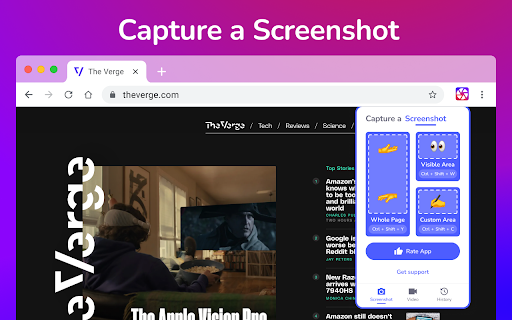
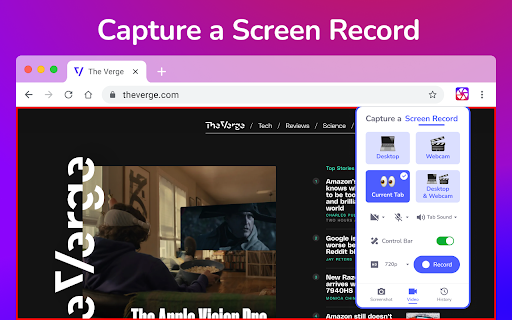
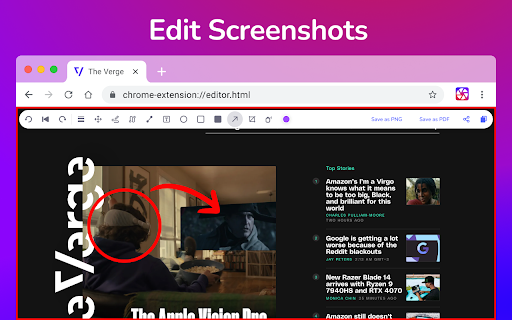
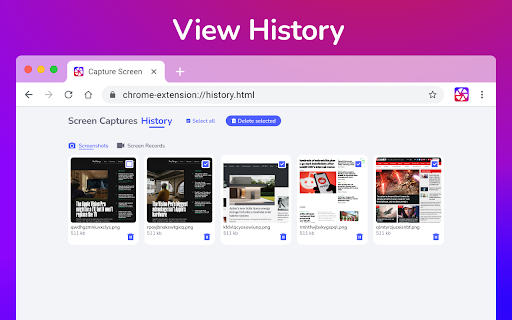
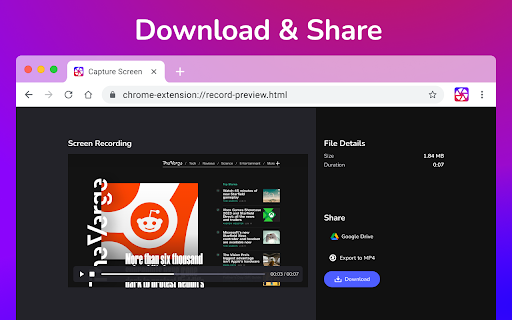
A versatile tool for capturing high-quality screenshots and recording screen activities. Users can capture custom regions or entire pages, utilize annotation features for clear communication, and record desktop, tab, or webcam feeds. Saved files can be exported locally in formats like PDF, PNG, MP4, and WebM, or shared instantly via Google Drive.

Developer:CaptureCast
Version:1.0.8
Size:23.78MiB
Last updated:

Overview

Installs

50K+

Rating

★ 4.7

1,976 reviews

Languages

52 locales

Includes Deutsch, English, English (United Kingdom), English (United States)...

Market analysis

Review-backed positioning, friction, and market signals for this Chrome extension.

Backed by review samples

Macro category

Automation & Workflow Efficiency

Pricing friction

Low review signal

Complaint intensity

High review signal

Listing & review signals
Observed signals from store listing text and review samples.

Listing positioning

This Chrome extension positions itself as an all-in-one screen capture and recording utility designed for modern digital needs. It highlights robust capabilities for capturing full webpages, designated sections, or visible browser areas, paired with immediate editing options. Additionally, it emphasizes seamless, asynchronous collaboration features like instant sharing links and cloud storage integration.

Inferred product pattern

A fully free utility serving as a high-volume lead generator, though plagued by critical stability and local storage issues.

Review-backed pain points

The most severe pain point is that the tool frequently fails to save completed video recordings, meaning users lose critical meeting and tutorial footage. Additionally, the screenshot tool often stops functioning after initial use, forcing users to clear cache or reinstall. Users also find the lack of a pre-recording delay countdown and immediate recording starts frustrating.

Observed feature gaps

Reviews indicate a need for step-by-step visual guides on capturing custom screen areas, a pre-recording countdown timer rather than an immediate start, more reliable auto-save mechanisms to prevent lost recordings, and a fix for the state issues that cause the tool to freeze after its first launch.

Tags
Screen RecorderScreenshot ToolScreen CaptureVideo RecorderChrome Extension
Target users

- Remote workers and collaborative teams

- Educators and online tutorial creators

- QA testers and web developers

- General web users seeking quick markup tools

Primary use cases

- Recording instructional videos or product walkthroughs with camera overlays

- Capturing and annotating webpage designs for feedback and collaboration

- Sharing quick, asynchronous video updates via direct links

Positive themes

- Great initial user experience and utility before performance issues arise

Negative themes

- Failure of custom area selection and screen capture triggers

- Unsaved or completely lost video recordings after completing sessions

- Lack of intuitive navigation and user onboarding instructions

- Low-quality recording outputs with severe pixelation and compression artifacts

- Sudden malfunction of features after the first use requiring cache clears

Observed friction

- Performance complaints detected

- No billing or paywall friction complaints were found in the provided review sample.

Evidence boundary: The findings are drawn from the official extension description details and a sample of 10 user reviews, which highlight severe functional breakdowns despite the overall high store score. The review sample is entirely composed of 1-star and 2-star reviews, meaning positive user perspectives and high-rating themes are underrepresented in this specific feedback pool.
Complaint summaries
Review-backed complaint signals grouped by operational area.

Support

No direct complaints about support channels were found, but users express high frustration over the lack of troubleshooting guidance or user instructions inside the app.

Reliability

Reliability is a major concern, with multiple reports of recordings disappearing upon completion, audio failing to record, pixelated video quality, and the extension completely breaking after a single use.

Privacy

No privacy or data leakage concerns were reported by users in the provided sample.

Access & pricing

- Free usage observed

- No account requirement observed

- Free plan or free usage claimed

Store listing facts

Listing assets

- Screenshots: 5

- Videos: 0

- Languages: 52

Trust signals

- Privacy policy

- Developer contact

- Official website

Store metadata

- Version: 1.0.8

- Size: 23.78MiB

- Last updated:

Listing SEO keywords

Search intent keywords
Keyword signals for evaluating how users may discover, compare, or search for this extension category.

Core discovery

screen capture chromescreen recorder extensiontake a screenshot onlinefree screen recorderchrome screenshot tool

Comparison

screen capture vs screenshotscreencastify alternativeloom vs capturecastawesome screenshot alternative

Problem

how to record screen macscreenshot not working chromerecord screen with audio chromehow to take custom screenshot

Alternative

QuickTime PlayerLoomScreencastifyAwesome Screenshot

Similar extensions

Jump to related discovery paths:

Screenshots

Screen capture and recorder - Screenshot Tool screenshot

Links

Recommended Chrome extensions

Related listings from the same category, trending peers, and the same publisher portfolio.

Browse workflow
Google Scholar PDF Reader icon

Google Scholar PDF Reader

scholar-chrome-extensions

Supercharge your paper reading: follow references, skim outline, jump to figures, cite and save.

Installs

2.0M+

Rating

★ 4.1

Keeper® Password Manager & Digital Vault icon

Keeper® Password Manager & Digital Vault

Keeper Security

Generate strong passwords, autofill and protect your confidential info with zero-knowledge encryption.

Installs

2.0M+

Rating

★ 4.8

Snow Web Application Metering icon

Snow Web Application Metering

snow_chrome_extensions

This extension tracks web application use for the purpose of license compliance and cost optimization. www.snowsoftware.com/browser

Installs

2.0M+

Rating

★ 1.3

Microsoft Defender Browser Protection icon

Microsoft Defender Browser Protection

Microsoft Corporation

Protect yourself against online threats, like phishing and malicious websites, with real-time protection from Microsoft.

Installs

2.0M+

Rating

★ 4.1

Визуальные закладки icon

Визуальные закладки

Yandex

Визуальные закладки – это страница, на которой собраны ваши любимые сайты

Installs

2.0M+

Rating

★ 3.4

Screen Recorder icon

Screen Recorder

Erich Behrens

Record a video from the camera or capture it from the screen (desktop, specific application window or browser tab)

Installs

2.0M+

Rating

★ 3.8

Адаптер Рутокен Плагин icon

Адаптер Рутокен Плагин

АО "Актив-Софт"

Позволяет использовать Рутокен Плагин

Installs

2.0M+

Rating

★ 2.5

Solventum Fluency Direct Web Connector icon

Solventum Fluency Direct Web Connector

3M M*Modal

Enables level 3 support for many web applications.

Installs

1.0M+

Rating

★ 4.1

uBlock icon

uBlock

ublock

A no-nonsense ad blocker

Installs

1.0M+

Rating

★ 3.4

Scribe: AI Documentation, SOPs & Process Intelligence icon

Scribe: AI Documentation, SOPs & Process Intelligence

chrome-store-admins

Turn any workflow into documentation your teams and AI agents can follow. Save each team member 35 hours/month.

Installs

1.0M+

Rating

★ 4.8