Copy Tab URL for Slack, Teams, Email icon

Copy Tab URL for Slack, Teams, Email Chrome Extension Analysis

Automation & Workflow Efficiency

Chrome extension ID: moefgohmcbnobbaohgkhieihegipofcn

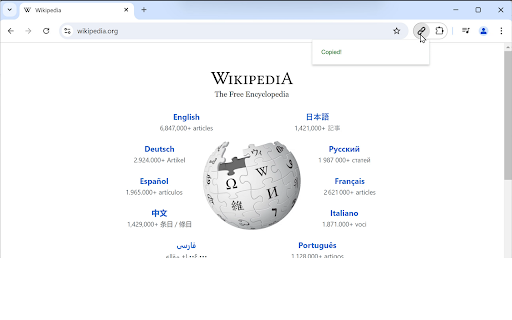
This tool copies the title and URL of the current browser tab to the clipboard as a clickable hyperlink. It is specifically formatted for pasting into business communication platforms and allows users to trigger the action via keyboard shortcuts.

Version:1.0
Size:11.82KiB
Last updated:

Overview

Installs

243

Rating

4.0

3 reviews

Languages

1 locales

Includes English (United States)

Market analysis

Review-backed positioning, friction, and market signals for this Chrome extension.

Backed by review samples

Macro category

Automation & Workflow Efficiency

Pricing friction

Low review signal

Complaint intensity

Moderate review signal

Listing & review signals
Observed signals from store listing text and review samples.

Listing positioning

The extension positions itself as a productivity utility designed to streamline communication by formatting tab titles and URLs for platforms like Slack, Teams, and Email. It emphasizes a 'no-click' experience through customizable keyboard shortcuts to eliminate manual copy-paste fatigue.

Inferred product pattern

Single-purpose utility extension focused on clipboard manipulation for workflow efficiency.

Review-backed pain points

Users struggle with the lack of an intuitive interface to change default keyboard shortcuts, leading to key collisions with browser-native functions like Developer Tools.

Observed feature gaps

The product lacks an in-extension settings menu to customize keyboard shortcuts, forcing users to rely on browser-level configuration or default settings.

Tags
ProductivityCopy LinkBrowser UtilityWorkflow Automation
Target users

- Remote workers

- Project managers

- Knowledge workers

- Team collaborators

Primary use cases

- Sharing links in Slack

- Documenting browser tabs in emails

- Efficient URL management for team collaboration

Positive themes

- Reliability compared to alternatives

- High utility for daily communication workflows

Negative themes

- Shortcut configuration limitations

- Conflicts with native browser keyboard shortcuts (e.g., DevTools)

Observed friction

- No pricing friction observed as the tool appears to be free.

Evidence boundary: The data is derived from store listing claims and a small sample of user reviews identifying specific usability hurdles regarding shortcut management. The review sample size is very small (3 comments), meaning current sentiment may not reflect the entire user base.
Complaint summaries
Review-backed complaint signals grouped by operational area.

Support

No support complaints found, though users have requested feature changes via reviews.

Reliability

Users report technical friction due to shortcut conflicts, but not functional breakage of the copying mechanism itself.

Privacy

No privacy complaints identified.

Access & pricing

- Free usage observed

- No account requirement observed

- Free plan or free usage claimed

Store listing facts

Listing assets

- Screenshots: 1

- Videos: 0

- Languages: 1

Trust signals

- Developer contact

- Support link

Store metadata

- Version: 1.0

- Size: 11.82KiB

- Last updated:

Listing SEO keywords

Search intent keywords
Keyword signals for evaluating how users may discover, compare, or search for this extension category.

Core discovery

copy tab urlslack link formatterbrowser link sharercopy page title and url

Comparison

copy url extensionlink sharing tool

Problem

how to share links in slackbrowser shortcut conflict

Alternative

url copy extensionsproductivity browser tools

Similar extensions

Jump to related discovery paths:

Screenshots

Copy Tab URL for Slack, Teams, Email screenshot

Links

Recommended Chrome extensions

Related listings from the same category, trending peers, and the same publisher portfolio.

Browse communication
Grammarly: AI Writing Assistant and Grammar Checker App icon

Grammarly: AI Writing Assistant and Grammar Checker App

Grammarly

Grammarly for Chrome helps you write with confidence. Get AI support for grammar, clarity, and tone, from first draft to final edit.

Installs

36.0M+

Rating

4.5

Loom – Screen Recorder & Screen Capture icon

Loom – Screen Recorder & Screen Capture

Loom

Record your screen and camera with one click. Share that content in an instant with a link.

Installs

7.0M+

Rating

4.6

Quillbot: AI Writing Assistant to Grammar Check, Paraphrase & Translate icon

Quillbot: AI Writing Assistant to Grammar Check, Paraphrase & Translate

quillbot

Write better emails, essays and messages with Quillbot's Grammar Checker, Paraphrasing Tool, Generative AI, Summarizer and more!

Installs

5.0M+

Rating

4.7

DeepL: translate and write with AI icon

DeepL: translate and write with AI

team-browser-extensions

Translate while you read and write with DeepL Translate, the world’s most accurate translator.

Installs

4.0M+

Rating

4.7

Mailtrack® – Email Tracker for Gmail icon

Mailtrack® – Email Tracker for Gmail

Mailsuite

The original Mailtrack®: free, unlimited email tracking for Gmail. Trusted by millions, GDPR-compliant and Google-audited.

Installs

3.0M+

Rating

4.4

HubSpot Sales icon

HubSpot Sales

signals-extension-publishing

Email tracking, CRM for Gmail, and sales productivity tools in your inbox

Installs

1.0M+

Rating

4.4

Connecteur Antidote icon

Connecteur Antidote

Druide informatique

Intégrez Antidote à votre navigateur pour corriger vos textes en temps réel et consulter ses dictionnaires et guides linguistiques.

Installs

800K+

Rating

3.0

Fathom AI Note Taker for Google Meet icon

Fathom AI Note Taker for Google Meet

Fathom

Records, transcribes & summarizes meetings FREE

Installs

500K+

Rating

4.9

GMass: Powerful mail merge for Gmail icon

GMass: Powerful mail merge for Gmail

GMass, Inc.

A powerful mass email and mail merge system for Gmail.

Installs

400K+

Rating

4.8

L.O.C icon

L.O.C

Loc Mai

L.O.C is a collection of automation tools.

Installs

300K+

Rating

4.3