
Download Accelerator & Manager Chrome Extension Analysis
Video & Image DownloadersChrome extension ID: monfeonpgfbmljdpjhpjjponhmhefgce
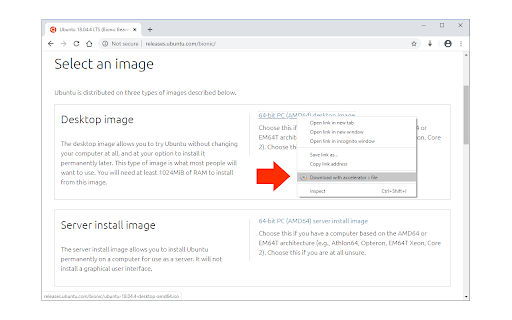
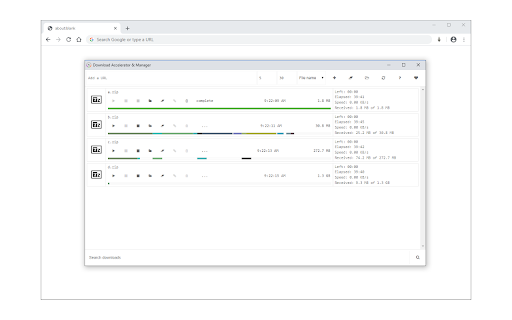
This extension is a parallel file downloading tool designed to accelerate download speeds in-browser. It segments target files and retrieves them concurrently through user-configured threads, offering context menu integration for ease of use.
Overview
Installs
10K+
Rating
★ 3.6
34 reviews
Languages
1 locales
Includes English
Market analysis
Review-backed positioning, friction, and market signals for this Chrome extension.
Macro category
Video & Image Downloaders
Pricing friction
Low review signal
Complaint intensity
High review signal
Listing positioning
Download Accelerator & Manager positions itself as a browser utility designed to speed up file downloads by up to five times. It uses a multi-threaded parallel download method to divide files into multiple sections and download them simultaneously. Users are instructed to adjust thread counts up to a maximum of five through either the extension popup or a context menu option.
Inferred product pattern
A multi-threaded parallel browser downloading utility that operates entirely client-side via browser-level APIs.
Review-backed pain points
The most significant user pain points include the lack of actual speed improvements, file corruption issues upon resuming downloads, and downloaded files vanishing or failing to save to the designated folder. Additionally, some UI elements like 'stop' and 'delete' buttons do not function, and one reviewer warned of severe data-theft/ransom claims.
Observed feature gaps
Key gaps include an unstable auto-resume function, the absence of dynamic connection-throttling adjustments to prevent servers from reducing speeds, missing extraction of the original download URL, and the inability to run downloads reliably in the background without keeping the source page active.
- Users regularly downloading large files
- Users seeking faster browser-based downloads
- People seeking alternatives to standalone download managers
- Downloading large files with multi-threading
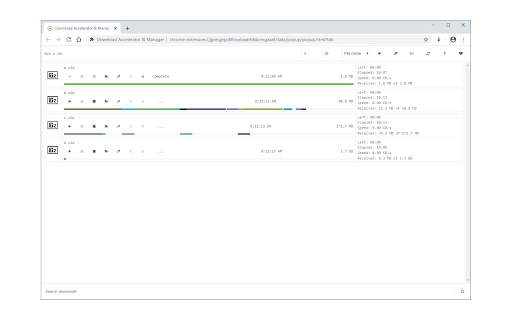
- Managing and queueing browser downloads in a central UI
- Triggering parallel downloads directly via right-click context menus
- Successful download of large gigabyte-scale files where default browser downloads fail
- No noticeable speed increase compared to standard downloads or chrome flags
- Downloaded files failing to appear in the expected destination folders
- Broken UI control features including the stop and delete buttons
- File corruption occurring when attempting to resume interrupted downloads
- Performance complaints detected
- Privacy complaints detected
- The extension claims to be free to use. However, there is an unverified user report alleging data extortion/ransom demands, though no official paywalls or in-app purchases are listed.
Support
There are no direct reports of interacting with a support desk, but the lack of bug fixes for broken UI buttons and persistent file corruption points to a lack of active developer support.
Reliability
Users report substantial reliability problems, specifically file corruption when resuming, the application failing to properly register finished downloads in the 'Downloads' folder, and non-functional control buttons.
Privacy
A highly concerning review claims that the extension was used to access and hold files for ransom, though this security concern remains a single unverified user assertion.
- Free usage observed
- No account requirement observed
- Free plan or free usage claimed
Store listing facts
- Screenshots: 3
- Videos: 0
- Languages: 1
- Developer contact
- Official website
- Version: 0.2.0
- Size: 161KiB
- Last updated:
Listing SEO keywords
Core discovery
Comparison
Problem
Alternative
Similar extensions
Jump to related discovery paths:
Screenshots
Links
Website: mybrowseraddon.com