HTML Validator icon

HTML Validator Chrome Extension Analysis

Developer & Designer Tools

Chrome extension ID: mpbelhhnfhfjnaehkcnnaknldmnocglk

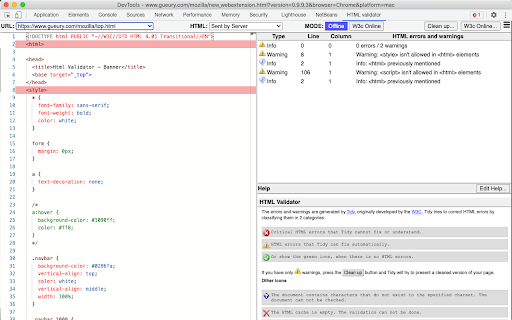
This extension enables developers to validate the syntax and structure of their HTML pages locally within the browser. It classifies issues into errors and warnings, providing a diagnostic interface for code maintenance without sending data to third-party servers.

Developer:Marc Gueury
Version:0.9.9.8
Size:2.5MiB
Last updated:

Overview

Installs

30K+

Rating

3.5

37 reviews

Languages

1 locales

Includes English (United States)

Market analysis

Review-backed positioning, friction, and market signals for this Chrome extension.

Backed by review samples

Macro category

Developer & Designer Tools

Pricing friction

Low review signal

Complaint intensity

Moderate review signal

Listing & review signals
Observed signals from store listing text and review samples.

Listing positioning

The HTML Validator extension positions itself as a developer-centric utility that integrates directly into the Chrome Developer Tools. It leverages the HTML Tidy algorithm to perform local, private validation of HTML5 pages, offering error detection, accessibility warnings, and auto-cleanup capabilities.

Inferred product pattern

Legacy browser developer utility experiencing maintenance challenges.

Review-backed pain points

Users frequently report that the tool fails to re-validate after page reloads, requires multiple manual triggers to function, and occasionally produces false-positive error flags.

Observed feature gaps

Lack of real-time automatic synchronization with page navigation and potential abandonment/lack of recent maintenance on reported bugs.

Tags
HTML ValidatorDeveloper ToolsCode QualityW3C Standards
Target users

- Web Developers

- Frontend Engineers

- Quality Assurance Testers

Primary use cases

- Validating HTML5 code syntax

- Checking page accessibility compliance

- Automating HTML code cleanup

Positive themes

- Local, private validation functionality

- Integration with Chrome Developer Tools

Negative themes

- Failure to update results on page refresh

- Inconsistent/inaccurate error reporting

- Performance stability issues

Observed friction

- Performance complaints detected

- None observed; the product appears to be free.

Evidence boundary: Evidence is derived from Chrome Web Store user feedback, specifically highlighting chronic reliability issues and lack of maintenance updates. Review data reflects a sample of users experiencing specific functional regressions, which may not represent the experience of all active users.
Complaint summaries
Review-backed complaint signals grouped by operational area.

Support

Users expressed frustration over long-standing bugs, specifically regarding the lack of tool updates and maintenance.

Reliability

High incidence of reports regarding the tool not updating after page navigation or refresh, and inconsistent analysis results.

Privacy

None; the listing emphasizes that validation is performed locally without third-party server intervention.

Access & pricing

- Free usage observed

- No account requirement observed

- Free plan or free usage claimed

Store listing facts

Listing assets

- Screenshots: 1

- Videos: 0

- Languages: 1

Trust signals

- Developer contact

- Official website

- Support link

Store metadata

- Version: 0.9.9.8

- Size: 2.5MiB

- Last updated:

Listing SEO keywords

Search intent keywords
Keyword signals for evaluating how users may discover, compare, or search for this extension category.

Core discovery

HTML validator extensionChrome devtools HTML checkvalidate HTML5 locallyHTML tidy chrome

Comparison

W3C validator alternativeHTML linting extension

Problem

HTML validator not workingHTML validator not refreshingchrome extension page reload bug

Alternative

W3C markup validation serviceNu Html Checker

Similar extensions

Jump to related discovery paths:

Screenshots

HTML Validator screenshot

Links

Recommended Chrome extensions

Related listings from the same category, trending peers, and the same publisher portfolio.

Browse developer