PolyBox - ChatGPT launcher and prompts, search tabs, bookmarks, history icon

PolyBox Chrome Extension Analysis

Automation & Workflow Efficiency

Store listing title: PolyBox - ChatGPT launcher and prompts, search tabs, bookmarks, history

Chrome extension ID: mpndfekdcijnjgfcoghjkhnjmdajhmnf

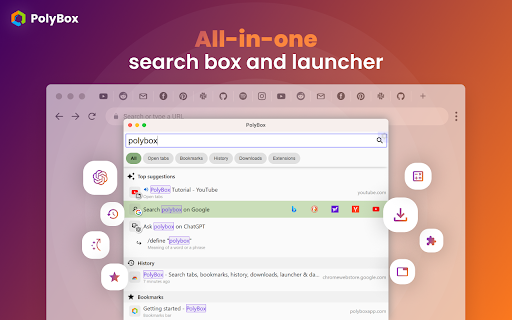
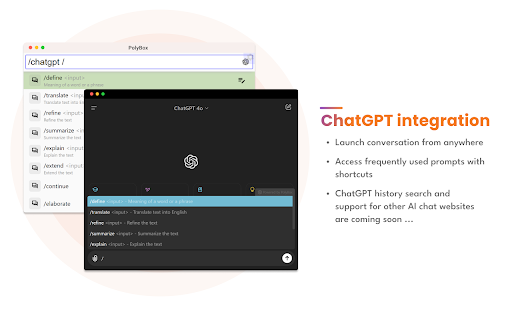
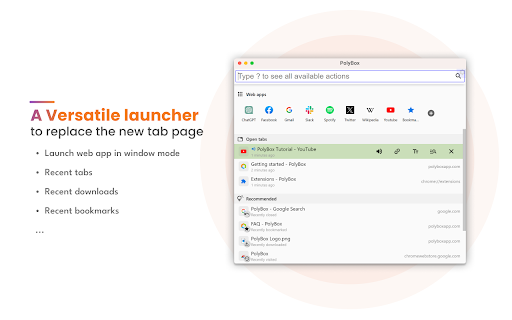
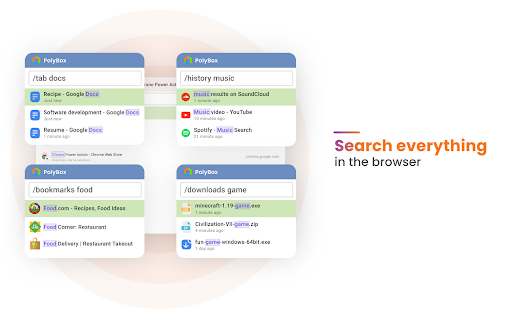
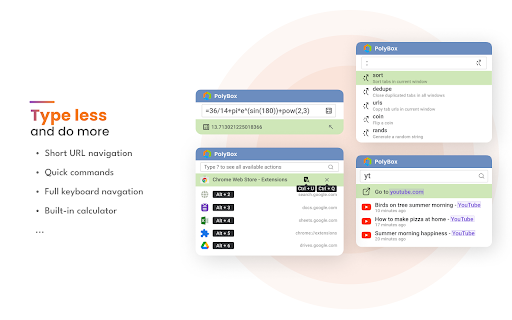
PolyBox is a browser utility that provides a quick-launch interface for ChatGPT with custom prompt shortcut support. It also includes a global search tool for browser data, short URL navigation mappings, and various productivity tools like a built-in calculator and tab management utilities.

Version:0.5.3
Size:391KiB
Last updated:

Overview

Installs

10K+

Rating

★ 4.5

50 reviews

Languages

3 locales

Includes English, 中文(中国), 中文(台灣)

Market analysis

Review-backed positioning, friction, and market signals for this Chrome extension.

Backed by review samples

Macro category

Automation & Workflow Efficiency

Pricing friction

Low review signal

Complaint intensity

Moderate review signal

Listing & review signals
Observed signals from store listing text and review samples.

Listing positioning

The product is positioned as a centralized command center for the browser. It emphasizes streamlining access to AI via ChatGPT and providing a unified search interface for tabs, bookmarks, and history.

Inferred product pattern

A 'Command Palette' style extension for browser-wide navigation and AI integration.

Review-backed pain points

Users report a significant lag when calling up the interface via shortcuts and a specific bug where the browser window jumps to a different screen on dual-monitor setups.

Observed feature gaps

Users have requested the ability to disable unnecessary modules (like downloads or extensions search) and better integration for bookmarks to appear in the general 'All' search result.

Tags
ChatGPT LauncherBrowser ProductivitySearch ToolShortcut ManagerAI Prompts
Target users

- Power users

- AI enthusiasts

- Researchers

- Productivity hackers

Primary use cases

- Quickly launching AI prompts

- Navigating large volumes of open tabs

- Searching browser history and bookmarks via shortcuts

- Rapid site navigation via short URL aliases

Positive themes

- Comprehensive feature set

- Versatile search functionality

- Pleasant UI and dark theme

- Improved browsing efficiency

Negative themes

- Slow activation speed

- Multi-monitor display bugs

- Inefficient bookmark search UX

Observed friction

- Performance complaints detected

- No pricing friction observed in provided data.

Evidence boundary: Analysis based on store listing descriptions and 10 sampled user reviews. Review sample size is small, which may not represent the entire user base.
Complaint summaries
Review-backed complaint signals grouped by operational area.

Support

No support or account-related complaints observed.

Reliability

Performance issues noted regarding slow loading times upon activation and window positioning errors on secondary screens.

Privacy

No privacy or security complaints observed.

Access & pricing

- No clear monetization signal

- No account requirement observed

- No clear pricing signal

Store listing facts

Listing assets

- Screenshots: 5

- Videos: 0

- Languages: 3

Trust signals

- Developer contact

- Official website

Store metadata

- Version: 0.5.3

- Size: 391KiB

- Last updated:

Listing SEO keywords

Search intent keywords
Keyword signals for evaluating how users may discover, compare, or search for this extension category.

Core discovery

ChatGPT launcherbrowser search toolChrome tab managerAI prompt library

Comparison

PolyBox vs RaycastPolyBox vs Alfred for Chrome

Problem

too many open tabsslow ChatGPT accesshard to find bookmarks

Alternative

ChatGPT shortcut extensionbrowser command palette

Similar extensions

Jump to related discovery paths:

Screenshots

PolyBox - ChatGPT launcher and prompts, search tabs, bookmarks, history screenshot

Links

Recommended Chrome extensions

Related listings from the same category, trending peers, and the same publisher portfolio.

Browse tools
Chrono Download Manager icon

Chrono Download Manager

Chrono Extensions

Download Manager | Video Downloader | Bulk Image Downloader

Installs

800K+

Rating

★ 4.5

Microsoft Bing Homepage & Search for Chrome icon

Microsoft Bing Homepage & Search for Chrome

Microsoft Corporation

Set Microsoft Bing as your default homepage and default search engine

Installs

7.0M+

Rating

★ 3.8

Video Download Helper icon

Video Download Helper

Aclap

Download Videos from the Web.

Installs

6.0M+

Rating

★ 4.7

AnyDoc Translator - Translate Web and PDF icon

AnyDoc Translator - Translate Web and PDF

www.wps.com

Handwritten notes, course reading, creased scans, TED/Coursera lectures: layout kept, bilingual subtitles. Web instant, auto match.

Installs

6.0M+

Rating

★ 4.6

WPS PDF - Read, Edit, Fill, Convert, and AI Chat PDF with Ease icon

WPS PDF - Read, Edit, Fill, Convert, and AI Chat PDF with Ease

www.wps.com

Easy-to-use PDF tools to view, edit, convert, fill, e-sign PDF files, and more in your browser.

Installs

6.0M+

Rating

★ 4.5

Sider: Chat with all AI: GPT-5, Claude, DeepSeek, Gemini, Grok icon

Sider: Chat with all AI: GPT-5, Claude, DeepSeek, Gemini, Grok

ChatGPT Sidebar

ChatGPT, DeepSeek, Gemini, Claude, Grok all in one AI sidebar, for AI search, read, and write.

Installs

5.0M+

Rating

★ 4.9

Norton Safe Search icon

Norton Safe Search

NortonLifeLock Inc

Search safely online by enabling Norton Safe Search as your default search provider for maximum protection on Chrome.

Installs

5.0M+

Rating

★ 2.7

Shazam: Find song names from your browser icon

Shazam: Find song names from your browser

Shazam

Identify music, search lyrics & more

Installs

5.0M+

Rating

★ 4.7

Google Input Tools icon

Google Input Tools

cloud-input-team

Input Tools lets you type in the language of your choice.

Installs

4.0M+

Rating

★ 3.7

IE Tab icon

IE Tab

Blackfish Software

Display web pages using IE within Chrome. Use Java, Silverlight, ActiveX, Sharepoint, and more.

Installs

4.0M+

Rating

★ 4.0