Google Calendar Dark Mode icon

Google Calendar Dark Mode Chrome Extension Analysis

Tab & Bookmark Productivity

Chrome extension ID: nbefdmllbjackokegljnjidmebhojghn

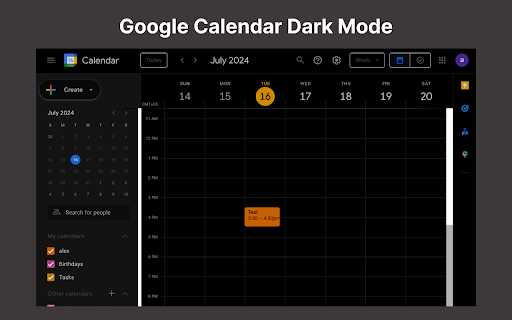
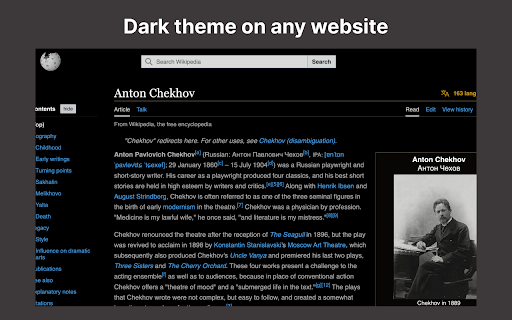
This Chrome extension applies a dark mode theme to Google Calendar, designed to reduce eye strain and improve visual comfort. It offers features like one-click activation, seamless switching between light and dark modes, and options to adjust brightness and contrast. The extension aims to provide a consistent, professional look across devices and claims no data tracking.

Version:1.0
Size:823KiB
Last updated:

Overview

Installs

3K+

Rating

4.0

5 reviews

Languages

52 locales

Includes Deutsch, English, Filipino, Indonesia...

Market analysis

Review-backed positioning, friction, and market signals for this Chrome extension.

Backed by review samples

Macro category

Tab & Bookmark Productivity

Pricing friction

Low review signal

Complaint intensity

High review signal

Listing & review signals
Observed signals from store listing text and review samples.

Listing positioning

The store listing positions the product as an essential Chrome extension for Google Calendar, primarily emphasizing its ability to reduce eye strain and improve usability through a customizable dark mode. It highlights easy activation, enhanced visual comfort, and a sleek, modern interface, aiming to transform daily planning into a more aesthetically pleasing and comfortable experience.

Inferred product pattern

A simple utility extension designed to provide aesthetic customization (dark mode) for a popular web application (Google Calendar) to enhance user comfort and experience.

Review-backed pain points

Users have reported critical installation failures where the extension cannot be added to Chrome. There's also a pain point regarding the actual dark theme color not matching the advertised 'true black' in screenshots, instead appearing as dark grey, indicating a gap in customization or visual representation.

Observed feature gaps

A significant feature gap is the reported inability to install the extension for some users. Additionally, while the listing mentions 'various shades of themes' and brightness/contrast adjustments, a review points out the lack of an option for a 'true black' background as depicted in the screenshots, suggesting limited advanced color customization beyond general dark grey tones.

Tags
Dark ModeGoogle CalendarEye Strain ReliefProductivity Tool
Target users

- Google Calendar users who prefer dark mode

- Individuals seeking to reduce eye strain during prolonged screen time

- Users looking for aesthetic customization of their web tools

Primary use cases

- Applying a dark theme to Google Calendar

- Reducing eye strain during long periods of calendar use

- Enhancing the visual aesthetic and comfort of the Google Calendar interface

Positive themes

- Effectively provides the desired dark mode functionality

- Improves visual comfort and reduces eye strain

- Simple and effective in its primary function

Negative themes

- Inability to install the extension due to errors

- Discrepancy between advertised screenshot color (true black) and actual theme (dark grey)

- Limited customization options for specific color depth

Observed friction

- Performance complaints detected

- The store listing does not indicate any pricing or monetization model, and review-backed data regarding pricing friction is not available.

Evidence boundary: The analysis leveraged the Chrome Web Store listing's title, short and long descriptions, and a sample of 5 user reviews. The reviews included high-rating feedback highlighting functionality, a medium-rating review indicating a customization desire, and a low-rating review detailing a critical installation error. The limited number of user reviews (5 for 3,000+ users) restricts the comprehensive understanding of prevalent user satisfaction, common complaints, or widespread feature requests. The insights derived, particularly concerning negative feedback, may not represent the overall user experience distribution.
Complaint summaries
Review-backed complaint signals grouped by operational area.

Support

One user reported being unable to install the extension due to an error, which implies a potential need for support. The listing claims a 'dedicated support team,' but review-backed evidence of the support experience is not available.

Reliability

A core reliability complaint is the reported inability to install the extension, leading to an 'error message appears' for some users. This indicates fundamental breakage and prevents the product from functioning at all for those affected.

Privacy

The store listing explicitly states 'No data tracking or privacy concerns.' Review-backed data contradicting this claim or raising privacy complaints is not available.

Access & pricing

- Free usage observed

- No account requirement observed

- Free plan or free usage claimed

Store listing facts

Listing assets

- Screenshots: 2

- Videos: 0

- Languages: 52

Trust signals

- Privacy policy

- Developer contact

Store metadata

- Version: 1.0

- Size: 823KiB

- Last updated:

Listing SEO keywords

Search intent keywords
Keyword signals for evaluating how users may discover, compare, or search for this extension category.

Core discovery

Google Calendar Dark Modedark mode google calendargoogle calender dark modenight theme google calendarreduce eye strain calendar

Problem

eye strainbright screentoo bright calendaruncomfortable viewing

Similar extensions

Jump to related discovery paths:

Screenshots

Google Calendar Dark Mode screenshot

Links

Recommended Chrome extensions

Related listings from the same category, trending peers, and the same publisher portfolio.

Browse tools