FileLens – Markdown & JSON Viewer icon

FileLens Chrome Extension Analysis

Developer & Designer Tools

Store listing title: FileLens – Markdown & JSON Viewer

Chrome extension ID: ndlbookgigclmmlhilipagonfpldpkno

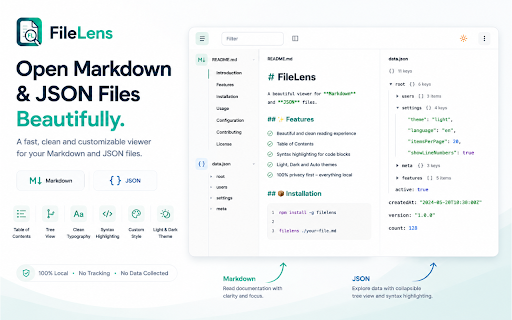
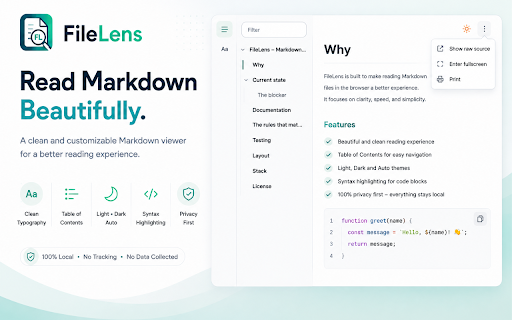
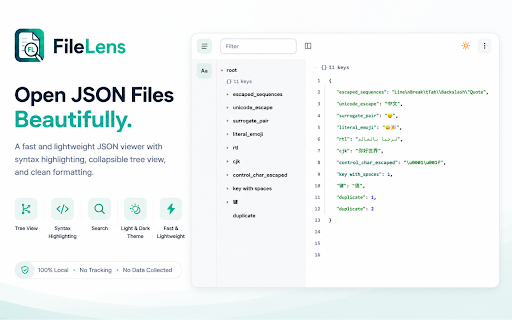
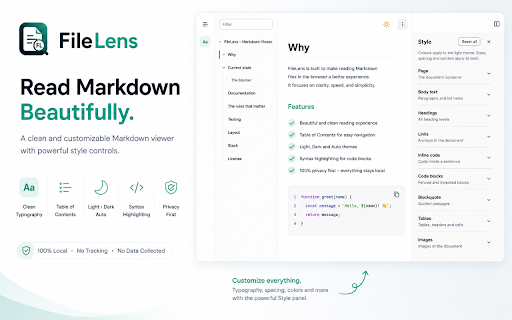
This extension renders plain Markdown and JSON files within the browser into formatted, readable documents. It features an interactive JSON tree, an outline sidebar for navigation, and extensive styling options including over 40 customization settings for themes and layout.

Developer:Ibrahim Riaz
Version:1.0.0
Size:122KiB
Last updated:

Overview

Installs

5

Rating

★ —

0 reviews

Languages

1 locales

Includes English (United Kingdom)

Market analysis

Review-backed positioning, friction, and market signals for this Chrome extension.

No review samples found

Macro category

Developer & Designer Tools

Pricing friction

Low review signal

Complaint intensity

Low review signal

Listing & review signals
Observed signals from store listing text and review samples.

Listing positioning

FileLens positions itself as a privacy-first, highly customizable viewer for technical documentation and data files. It emphasizes local processing and granular control over typography and layout to improve the readability of Markdown and JSON content.

Inferred product pattern

Single-purpose local-processing utility tool.

Review-backed pain points

Review-backed data is not available.

Observed feature gaps

No feature gaps identified; the extension is described as a specialized local-only viewer.

Tags
Markdown ViewerJSON FormatterDeveloper ToolsDocument Reader
Target users

- Software Developers

- Technical Writers

- API Researchers

- Data Analysts

Primary use cases

- Reading GitHub README files

- Inspecting local JSON configuration files

- Exploring API response data

- Previewing documentation locally

Positive themes

No positive theme data.

Negative themes

No negative theme data.

Observed friction

- Review-backed data is not available.

Evidence boundary: The data is derived solely from the Chrome Web Store listing as there are zero user reviews available. The lack of user reviews prevents verification of real-world performance, bugs, or UX satisfaction.
Complaint summaries
Review-backed complaint signals grouped by operational area.

Support

Review-backed data is not available.

Reliability

Review-backed data is not available.

Privacy

Review-backed data is not available.

Access & pricing

- Free usage observed

- No account requirement observed

- Free plan or free usage claimed

Store listing facts

Listing assets

- Screenshots: 4

- Videos: 0

- Languages: 1

Trust signals

- Privacy policy

- Developer contact

Store metadata

- Version: 1.0.0

- Size: 122KiB

- Last updated:

Listing SEO keywords

Search intent keywords
Keyword signals for evaluating how users may discover, compare, or search for this extension category.

Core discovery

markdown viewer extensionjson formatter chromereadme readerbrowser json viewer

Comparison

FileLens vs JSON viewerbetter than GitHub markdown

Problem

how to read raw jsonmake markdown readablerender markdown files

Alternative

JSON beautifierMarkdown previewer

Similar extensions

Jump to related discovery paths:

Screenshots

FileLens – Markdown & JSON Viewer screenshot

Links

Recommended Chrome extensions

Related listings from the same category, trending peers, and the same publisher portfolio.

Browse developer
Hide Shorts, Reels, Stories & Sponsored – YouTube, Facebook & Instagram icon

Hide Shorts, Reels, Stories & Sponsored – YouTube, Facebook & Instagram

Ibrahim Riaz

Hide Shorts, Reels, Stories, Videos, Sponsored, Ads & Explore on YouTube, Facebook & Instagram. Pro unlocks more control.

Installs

8K+

Rating

★ 4.6

Formatly — Social Media Text Formatter icon

Formatly — Social Media Text Formatter

Ibrahim Riaz

Format your posts with Bold, Italic, Unicode styles, and more — directly on supported social platforms.

Installs

23

Rating

★ 5.0

WhatFont icon

WhatFont

Chengyin Liu

The easiest way to identify fonts on web pages.

Installs

3.0M+

Rating

★ 4.0

JSON Formatter icon

JSON Formatter

Code Formatter

Makes JSON easy to read

Installs

2.0M+

Rating

★ 4.3

Cookie-Editor icon

Cookie-Editor

cgagnier

Simple yet powerful Cookie Editor that allow you to quickly create, edit and delete cookies without leaving your tab.

Installs

2.0M+

Rating

★ 4.4

Chromebook Recovery Utility icon

Chromebook Recovery Utility

google.com

Create recovery media for your Chromebook.

Installs

2.0M+

Rating

★ 2.6

SEOquake: On-Page SEO Checker icon

SEOquake: On-Page SEO Checker

SEOquake

Run SEO audits, check technical issues, analyze links and keyword density, and see Semrush metrics as you browse and search.

Installs

1.0M+

Rating

★ 4.5

Similarweb - Website Traffic, AI Traffic & SEO Checker icon

Similarweb - Website Traffic, AI Traffic & SEO Checker

Similarweb

Instant website analysis, AI traffic insights, and SEO metrics at your fingertips.

Installs

1.0M+

Rating

★ 4.6

Clear Cache icon

Clear Cache

Little Void LLC (Ben Bojko)

Powerful, user-friendly browser data management, right from your toolbar.

Installs

1.0M+

Rating

★ 4.5

Stylus icon

Stylus

stylus.openstyles

Redesign the web with Stylus, a user styles manager. Stylus allows you to easily install themes and skins for many popular sites.

Installs

1.0M+

Rating

★ 4.5