Sound Adjustment icon

Sound Adjustment Chrome Extension Analysis

Niche Lifestyle & Gaming Hacks

Chrome extension ID: nebbehiamgpclkolmehcolhnfkkagdmp

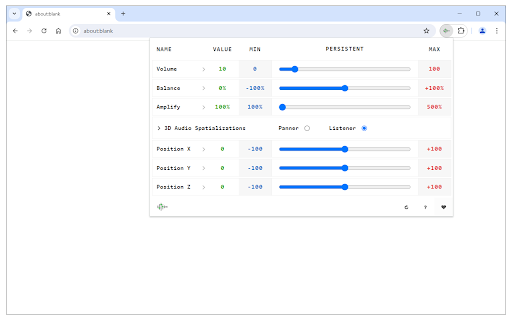
Sound Adjustment is a browser extension designed to modify audio output for web-based video and audio elements. It allows users to amplify sound up to 500%, adjust left/right balance, and toggle persistent settings for specific domains.

Developer:Keller
Version:0.1.6
Size:24.43KiB
Last updated:

Overview

Installs

20K+

Rating

4.2

59 reviews

Languages

1 locales

Includes English

Market analysis

Review-backed positioning, friction, and market signals for this Chrome extension.

Backed by review samples

Macro category

Niche Lifestyle & Gaming Hacks

Pricing friction

Low review signal

Complaint intensity

Moderate review signal

Listing & review signals
Observed signals from store listing text and review samples.

Listing positioning

The product is positioned as a lightweight utility for controlling various audio parameters directly from the browser toolbar. It highlights features like volume amplification, speaker balance, and 3D audio spatialization for HTML5 media.

Inferred product pattern

A lightweight audio utility that offers advanced control but struggles with state persistence and reliability across diverse web environments.

Review-backed pain points

Users experience significant frustration with settings not staying active when switching videos or tabs, and reports of the extension causing audio to cut out entirely on some sites.

Observed feature gaps

There is a reported lack of a simple 'reset to default' function and inconsistencies in how settings are enforced across different media players.

Tags
Volume BoosterAudio EqualizerSound ControlAudio SpatializerBrowser Utility
Target users

- Media consumers

- YouTube users

- Audio enthusiasts

Primary use cases

- Increasing volume for quiet web videos

- Adjusting speaker balance

- Applying 3D audio spatialization to browser media

Positive themes

- Useful audio balancing capabilities

- Valuable persistent setting feature when functioning correctly

- Helpful concept for volume management

Negative themes

- Settings failing to persist across video changes in playlists

- Audio cutting out on certain websites

- Inconsistent behavior following permission updates

- Lack of a dedicated reset button

Observed friction

- Performance complaints detected

- No pricing friction observed; the extension uses a donation-based model.

Evidence boundary: Extracted from store description and user reviews highlighting volume, persistence, and reliability issues. Review data is based on a small sample size of 59 comments.
Complaint summaries
Review-backed complaint signals grouped by operational area.

Support

No specific complaints regarding support responsiveness were found in the provided samples.

Reliability

High frequency of complaints regarding the extension's inability to maintain volume settings across playlists and audio cutting out on specific websites.

Privacy

No privacy-specific complaints were identified, although users noted changes in permission requirements.

Access & pricing

- No clear monetization signal

- No account requirement observed

- Free plan or free usage claimed

Store listing facts

Listing assets

- Screenshots: 1

- Videos: 0

- Languages: 1

Trust signals

- Privacy policy

- Developer contact

- Official website

Store metadata

- Version: 0.1.6

- Size: 24.43KiB

- Last updated:

Listing SEO keywords

Search intent keywords
Keyword signals for evaluating how users may discover, compare, or search for this extension category.

Core discovery

volume booster chrome extensionbrowser audio equalizeramplify youtube soundaudio balance tool

Comparison

volume boosteraudio controller

Problem

low volume web videoaudio cutting out chromevolume not saving

Alternative

sound adjustmentaudio manager

Similar extensions

Jump to related discovery paths:

Screenshots

Sound Adjustment screenshot

Links

Recommended Chrome extensions

Related listings from the same category, trending peers, and the same publisher portfolio.

Browse tools