Selection Highlighter icon

Selection Highlighter Chrome Extension Analysis

Developer & Designer Tools

Chrome extension ID: nepmkgohgoagfgcoegjaggacodcpdibj

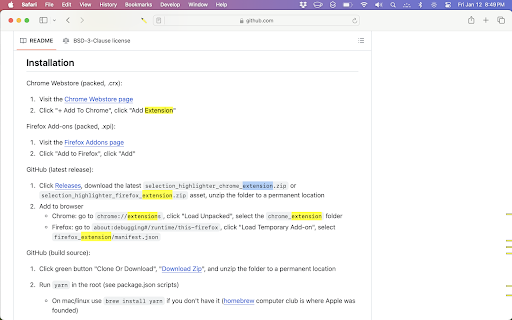
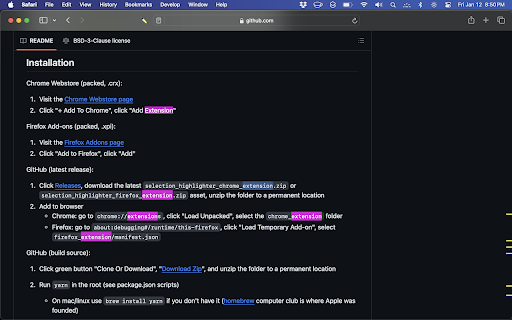
A browser extension that automatically highlights all occurrences of a selected text string on a webpage. It is specifically marketed for use on technical sites like GitHub, StackOverflow, and Reddit.

Developer:neaucode
Version:3.3.0
Size:485KiB
Last updated:

Overview

Installs

8K+

Rating

★ 4.5

96 reviews

Languages

1 locales

Includes English

Market analysis

Review-backed positioning, friction, and market signals for this Chrome extension.

Backed by review samples

Macro category

Developer & Designer Tools

Pricing friction

Low review signal

Complaint intensity

Low review signal

Listing & review signals
Observed signals from store listing text and review samples.

Listing positioning

The product is positioned as a tool for code inspection and document analysis that removes the need for CMD+F. It emphasizes its open-source nature and high configurability for power users.

Inferred product pattern

Open-source single-purpose utility designed to optimize a specific developer workflow (text scanning).

Review-backed pain points

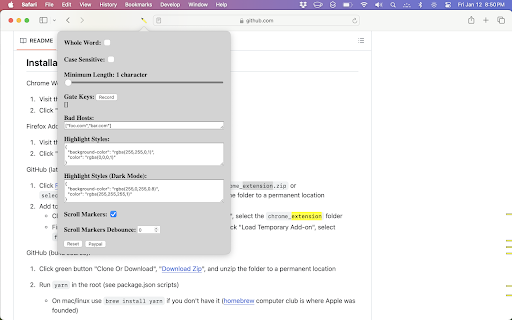
Users report that the extension does not support highlighting symbols (e.g., * or +) and has a non-configurable minimum word length requirement of 3 characters.

Observed feature gaps

Lack of support for multi-color persistent highlighting for different keywords and insufficient whitespace handling options in matching.

Tags
Code InspectionText HighlighterDeveloper UtilityOpen SourceDocument Analysis
Target users

- Software Developers

- Technical Researchers

- Code Auditors

- Power Users

Primary use cases

- Scanning for keywords in source code

- Analyzing technical documentation

- Rapidly locating repeated terms without using browser search

Positive themes

- Increased work efficiency

- Useful scroll bar markers for highlights

- Simple and lightweight execution

Negative themes

- Inability to highlight symbols

- Restrictive minimum character length

- Performance lag on extremely large pages

Observed friction

- Performance complaints detected

- No pricing friction observed; the tool is described as open source.

Evidence boundary: Analysis based on the store listing and 10 selected helpful reviews. The review sample represents a small fraction of the total 96 comments.
Complaint summaries
Review-backed complaint signals grouped by operational area.

Support

One user mentioned a lack of instructions, making it difficult to get the extension working initially.

Reliability

Reports of the extension failing to work on specific sites like Microsoft Docs code snippets and failing when symbols are selected.

Privacy

No privacy complaints observed.

Access & pricing

- Free usage observed

- No account requirement observed

- Free plan or free usage claimed

Store listing facts

Listing assets

- Screenshots: 3

- Videos: 1

- Languages: 1

Trust signals

- Developer contact

- Official website

- Support link

Store metadata

- Version: 3.3.0

- Size: 485KiB

- Last updated:

Listing SEO keywords

Search intent keywords
Keyword signals for evaluating how users may discover, compare, or search for this extension category.

Core discovery

Selection Highlighterhighlight selected textautomatic keyword highlightercode inspection extension

Comparison

Selection Highlighter vs CMD+Fbest text highlighter for developers

Problem

finding keywords in codehighlighting multiple occurrencesscanning long documents

Alternative

text highlighter chrome extensionmulti-highlight tool

Similar extensions

Jump to related discovery paths:

Screenshots

Selection Highlighter screenshot

Links

Recommended Chrome extensions

Related listings from the same category, trending peers, and the same publisher portfolio.

Browse developer