

Copy as Markdown Chrome Extension Analysis
Developer & Designer ToolsChrome extension ID: nlaionblcaejecbkcillglodmmfhjhfi
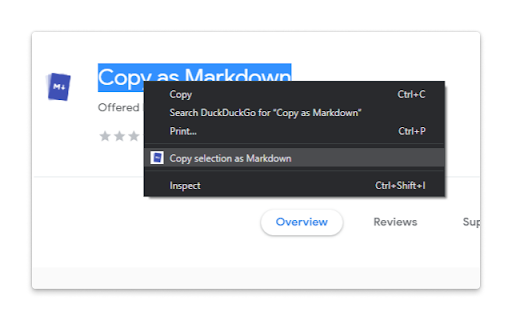
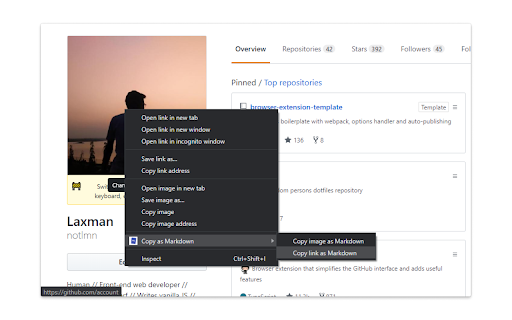
This browser extension enables users to copy various elements from a webpage, such as selected text, links, images, and structured content like lists and tables, converting them into Markdown syntax. It also aims to support formatted text and code blocks for easy transfer to Markdown-compatible environments.
Overview
Installs
10K+
Rating
★ 3.8
44 reviews
Languages
1 locales
Includes English (United Kingdom)
Market analysis
Review-backed positioning, friction, and market signals for this Chrome extension.
Macro category
Developer & Designer Tools
Pricing friction
Low review signal
Complaint intensity
High review signal
Listing positioning
The extension is positioned as a browser tool designed to convert and copy selected web content, including hyperlinks, images, formatted text, lists, tables, and code blocks, into Markdown format. It highlights support for GFM tables and fenced code blocks with language detection.
Inferred product pattern
A free, open-source browser extension designed to facilitate the conversion and copying of web content into Markdown format, primarily accessed via a context menu.
Review-backed pain points
The primary pain point for users is the extension's fundamental failure to perform its advertised function, often resulting in nothing being copied to the clipboard, or incorrect content (such as HTML or the command text itself) being copied instead of Markdown. Users also report specific issues with copying code blocks and confusion regarding the extension's icon behavior.
Observed feature gaps
Reviews indicate a significant gap between the advertised capability and actual functionality, particularly concerning the core function of copying content as Markdown. While the listing claims support for 'fenced code blocks,' at least one review explicitly states this feature does not work. The widespread reports of general non-functionality suggest a broader gap in robust implementation across various content types and operating systems.
- Developers
- Technical Writers
- Content Creators
- Students
- Knowledge Workers
- Quickly convert web page content to Markdown for documentation
- Capture web page information for note-taking in Markdown editors
- Copy formatted text or code snippets into Markdown files
No positive theme data.
- Core functionality failure (nothing copied to clipboard)
- Incorrect output (copies HTML instead of Markdown, or copies command text)
- Specific feature failure (inability to copy code as Markdown)
- Extension icon opening GitHub page instead of functioning
- Performance complaints detected
- Pricing information is not available in the store listing or reviews; the extension appears to be free.
Support
No direct support complaints were observed. However, the presence of a GitHub link for issues, coupled with reports of the extension not working, implies a potential need for improved user guidance or troubleshooting support.
Reliability
Numerous reviews indicate severe reliability issues, with users consistently reporting that the extension 'doesn't work,' 'does nothing,' or fails to copy content as Markdown to the clipboard. This suggests a fundamental lack of dependable functionality.
Privacy
No privacy or security complaints were observed in the reviews. The listing clarifies that the extension requires 'contextMenus' and 'activeTab' permissions and can only write to the clipboard, not read from it.
- Free usage observed
- No account requirement observed
- Free plan or free usage claimed
Store listing facts
- Screenshots: 2
- Videos: 0
- Languages: 1
- Developer contact
- Official website
- Support link
- Version: 25.6.9
- Size: 162KiB
- Last updated:
Listing SEO keywords
Core discovery
Comparison
Problem
Alternative
Similar extensions
Jump to related discovery paths:
Screenshots
Links
Website: github.com
Support links: https://github.com/notlmn/copy-as-markdown/issues







