Web Data Assistant icon

Web Data Assistant Chrome Extension Analysis

Developer & Designer Tools

Chrome extension ID: oacpegaegonlmnobkoeiiegdccgcmpnj

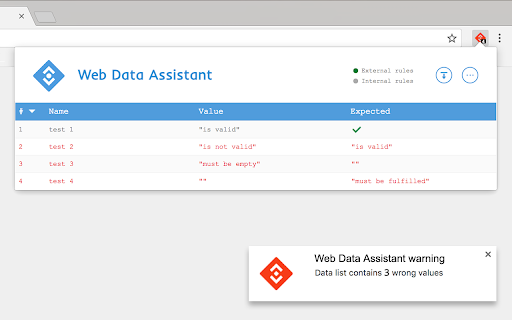
This extension provides a mechanism for developers and analytics professionals to monitor and validate data values on web pages in real-time. It supports the creation of custom check rules, data layer monitoring, and notifications for incorrect data, aiming to streamline quality assurance for analytics teams.

Version:2.2.1
Size:77.3KiB
Last updated:

Overview

Installs

70K+

Rating

★ 3.5

64 reviews

Languages

1 locales

Includes English

Market analysis

Review-backed positioning, friction, and market signals for this Chrome extension.

Backed by review samples

Macro category

Developer & Designer Tools

Pricing friction

Low review signal

Complaint intensity

High review signal

Listing & review signals
Observed signals from store listing text and review samples.

Listing positioning

Web Data Assistant positions itself as a specialized utility for verifying custom JavaScript data implementations and tag layers. It focuses on enabling teams to define custom validation rules without requiring new code deployments.

Inferred product pattern

Technical debugging utility undergoing a major shift in product-market fit or UI redesign.

Review-backed pain points

Users express high levels of frustration with recent updates, describing the tool as difficult to use, incomprehensible, and lacking the core features expected from a tag debugging tool.

Observed feature gaps

Reviewers note a lack of intuitive design and insufficient guidance, with frequent requests for a rollback to previous functional versions.

Tags
Web DevelopmentData ValidationTag ManagementDebugging Tool
Target users

- Web Developers

- Analytics Professionals

- Project Managers

- Technical QA Specialists

Primary use cases

- Custom JavaScript data validation

- Tag management debugging

- Automated data layer checks

- Cross-team data implementation sharing

Positive themes

- None clearly identified in the sample set provided, as recent sentiment is overwhelmingly negative.

Negative themes

- Poor user interface and usability

- Confusion regarding recent updates/rollouts

- Lack of clear tutorials or documentation

- Failure to serve as a functional replacement for legacy tag management tools

Observed friction

- No direct complaints regarding pricing; friction is concentrated on product utility and design changes.

Evidence boundary: The analysis is based on recent user feedback following a significant update, which indicates a sharp decline in user satisfaction due to UI/UX friction and perceived loss of functionality. The sample reflects primarily negative sentiment following an update; positive long-term user sentiment may be underrepresented in the provided feedback.
Complaint summaries
Review-backed complaint signals grouped by operational area.

Support

Users report that the product is unintuitive and lacks necessary tutorials for effective usage.

Reliability

Users claim the tool is no longer useful for basic tag inspection tasks following recent updates.

Privacy

None noted.

Access & pricing

- No clear monetization signal

- No account requirement observed

- No clear pricing signal

Store listing facts

Listing assets

- Screenshots: 1

- Videos: 0

- Languages: 1

Trust signals

- Developer contact

Store metadata

- Version: 2.2.1

- Size: 77.3KiB

- Last updated:

Listing SEO keywords

Search intent keywords
Keyword signals for evaluating how users may discover, compare, or search for this extension category.

Core discovery

JavaScript debuggerData layer validatorTag assistant alternativeCustom rule checker

Comparison

Tag Assistant legacy replacementweb data QA tool

Problem

difficult to usehard to understand extensionpoor interface

Alternative

Google Tag Assistant alternativeanalytics debugger

Similar extensions

Jump to related discovery paths:

Screenshots

Web Data Assistant screenshot

Recommended Chrome extensions

Related listings from the same category, trending peers, and the same publisher portfolio.

Browse developer