Mixmax: AI-Powered Sales Engagement, Email Tracking and Meeting Scheduling icon

Mixmax Chrome Extension Analysis

Automation & Workflow Efficiency

Store listing title: Mixmax: AI-Powered Sales Engagement, Email Tracking and Meeting Scheduling

Chrome extension ID: ocpljaamllnldhepankaeljmeeeghnid

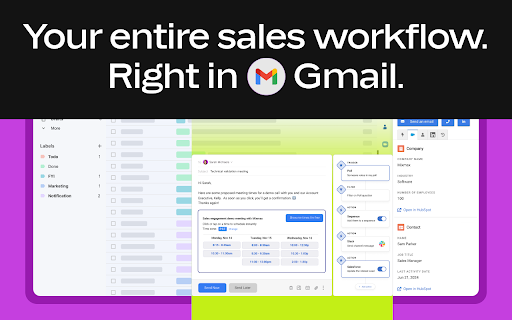
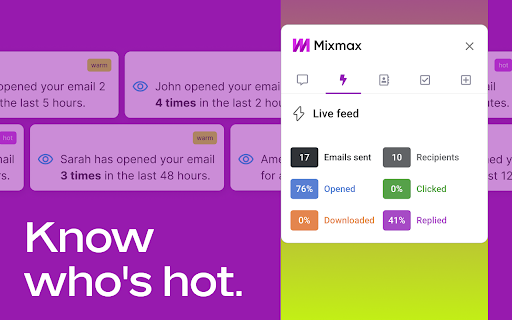
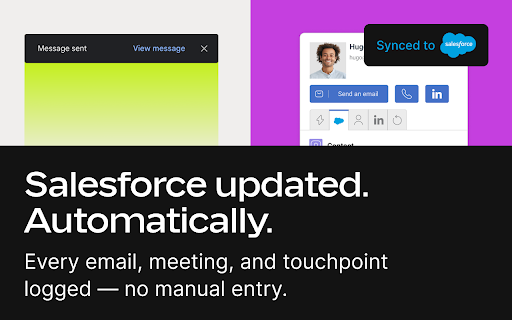
This Chrome extension enhances the Gmail interface with built-in productivity and automation tools for client communications. It enables users to track email opens and clicks, embed interactive elements like polls, and schedule meetings directly within email drafts. The extension also supports multi-channel outreach sequencing and automatic updates to popular CRMs.

Developer:Mixmax, Inc.
Version:6.53.1
Size:14.44MiB
Last updated:

Overview

Installs

60K+

Rating

4.5

554 reviews

Languages

4 locales

Includes Deutsch, English, español, français

Market analysis

Review-backed positioning, friction, and market signals for this Chrome extension.

Backed by review samples

Macro category

Automation & Workflow Efficiency

Pricing friction

Low review signal

Complaint intensity

High review signal

Listing & review signals
Observed signals from store listing text and review samples.

Listing positioning

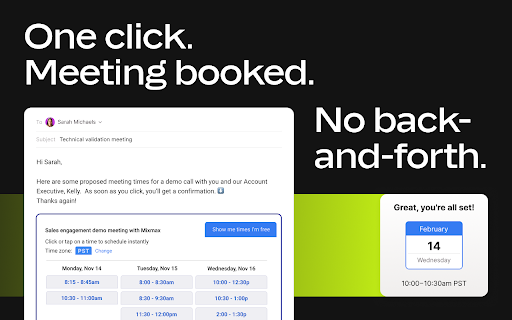
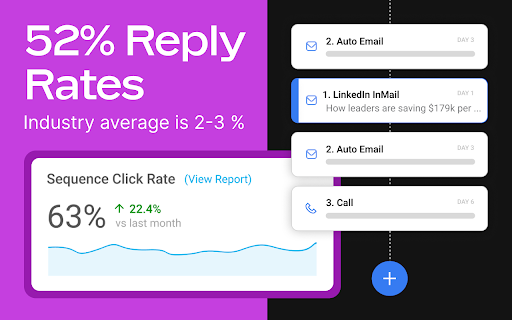
Mixmax positions itself as an all-in-one, AI-powered sales execution platform that integrates directly into the user's Gmail inbox. It promises to make sales outreach effortless by combining email tracking, multi-step sequences, one-click scheduling, and automated CRM sync in one place. The listing heavily promotes high team adoption rates and its triple 'AI Copilots' designed to streamline inbox management, meeting summaries, and sequence writing.

Inferred product pattern

Gmail overlay sales automation utility monetized via per-seat software-as-a-service subscriptions.

Review-backed pain points

The most severe user pain points center around the extension 'taking over' the Gmail interface, which includes blocking basic Gmail usage unless signed into Mixmax, and causing the tab to run slowly. Additionally, users express frustration over bugs that break standard Gmail keyboard shortcuts, alter default compose fonts, and occasionally fail to send emails, relegating them back to draft status with error prompts.

Observed feature gaps

Review data suggests a critical feature gap in the stability and support for email alias sending ('send mail as') within sequences, which users report has broken. There is also a noted lack of a clean, persistent deactivation method, as users complain they continue to receive reinstallation prompts even after deactivating the product for their email addresses.

Tags
Sales EngagementEmail TrackingMeeting SchedulerGmail IntegrationAI Sales Copilot
Target users

- Sales representatives

- Account executives

- Business development representatives (BDRs)

- Small business owners

- Professionals using Gmail for client communication

Primary use cases

- Automating multi-channel cold sales sequences directly from Gmail

- Tracking email opens, clicks, and replies in real-time

- Scheduling client meetings via one-click interactive calendars

- Syncing email interactions to CRM platforms like Salesforce and HubSpot automatically

Positive themes

- Useful email open and delivery tracking features

- Insightful analytics that are non-intrusive to the email recipient

- Valuable consolidated workspace directly inside the default Gmail inbox

Negative themes

- Intrusive onboarding and interface modifications

- Login loop bugs and blocking of normal Gmail usage when logged out

- Difficulty completely uninstalling and persistent prompts to reinstall

- Performance lag in Gmail and interference with default keyboard shortcuts

- Bugs related to saving draft emails and maintaining consistent fonts

Observed friction

- Account blocking complaints detected

- Performance complaints detected

- While a free tier is available, some users express strong friction regarding the cost of individual paid plans, finding the pricing model prohibitive for non-enterprise or solo users who need basic tracking features.

Evidence boundary: Analysis is based on official developer listing descriptions including tier details, as well as several user reviews highlighting performance issues, sequence bugs on alias addresses, and interface takeover complaints. Findings are based on public store listings and a limited selection of historical user reviews, which may not capture recent updates, hotfixes, or the full distribution of user experiences.
Complaint summaries
Review-backed complaint signals grouped by operational area.

Support

Some users complain about a drop-off in support quality, noting long resolution times, a lack of proactive communication regarding plan feature changes (like the removal of alias tracking in small business accounts), and difficulty troubleshooting technical bugs with agents.

Reliability

Reliability complaints focus heavily on core email function failures, where drafts fail to send and return errors. Users also report system slowdowns, buggy email-snooze actions, and login prompt loops that render the main Gmail client barely usable.

Privacy

There are no major data breach complaints, but several users describe the extension's behavior as 'intrusiveware' or 'stickyware' due to its forced redirection upon deletion and persistence in asking for permissions.

Access & pricing

- Free entry with paid features

- Login needed for core features

- Limited free usage observed

Store listing facts

Listing assets

- Screenshots: 5

- Videos: 1

- Languages: 4

Trust signals

- Privacy policy

- Developer contact

- Official website

Store metadata

- Version: 6.53.1

- Size: 14.44MiB

- Last updated:

Listing SEO keywords

Search intent keywords
Keyword signals for evaluating how users may discover, compare, or search for this extension category.

Core discovery

gmail sales engagement toolemail tracking extension chromegmail meeting schedulersales sequence automation gmailcrm email sync extension

Comparison

mixmax alternativesmixmax vs yeswaremixmax vs toutappmixmax vs mailtrack

Problem

how to track email opens in gmailhow to schedule meetings in gmailgmail keyboard shortcuts not working mixmaxhow to deactivate mixmax

Alternative

YeswareMailtrackHubSpot Sales Chrome ExtensionStreak CRM

Similar extensions

Jump to related discovery paths:

Screenshots

Mixmax: AI-Powered Sales Engagement, Email Tracking and Meeting Scheduling screenshot

Links

Recommended Chrome extensions

Related listings from the same category, trending peers, and the same publisher portfolio.

Browse workflow
Signer.Digital Digital Signature, PKI icon

Signer.Digital Digital Signature, PKI

Chartered Information Systems Pvt. Ltd.

Digital Signature of eReturns, PDF & Web User Auth, RSA Encryption/Decryption, Certificate Enrollment/Download on Smartcard.

Installs

3.0M+

Rating

4.2

Web Threat Shield icon

Web Threat Shield

Webroot

Keeps you safe when browsing the web by identifying and blocking dangerous websites.

Installs

3.0M+

Rating

2.5

Free Download Manager icon

Free Download Manager

Free Download Manager.ORG

Free Download Manager integration with browser

Installs

3.0M+

Rating

4.2

TeraBox Download Assistant icon

TeraBox Download Assistant

terabox-developers

Supports screenshots, uploads, and other TeraBox features

Installs

3.0M+

Rating

2.3

夸克网盘-网页嗅探 icon

夸克网盘-网页嗅探

广州市动悦信息技术有限公司

识别到网页资源时,可一键存夸克网盘

Installs

3.0M+

Rating

1.7

AI Grammar Checker & Paraphraser – LanguageTool icon

AI Grammar Checker & Paraphraser – LanguageTool

lt-extension-publisher

Instantly Enhance Your Texts with LanguageTool’s Grammar Checker and Paraphrasing Tool

Installs

2.0M+

Rating

4.7

Sound Booster - increase volume up icon

Sound Booster - increase volume up

Sound-ultimate.com

Volume Booster helps boost sound video or music on any tab! Increase volume and bass booster, equalizer. Volume control.

Installs

2.0M+

Rating

4.5

Momentum icon

Momentum

Momentum

Transform your browser into a beautifully designed tab that helps you feel calm, keep focus, and stay energized.

Installs

2.0M+

Rating

4.5

Pop up blocker for Chrome™ - Poper Blocker icon

Pop up blocker for Chrome™ - Poper Blocker

dingosolutions

Block popups, ads, cookie requests, trackers, notifications, ads on social media & more. A clean browsing experience starts today.

Installs

2.0M+

Rating

4.8

Evernote Web Clipper icon

Evernote Web Clipper

Evernote

Use the Evernote extension to save things you see on the web into your Evernote account.

Installs

2.0M+

Rating

4.7