Charset icon

Charset Chrome Extension Analysis

Developer & Designer Tools

Chrome extension ID: oenllhgkiiljibhfagbfogdbchhdchml

Charset is a utility that allows users to manually modify the character encoding of a website. This ensures that pages with incorrect charset headers are displayed correctly instead of as unreadable text.

Developer:jinliming2
Version:1.0.0
Size:64.54KiB
Last updated:

Overview

Installs

90K+

Rating

★ 4.8

125 reviews

Languages

48 locales

Includes Deutsch, English, Filipino, Indonesia...

Market analysis

Review-backed positioning, friction, and market signals for this Chrome extension.

Backed by review samples

Macro category

Developer & Designer Tools

Pricing friction

Low review signal

Complaint intensity

Low review signal

Listing & review signals
Observed signals from store listing text and review samples.

Listing positioning

The product is positioned as a necessary replacement for a native Chrome feature removed after version 55. It specifically targets the issue of garbled characters appearing on websites that are incorrectly configured.

Inferred product pattern

Open-source utility filling a specific functional gap created by a browser update.

Review-backed pain points

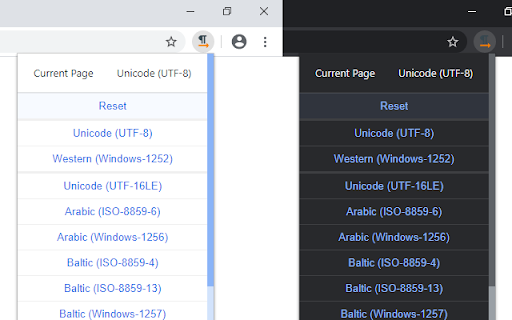
Users express frustration with the visual design of the extension and report occasional bugs where encoding changes require multiple clicks to activate.

Observed feature gaps

Lack of a modern user interface and inefficiency in the application of encoding changes.

Tags
Character EncodingWeb UtilityDeveloper ToolEncoding Fixer
Target users

- Web developers

- Users of legacy websites

- International users accessing regional sites

Primary use cases

- Fixing garbled text on misconfigured websites

- Manually overriding default browser encoding

- Viewing legacy sites with specific encoding needs like SHIFT_JS

Positive themes

- Effective replacement for native browser features

- Successful resolution of garbled text

- Ease of use

- Encoding persistence across page navigation

Negative themes

- Dated or unattractive user interface

- UI glitches such as black dropdown menus

- Functional friction requiring multiple clicks to apply changes

Observed friction

- No pricing friction observed as the tool is free and open-source.

Evidence boundary: Analysis based on store listing data and a sample of 10 multilingual reviews. The review sample is a small fraction of the total comment count.
Complaint summaries
Review-backed complaint signals grouped by operational area.

Support

No significant support or account-related complaints found in review samples.

Reliability

Some reports of UI elements not displaying correctly and encoding settings requiring repeat actions to trigger.

Privacy

No privacy or security complaints observed.

Access & pricing

- Free usage observed

- No account requirement observed

- Free plan or free usage claimed

Store listing facts

Listing assets

- Screenshots: 2

- Videos: 0

- Languages: 48

Trust signals

- Privacy policy

- Developer contact

- Official website

- Support link

Store metadata

- Version: 1.0.0

- Size: 64.54KiB

- Last updated:

Listing SEO keywords

Search intent keywords
Keyword signals for evaluating how users may discover, compare, or search for this extension category.

Core discovery

chrome charset modifierfix garbled text chromemanual character encoding extension

Comparison

chrome native encodingset character encoding alternative

Problem

garbled textwrong encodingcharset errorgibberish characters

Alternative

Charset alternativeencoding fixer extension

Similar extensions

Jump to related discovery paths:

Screenshots

Charset screenshot
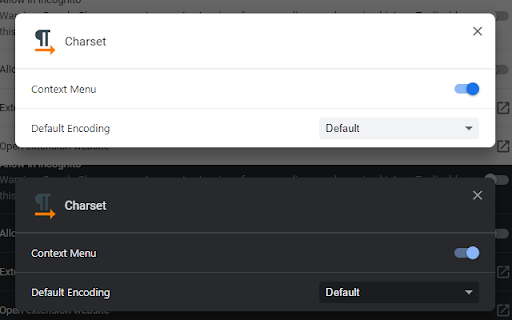
Charset screenshot

Links

Recommended Chrome extensions

Related listings from the same category, trending peers, and the same publisher portfolio.

Browse developer
Google Analytics Debugger icon

Google Analytics Debugger

Google Analytics

Prints useful information to the JavaScript console by enabling the debug version of the Google Analytics Javascript.

Installs

600K+

Rating

★ 4.2

Salesforce Inspector Reloaded icon

Salesforce Inspector Reloaded

Thomas Prouvot

Productivity tools for Salesforce administrators and developers to inspect data and metadata directly from the Salesforce UI.

Installs

500K+

Rating

★ 4.8

Tag Assistant Companion icon

Tag Assistant Companion

Google

The Tag Assistant Companion extension works with Tag Assistant to help troubleshoot installation of gtag.js and Google Tag Manager.

Installs

500K+

Rating

★ 3.1

Axure RP Extension for Chrome icon

Axure RP Extension for Chrome

Axure Software Solutions, Inc.

An extension that allows viewing of locally published Axure RP prototypes (HTML files) from Google Chrome.

Installs

500K+

Rating

★ 3.3

User-Agent Switcher and Manager icon

User-Agent Switcher and Manager

rynu.smith

Spoof websites trying to gather information about your web navigation to deliver distinct content you may not want

Installs

400K+

Rating

★ 4.3

SelectorsHub icon

SelectorsHub

Sanjay Kumar | SelectorsHub Founder

Locators Plugin to Auto Generate and Verify Playwright Locators, XPath & CSS Selectors.

Installs

400K+

Rating

★ 4.8

daily.dev | Where developers discover what's next icon

daily.dev | Where developers discover what's next

Daily Dev Ltd.

Developer news, personalized to your stack, in every new tab. Join 400,000+ developers. Free and open source.

Installs

400K+

Rating

★ 4.8

CSS Peeper icon

CSS Peeper

CSS Peeper

Inspect website styles in seconds. Supercharge your workflow, and save hours of work.

Installs

400K+

Rating

★ 4.1

MarketApp P2P icon

MarketApp P2P

market-app

Creates P2P exchanges between steam users

Installs

400K+

Rating

★ 4.4

SAML-tracer icon

SAML-tracer

SimpleSAMLphp

A debugger for viewing SAML messages

Installs

400K+

Rating

★ 4.5