Keyconfig icon

Keyconfig Chrome Extension Analysis

Automation & Workflow Efficiency

Chrome extension ID: okneonigbfnolfkmfgjmaeniipdjkgkl

This extension allows users to remap and create custom keyboard shortcuts within the Chrome browser. It aims to provide power-user functionality, such as Vim-style navigation, to streamline web browsing tasks.

Developer:Shogo Ohta
Version:2.0.0
Size:49.2KiB
Last updated:

Overview

Installs

10K+

Rating

3.8

141 reviews

Languages

2 locales

Includes English (United States), 日本語

Market analysis

Review-backed positioning, friction, and market signals for this Chrome extension.

Backed by review samples

Macro category

Automation & Workflow Efficiency

Pricing friction

Low review signal

Complaint intensity

High review signal

Listing & review signals
Observed signals from store listing text and review samples.

Listing positioning

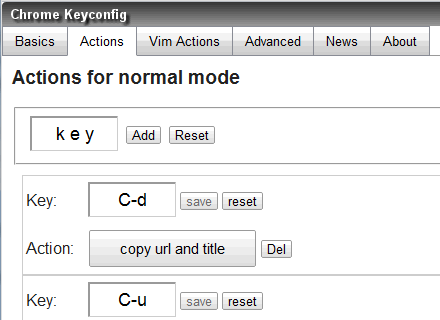
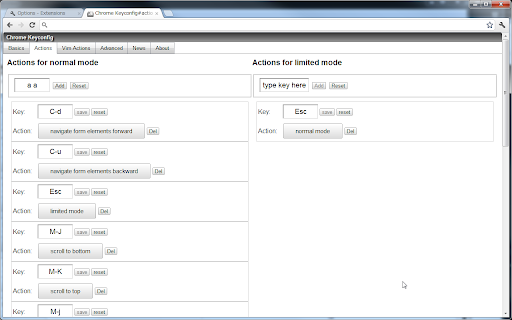
Keyconfig is positioned as a customization tool for Google Chrome users to enhance browsing speed. It promises improved navigation through user-defined keyboard shortcuts, smooth scrolling, and optional reading controls.

Inferred product pattern

Legacy keyboard mapping utility that appears abandoned and incompatible with modern browser versions.

Review-backed pain points

Users frequently report the extension stops working suddenly, fails to register inputs, or shows 'undefined' errors; there is a notable absence of help files or instructions for configuration.

Observed feature gaps

The extension lacks ongoing maintenance, proper UI feedback for configuration errors, and clear setup documentation for non-technical users.

Tags
Keyboard ShortcutsBrowser NavigationProductivity ToolCustomization
Target users

- Power users

- Developers

- Vim enthusiasts

Primary use cases

- Customizing Chrome browser shortcuts

- Enabling Vim-like web navigation

- Implementing custom smooth scrolling

Positive themes

- Initial utility when functional

- Provides desired keyboard customization

Negative themes

- Complete functional failure in newer Chrome versions

- Lack of documentation/help files

- User interface confusion (e.g., 'undefined' errors)

- Interference with regular typing keys

Observed friction

- Performance complaints detected

- None identified; the product appears to be free, but users report it is non-functional.

Evidence boundary: Evidence is drawn from historical user reviews spanning 2013-2017, consistently highlighting functional abandonment and browser compatibility issues. The review data is dated and reflects older versions of the Chrome browser; it may not represent the experience on current browser builds if silent updates occurred.
Complaint summaries
Review-backed complaint signals grouped by operational area.

Support

Users express frustration over the lack of developer response, lack of documentation, and no clear channel for reporting bugs or seeking help.

Reliability

High; consistent reports of the extension breaking after browser updates, losing functionality, and interfering with standard keyboard input.

Privacy

No privacy-related complaints found.

Access & pricing

- Free usage observed

- No account requirement observed

- Free plan or free usage claimed

Store listing facts

Listing assets

- Screenshots: 2

- Videos: 0

- Languages: 2

Trust signals

- Privacy policy

- Developer contact

Store metadata

- Version: 2.0.0

- Size: 49.2KiB

- Last updated:

Listing SEO keywords

Search intent keywords
Keyword signals for evaluating how users may discover, compare, or search for this extension category.

Core discovery

Chrome keyboard shortcutscustom browser shortcutsbrowser navigation extensionVim navigation chrome

Comparison

Shortkeys alternativekeyboard remapper chrome

Problem

extension not workingchrome shortcut errorkeyconfig broken

Alternative

ShortkeysVimium

Similar extensions

Jump to related discovery paths:

Screenshots

Keyconfig screenshot

Links

Recommended Chrome extensions

Related listings from the same category, trending peers, and the same publisher portfolio.

Browse developer
Salesforce Inspector Reloaded icon

Salesforce Inspector Reloaded

Thomas Prouvot

Productivity tools for Salesforce administrators and developers to inspect data and metadata directly from the Salesforce UI.

Installs

500K+

Rating

4.8

Tag Assistant Companion icon

Tag Assistant Companion

Google

The Tag Assistant Companion extension works with Tag Assistant to help troubleshoot installation of gtag.js and Google Tag Manager.

Installs

500K+

Rating

3.1

Axure RP Extension for Chrome icon

Axure RP Extension for Chrome

Axure Software Solutions, Inc.

An extension that allows viewing of locally published Axure RP prototypes (HTML files) from Google Chrome.

Installs

500K+

Rating

3.3

daily.dev | Where developers discover what's next icon

daily.dev | Where developers discover what's next

Daily Dev Ltd.

Developer news, personalized to your stack, in every new tab. Join 400,000+ developers. Free and open source.

Installs

400K+

Rating

4.8

Angular DevTools icon

Angular DevTools

Angular

Angular DevTools extends Chrome DevTools adding Angular specific debugging and profiling capabilities.

Installs

400K+

Rating

3.7

SelectorsHub icon

SelectorsHub

Sanjay Kumar | SelectorsHub Founder

Locators Plugin to Auto Generate and Verify Playwright Locators, XPath & CSS Selectors.

Installs

400K+

Rating

4.8

SAML-tracer icon

SAML-tracer

SimpleSAMLphp

A debugger for viewing SAML messages

Installs

400K+

Rating

4.5

CSS Peeper icon

CSS Peeper

CSS Peeper

Inspect website styles in seconds. Supercharge your workflow, and save hours of work.

Installs

400K+

Rating

4.1

Font Finder icon

Font Finder

unixeco

An easy-to-use font inspector to get CSS styles of the selected element

Installs

400K+

Rating

4.5

Netmirror Extension icon

Netmirror Extension

netmirror.art

Add, modify or remove a header for any request. https://netmirr.net/ Netmirror Mod Header (HTTP Headers) is an extension that can…

Installs

400K+

Rating

4.2