Scholar Utility Belt for Google Scholar icon

Scholar Utility Belt for Google Scholar Chrome Extension Analysis

SEO & Traffic Analytics

Chrome extension ID: omcogfcgldfmihfogbffflbocdbjockn

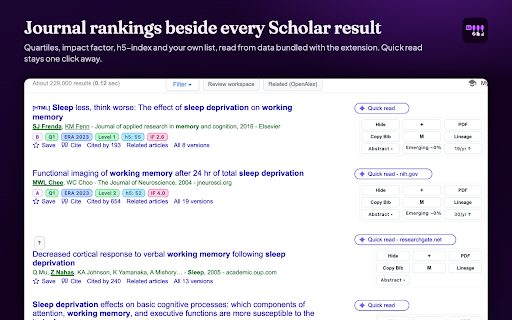
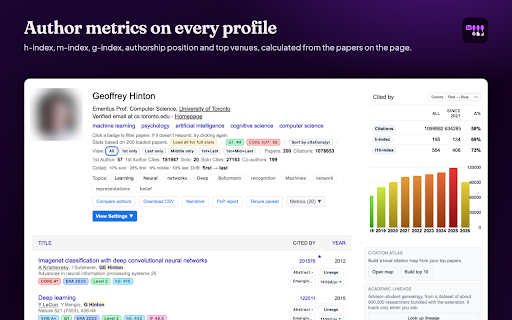
Scholar Utility Belt is a Chrome extension designed to augment Google Scholar with advanced academic research tools. It provides features such as journal quality badges, citation velocity analytics, author profile metrics (h-index, m-index), academic lineage trees, query trend tracking, and retraction alerts to streamline the research process.

Version:1.3.1
Size:17.93MiB
Last updated:

Overview

Installs

1K+

Rating

★ 4.5

16 reviews

Languages

1 locales

Includes English (United States)

Market analysis

Review-backed positioning, friction, and market signals for this Chrome extension.

Backed by review samples

Macro category

SEO & Traffic Analytics

Pricing friction

Low review signal

Complaint intensity

Moderate review signal

Listing & review signals
Observed signals from store listing text and review samples.

Listing positioning

The store listing positions Scholar Utility Belt as a personal productivity tool that enhances Google Scholar by integrating various academic metrics, journal rankings, and research workflow tools directly into the interface. It emphasizes efficiency, comprehensiveness, and a privacy-first approach for researchers.

Inferred product pattern

An open-source, privacy-first Chrome extension that integrates advanced academic research metrics and productivity tools directly into the Google Scholar interface, primarily operating locally.

Review-backed pain points

Users report significant CPU consumption when a Google Scholar tab with the extension is open. Additionally, compatibility issues manifest as incorrect dark mode rendering on macOS and problems with theme settings failing to save on specific OS/browser combinations.

Observed feature gaps

One user suggested improving the BibTeX export functionality to be available from more locations, such as author profiles, beyond just the search results page. No critical feature gaps were identified from the available reviews or listing.

Tags
Academic ResearchCitation AnalysisJournal RankingGoogle Scholar ToolsResearch Productivity
Target users

- Academic Researchers

- University Students

- Professors

Primary use cases

- Quickly assess the quality and impact of academic journals and publications.

- Analyze citation trends and evaluate authors' contributions and academic lineage.

- Monitor research topic trends and identify potentially retracted papers.

- Streamline common research tasks like saving papers and exporting citations.

Positive themes

- Provides meaningful and detailed insights into author contributions and publication quality.

- Highly useful and almost perfect for researchers in specific academic fields like Management Science.

- Offers convenient quick actions, such as BibTeX format citation copying directly from search results.

Negative themes

- Experiences high CPU usage, potentially impacting system performance.

- Exhibits minor bugs related to display themes, specifically dark mode issues on macOS.

- Faces issues with theme settings not saving correctly on certain operating systems and browsers (e.g., Edge on PopOS).

Observed friction

- Performance complaints detected

- The extension claims to be privacy-first with no tracking or accounts, and no pricing information is mentioned or complained about in the reviews.

Evidence boundary: Extracted data from the Chrome Web Store listing, including the title, short and long descriptions, and six user reviews with ratings ranging from 3 to 5 stars. The total number of user reviews (15) is relatively low, limiting the breadth and depth of review-backed insights, especially for uncovering a wider range of negative themes or feature requests.
Complaint summaries
Review-backed complaint signals grouped by operational area.

Support

No complaints regarding customer support, account management, or refunds were found in the available review data.

Reliability

Users have reported issues with high CPU usage and platform-specific bugs affecting the dark/light theme display and settings persistence.

Privacy

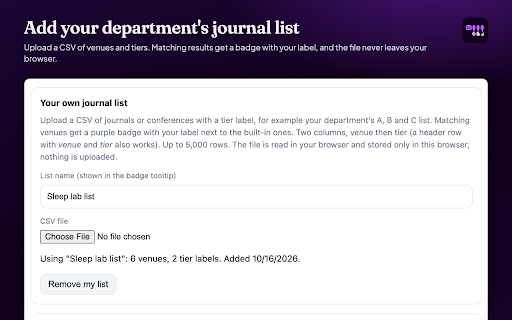
The listing prominently states a 'PRIVACY-FIRST' approach with local data handling, no API calls for badges, and no tracking or accounts. No privacy complaints were identified in the reviews.

Access & pricing

- Free usage observed

- No account requirement observed

- Free plan or free usage claimed

Store listing facts

Listing assets

- Screenshots: 3

- Videos: 1

- Languages: 1

Trust signals

- Privacy policy

- Developer contact

- Official website

Store metadata

- Version: 1.3.1

- Size: 17.93MiB

- Last updated:

Listing SEO keywords

Search intent keywords
Keyword signals for evaluating how users may discover, compare, or search for this extension category.

Core discovery

google scholar extensionacademic journal rankingscitation analysis toolh-index calculatorresearch trend trackerpaper retraction alerts

Comparison

google scholar vs web of scienceresearchgate vs scholar utility beltacademic metrics tools comparison

Problem

how to check journal qualityfind journal impact factoranalyze author citationstrack research trendsavoid retracted papersgoogle scholar workflow issues

Alternative

scholar utility belt alternativegoogle scholar productivity toolsacademic research extensions

Similar extensions

Jump to related discovery paths:

Screenshots

Scholar Utility Belt for Google Scholar screenshot

Links

Recommended Chrome extensions

Related listings from the same category, trending peers, and the same publisher portfolio.

Browse education
OpenDyslexic for Chrome icon

OpenDyslexic for Chrome

OpenDyslexic

Format pages using the OpenDyslexic font and low contrast help

Installs

800K+

Rating

★ 4.3

Voice In - Voice Typing & Speech-to-Text Dictation icon

Voice In - Voice Typing & Speech-to-Text Dictation

Dictanote

Voice typing in ChatGPT, Gmail, Google Docs & 10,000+ sites. Dictate emails, notes & AI prompts in 50+ languages.

Installs

700K+

Rating

★ 4.2

eJOY AI Dictionary icon

eJOY AI Dictionary

ejoy-english.com

Your ultimate knowledge and English learning tool to discover the world and upskill yourself. Translate video, websites and PDF.

Installs

700K+

Rating

★ 4.1

You Shall Not Pass by TeacherMagic.org icon

You Shall Not Pass by TeacherMagic.org

JamesTyler

Blocks proxy sites, filter evasion exploits, tab spam, and Google Sites abuse on student Chromebooks. Free forever.

Installs

700K+

Rating

★ 1.9

edpuzzle icon

edpuzzle

Edpuzzle

Import your favorite educational YouTube video into Edpuzzle with a click!

Installs

600K+

Rating

★ 4.1

Cite This For Me: Web Citer icon

Cite This For Me: Web Citer

Chegg Writing Tools

Automatically create website citations in the APA, MLA, Chicago, or Harvard referencing styles at the click of a button.

Installs

600K+

Rating

★ 3.5

GPTZero: AI Detection & Writing Replay icon

GPTZero: AI Detection & Writing Replay

chrome-extension-publisher

Bring AI detection, citation checks, live essay feedback, and writing replays directly into Google Docs and your workflow.

Installs

500K+

Rating

★ 4.6

Translate for Chrome -Translator, Dictionary icon

Translate for Chrome -Translator, Dictionary

Translator App.

Translate words, phrases or text on any webpage. Full page translator and dictionary, text to speech (TTS) using Google Translate.

Installs

500K+

Rating

★ 4.2

オクリンクプラス Webページスクリーンショット機能 icon

オクリンクプラス Webページスクリーンショット機能

ベネッセコーポレーション

オクリンクプラスのカードにWebページのスクリーンショットを挿入し、リンクを埋め込むことができます!

Installs

500K+

Rating

★ 3.0

Google Meet Breakout by Robert Hudek icon

Google Meet Breakout by Robert Hudek

Unknown developer

Only the teacher needs to install. Completely Free and your Data is Private. Google Classroom integration, Slider Control.

Installs

400K+

Rating

★ 4.4