Toolship: Browser Toolkit for DEV & QA icon

Toolship Chrome Extension Analysis

Developer & Designer Tools

Store listing title: Toolship: Browser Toolkit for DEV & QA

Chrome extension ID: omjocblcimogflgejnnadnmbfmngblmd

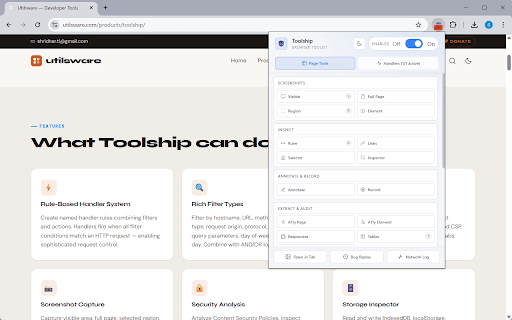
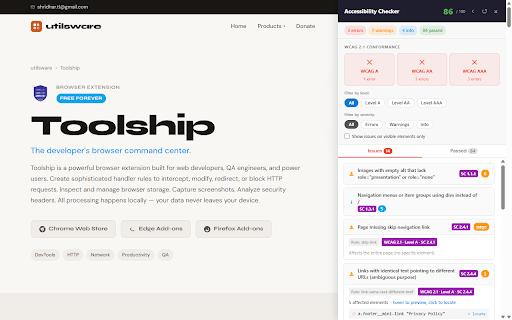
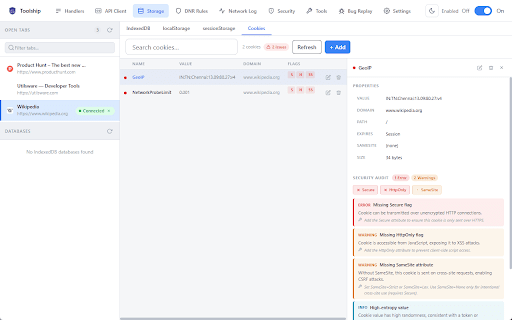
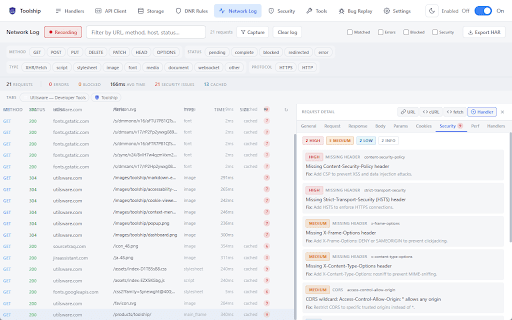
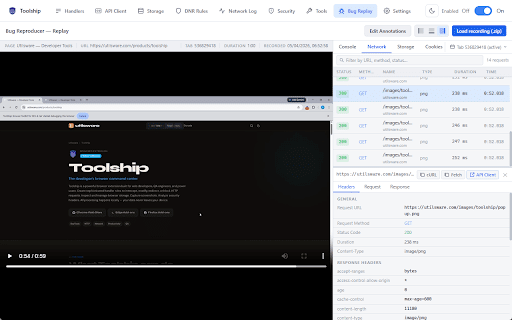
Toolship is a comprehensive browser toolkit designed to assist developers and power users in managing HTTP requests, inspecting IndexedDB storage, and auditing web pages. It provides a suite of in-page utilities including screenshot tools, accessibility checkers, responsive previews, and element inspectors to simplify daily web development workflows.

Developer:Shridhar TL
Version:0.11
Size:485KiB
Last updated:

Overview

Installs

201

Rating

★ 4.2

5 reviews

Languages

1 locales

Includes English (United States)

Market analysis

Review-backed positioning, friction, and market signals for this Chrome extension.

No review samples found

Macro category

Developer & Designer Tools

Pricing friction

Low review signal

Complaint intensity

Low review signal

Listing & review signals
Observed signals from store listing text and review samples.

Listing positioning

Toolship positions itself as an all-in-one suite for developers and QA engineers that consolidates complex debugging tasks—such as network interception, storage management, and accessibility auditing—into a single browser interface. By moving these functions out of standard DevTools and into a managed, rule-based extension, it aims to streamline environment switching and bug reproduction.

Inferred product pattern

Comprehensive all-in-one developer productivity suite.

Review-backed pain points

Review-backed data is not available.

Observed feature gaps

Review-backed data is not available.

Tags
DevToolsWeb DebuggingAutomationNetwork InterceptorQA Testing
Target users

- Web Developers

- QA Engineers

- Software Testers

- Frontend Developers

Primary use cases

- HTTP request modification

- IndexedDB storage management

- Web accessibility auditing

- Bug reporting and session recording

- Responsive layout testing

Positive themes

No positive theme data.

Negative themes

No negative theme data.

Observed friction

- No pricing friction reported; official store listing does not explicitly detail a paid model.

Evidence boundary: Data sourced from public Chrome Web Store listing information and feature documentation provided by the developer. Review-backed data is unavailable as there are currently no published user reviews to verify real-world performance or pain points.
Complaint summaries
Review-backed complaint signals grouped by operational area.

Support

No support complaints identified.

Reliability

No reliability complaints identified.

Privacy

No privacy complaints identified.

Access & pricing

- No clear monetization signal

- No account requirement observed

- No clear pricing signal

Store listing facts

Listing assets

- Screenshots: 5

- Videos: 0

- Languages: 1

Trust signals

- Privacy policy

- Developer contact

- Official website

Store metadata

- Version: 0.11

- Size: 485KiB

- Last updated:

Listing SEO keywords

Search intent keywords
Keyword signals for evaluating how users may discover, compare, or search for this extension category.

Core discovery

Chrome extension for developersHTTP request interceptorIndexedDB viewerweb accessibility checkerbrowser bug reporter

Comparison

alternative to Chrome DevToolsPostman for browserweb debugging tools

Problem

simplify web debuggingno-code request modificationstreamline QA testing

Alternative

developer utility extensionQA productivity tool

Similar extensions

Jump to related discovery paths:

Screenshots

Toolship: Browser Toolkit for DEV & QA screenshot

Links

Recommended Chrome extensions

Related listings from the same category, trending peers, and the same publisher portfolio.

Browse developer
Jira Assistant: Worklog, Sprint report, etc icon

Jira Assistant: Worklog, Sprint report, etc

Shridhar TL

Help to track & upload work done on a Jira Ticket on timely basis and generate Worklog, Sprint and other custom reports.

Installs

70K+

Rating

★ 4.6

GoFullPage - Full Page Screen Capture icon

GoFullPage - Full Page Screen Capture

GoFullPage

Capture a screenshot of your current page in entirety and reliably—without requesting any extra permissions!

Installs

11.0M+

Rating

★ 4.9

TouchEn PC보안 확장 icon

TouchEn PC보안 확장

라온시큐어

브라우저에서 라온시큐어의 PC보안 기능을 사용하기 위한 확장 프로그램입니다.

Installs

8.0M+

Rating

★ 1.2

React Developer Tools icon

React Developer Tools

React Foundation

Adds React debugging tools to the Chrome Developer Tools. Created from revision 1d34f91dfd.

Installs

5.0M+

Rating

★ 3.5

ColorZilla icon

ColorZilla

colorzilla.com

Advanced Eyedropper, Color Picker, Gradient Generator and other colorful goodies

Installs

4.0M+

Rating

★ 4.7

Full Page Screenshot & PDF - Web Capture by FireShot icon

Full Page Screenshot & PDF - Web Capture by FireShot

Evgeny Vokilsus

Capture full-page screenshots. Save as PDF or image. Trusted since 2010. Your screenshots stay private. Minimal permissions.

Installs

3.0M+

Rating

★ 4.9

Meta Ads Data Advisor icon

Meta Ads Data Advisor

Meta

Meta Ads Data Advisor automates connecting your website and marketing data to Meta for better ad performance. No developers needed.

Installs

3.0M+

Rating

★ 2.0

Tag Assistant icon

Tag Assistant

Google

The Tag Assistant extension works with Tag Assistant to help troubleshoot installation of gtag.js and Google Tag Manager.

Installs

3.0M+

Rating

★ 3.5

Wappalyzer - Technology profiler icon

Wappalyzer - Technology profiler

Wappalyzer

Identify web technologies

Installs

3.0M+

Rating

★ 4.0

WhatFont icon

WhatFont

Chengyin Liu

The easiest way to identify fonts on web pages.

Installs

3.0M+

Rating

★ 3.8