DuckShot – Screen Recorder & Screenshot icon

DuckShot Chrome Extension Analysis

Automation & Workflow Efficiency

Store listing title: DuckShot – Screen Recorder & Screenshot

Chrome extension ID: ompmpkbomfbligiolohidkakecgaddpk

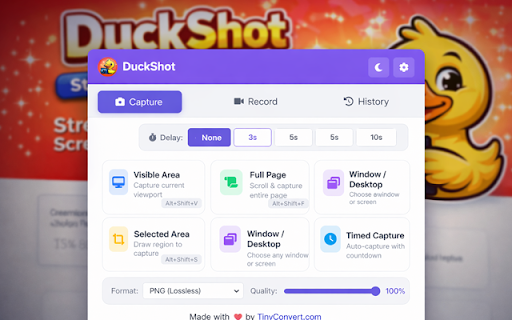
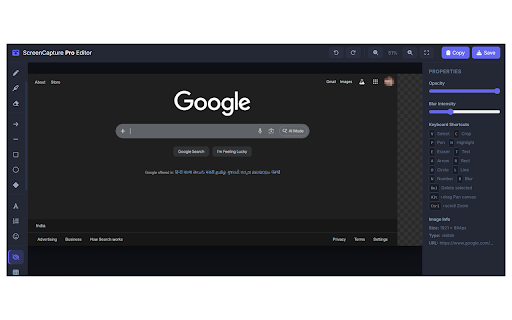
DuckShot is a Chrome extension designed to assist users in capturing screenshots and recording browser activity. It provides robust post-capture annotation features, including shapes, arrows, and sensitive information blurring. It is designed to be lightweight, running within the browser to generate quick visual assets for communication.

Developer:tinyconvert.com
Version:1.0.1
Size:366KiB
Last updated:

Overview

Installs

8

Rating

0 reviews

Languages

1 locales

Includes English

Market analysis

Review-backed positioning, friction, and market signals for this Chrome extension.

No review samples found

Macro category

Automation & Workflow Efficiency

Pricing friction

Low review signal

Complaint intensity

Low review signal

Listing & review signals
Observed signals from store listing text and review samples.

Listing positioning

DuckShot positions itself as a fast, lightweight, and versatile screen capture and recording utility for Google Chrome. It highlights its ability to seamlessly capture entire webpages, record high-quality screen tutorials, and apply quick visual adjustments. The listing emphasizes user control over privacy and branding with features like custom watermarks and information blurring.

Inferred product pattern

A lightweight local browser helper utility focusing on offline-first screenshot and video capture processing.

Review-backed pain points

Review-backed pain points are not available as the product currently has no reviews.

Observed feature gaps

No user-reported feature gaps are available due to the absence of public reviews.

Tags
Screen RecorderScreenshot ToolAnnotation ToolFull Page Capture
Target users

- Developers

- Designers

- Teachers

- Students

- Customer Support Teams

- Content Creators

Primary use cases

- Recording software demos or bug reports

- Capturing full-page screenshots of entire websites

- Annotating and blurring sensitive data before sharing screen assets

Positive themes

- No review-backed data is available.

Negative themes

- No review-backed data is available.

Observed friction

- No pricing friction signals are available from the reviews.

Evidence boundary: Analysis is based exclusively on the Chrome Web Store listing description, publisher website information, and metadata. No user reviews were available for extraction. The lack of user reviews and rating data prevents assessment of runtime stability, payment gates, or user experience issues.
Complaint summaries
Review-backed complaint signals grouped by operational area.

Support

No support or account-related complaints are available.

Reliability

No performance or reliability issues have been reported in reviews.

Privacy

No privacy or security concerns have been flagged by users.

Access & pricing

- No clear monetization signal

- No account requirement observed

- No clear pricing signal

Store listing facts

Listing assets

- Screenshots: 2

- Videos: 0

- Languages: 1

Trust signals

- Privacy policy

- Developer contact

- Official website

Store metadata

- Version: 1.0.1

- Size: 366KiB

- Last updated:

Listing SEO keywords

Search intent keywords
Keyword signals for evaluating how users may discover, compare, or search for this extension category.

Core discovery

chrome screen recorderfull page screenshot chromeannotate screenshot tool

Comparison

DuckShot vs Awesome ScreenshotDuckShot vs LoomDuckShot vs Nimbus Capture

Problem

how to record chrome screenhow to blur screenshothow to take full page screenshot

Alternative

Loom alternativeAwesome Screenshot alternativeScreencastify alternative

Similar extensions

Jump to related discovery paths:

Screenshots

DuckShot – Screen Recorder & Screenshot screenshot

Links

Recommended Chrome extensions

Related listings from the same category, trending peers, and the same publisher portfolio.

Browse workflow
User-Agent Switcher & Manager Pro icon

User-Agent Switcher & Manager Pro

tinyconvert.com

User-Agent switcher with Client Hints & navigator. Spoof, rotate & manage identities per-tab or per-domain with profiles.

Installs

936

Rating

5.0

Super Volume Booster icon

Super Volume Booster

tinyconvert.com

Boost volume up to 600%, your sound experience extraordinary! with our free audio master extension with equalizer and presets.

Installs

275

Rating

Free Download Manager icon

Free Download Manager

Free Download Manager.ORG

Free Download Manager integration with browser

Installs

3.0M+

Rating

4.2

TeraBox Download Assistant icon

TeraBox Download Assistant

terabox-developers

Supports screenshots, uploads, and other TeraBox features

Installs

3.0M+

Rating

2.3

夸克网盘-网页嗅探 icon

夸克网盘-网页嗅探

广州市动悦信息技术有限公司

识别到网页资源时,可一键存夸克网盘

Installs

3.0M+

Rating

1.7

AI Grammar Checker & Paraphraser – LanguageTool icon

AI Grammar Checker & Paraphraser – LanguageTool

lt-extension-publisher

Instantly Enhance Your Texts with LanguageTool’s Grammar Checker and Paraphrasing Tool

Installs

2.0M+

Rating

4.7

Sound Booster - increase volume up icon

Sound Booster - increase volume up

Sound-ultimate.com

Volume Booster helps boost sound video or music on any tab! Increase volume and bass booster, equalizer. Volume control.

Installs

2.0M+

Rating

4.5

Momentum icon

Momentum

Momentum

Transform your browser into a beautifully designed tab that helps you feel calm, keep focus, and stay energized.

Installs

2.0M+

Rating

4.5

Pop up blocker for Chrome™ - Poper Blocker icon

Pop up blocker for Chrome™ - Poper Blocker

dingosolutions

Block popups, ads, cookie requests, trackers, notifications, ads on social media & more. A clean browsing experience starts today.

Installs

2.0M+

Rating

4.8

Evernote Web Clipper icon

Evernote Web Clipper

Evernote

Use the Evernote extension to save things you see on the web into your Evernote account.

Installs

2.0M+

Rating

4.7