Auto Clicker icon

Auto Clicker Chrome Extension Analysis

Automation & Workflow Efficiency

Chrome extension ID: opichklehbipklghohkoijlhfiffopah

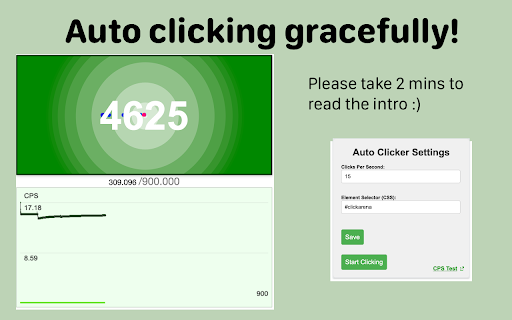
Auto Clicker is a browser extension that allows users to automate mouse clicks on specific web page elements. It uses a configurable clicks-per-second (CPS) setting and requires users to define a target element via a selector, such as a CSS ID or class.

Version:1.5
Size:198KiB
Last updated:

Overview

Installs

479

Rating

3.8

8 reviews

Languages

1 locales

Includes English

Market analysis

Review-backed positioning, friction, and market signals for this Chrome extension.

Backed by review samples

Macro category

Automation & Workflow Efficiency

Pricing friction

Low review signal

Complaint intensity

Moderate review signal

Listing & review signals
Observed signals from store listing text and review samples.

Listing positioning

The extension positions itself as a high-performance auto-clicker developed by experts in click-speed testing. It emphasizes precise element targeting using CSS selectors, distinguishing itself from simpler alternatives that lack granular control.

Inferred product pattern

Technical utility extension requiring developer-level interaction (CSS selectors) for end-user tasks.

Review-backed pain points

Users struggle with the technical requirement of finding and inputting CSS element selectors to make the clicker function.

Observed feature gaps

The UI lacks user-friendly controls for selecting elements without performing manual browser 'Inspect' actions.

Tags
Auto ClickerAutomationClick SpeedProductivity Tool
Target users

- Gamers

- Power Users

- Web Automation Enthusiasts

Primary use cases

- Automated clicking in browser games

- Rapid-fire clicking tasks

- Click speed testing

Positive themes

- High speed and effective performance

- Works well for specific gaming use cases like Cookie Clicker

- Reliable functionality once configured

Negative themes

- Steep learning curve for non-technical users

- Difficult to understand how to select elements

- Lack of clear instructions for general use across different websites

Observed friction

- No pricing friction; the extension appears free.

Evidence boundary: Product information and user feedback confirm the tool's core functionality as an element-based auto-clicker, with usability identified as the primary barrier. The review sample size is small, limiting the breadth of feedback regarding cross-website compatibility and long-term reliability.
Complaint summaries
Review-backed complaint signals grouped by operational area.

Support

Users express frustration regarding the lack of documentation or tutorials on how to operate the tool effectively.

Reliability

Some users report difficulties getting the clicker to trigger, often linked to incorrect element targeting rather than tool failure.

Privacy

No privacy complaints observed.

Access & pricing

- Free usage observed

- No account requirement observed

- Free plan or free usage claimed

Store listing facts

Listing assets

- Screenshots: 1

- Videos: 0

- Languages: 1

Trust signals

- Privacy policy

- Developer contact

- Official website

Store metadata

- Version: 1.5

- Size: 198KiB

- Last updated:

Listing SEO keywords

Search intent keywords
Keyword signals for evaluating how users may discover, compare, or search for this extension category.

Core discovery

auto clicker extensionfast auto clicker for chromemouse clicker automation

Comparison

best auto clicker for gameschrome auto clicker alternatives

Problem

how to use auto clicker on websiteauto clicker not working

Alternative

click botmacro clicker

Similar extensions

Jump to related discovery paths:

Screenshots

Auto Clicker screenshot

Links

Recommended Chrome extensions

Related listings from the same category, trending peers, and the same publisher portfolio.

Browse tools
QR Code Generator icon

QR Code Generator

Awesome Extensions

A super handy QR Code Generator / Creator for you.

Installs

700K+

Rating

4.9

Chinese Script Variant Converter icon

Chinese Script Variant Converter

Awesome Extensions

Convert Chinese text between Simplified, Traditional, and region-specific variants

Installs

10K+

Rating

4.7

Monica: All-In-One AI Assist & Smartest  AI Agent icon

Monica: All-In-One AI Assist & Smartest AI Agent

Monica Team

One stop AI Assistant with GPT, Claude, Gemini: Chat, Write, Translate, Search, Summarize, image generator, video generation

Installs

3.0M+

Rating

4.9

BetterTTV icon

BetterTTV

NightDev, LLC

BetterTTV enhances Twitch and YouTube with new features, emotes, and more.

Installs

3.0M+

Rating

4.6

Google Input Tools icon

Google Input Tools

cloud-input-team

Input Tools lets you type in the language of your choice.

Installs

3.0M+

Rating

4.0

Microsoft Bing Search with Rewards icon

Microsoft Bing Search with Rewards

Microsoft Corporation

Use the Microsoft Rewards extension to find new ways to earn every day, easily track your points and set your default search to Bing

Installs

3.0M+

Rating

4.3

Google Scholar Button icon

Google Scholar Button

scholar-chrome-extensions

Lookup scholarly articles as you browse the web.

Installs

3.0M+

Rating

4.6

ЮБуст - VPN для YouTube. Обход блокировки Ютуб без ВПН. VPN для браузера icon

ЮБуст - VPN для YouTube. Обход блокировки Ютуб без ВПН. VPN для браузера

Uboost

Ускоритель Ютуб без ВПН, VPN для браузера Яндекс, Chrome, Opera, Edge. Обход замедления Ютуба.

Installs

2.0M+

Rating

4.2

Smallpdf—Edit, Convert, Compress, & AI Summarize PDF icon

Smallpdf—Edit, Convert, Compress, & AI Summarize PDF

Smallpdf AG

Get instant access to dozens of PDF tools directly in your browser – no downloads, no switching tabs.

Installs

2.0M+

Rating

4.6

HID Credential Management Extension icon

HID Credential Management Extension

hid-global-chrome-web-store

Browser extension for HID credential management solution.

Installs

2.0M+

Rating

1.3