Seamless — Full Page Screenshot icon

Seamless Chrome Extension Analysis

Tab & Bookmark Productivity

Store listing title: Seamless — Full Page Screenshot

Chrome extension ID: pegkidacpdmonjlhdehlghajegmlnihe

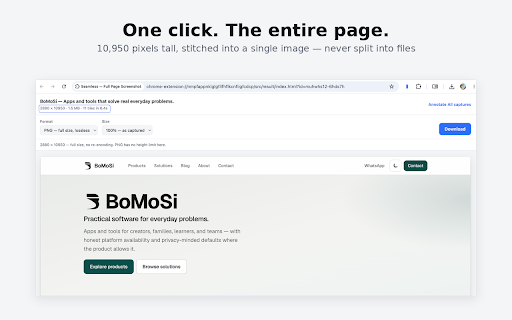
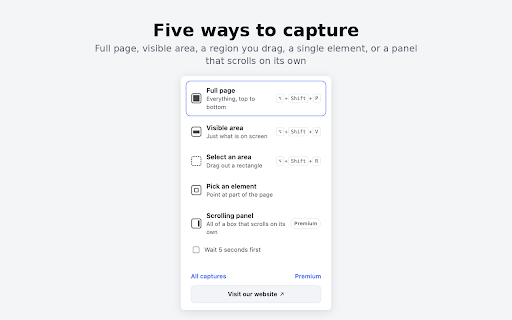
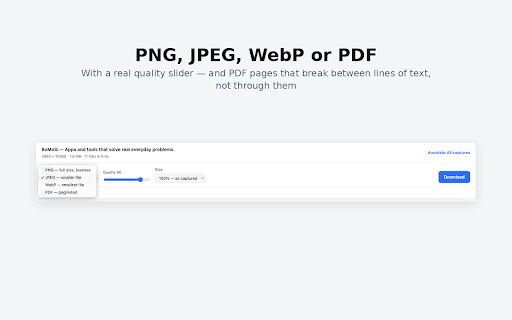
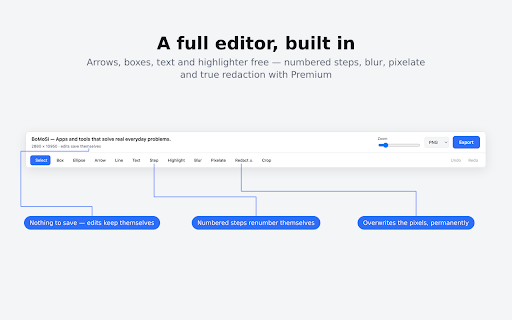
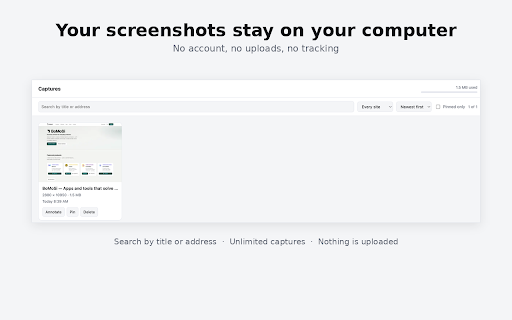
Seamless is a Chrome extension enabling various screenshot types, including full-page, visible area, selected area, and specific web elements. It offers an in-browser editor for annotations like arrows, text, and highlights. Core features are free, while advanced capabilities such as scrolling panel capture, redaction, and PDF/JPEG/WebP export with quality control are part of a premium subscription.

Developer:zuhagames
Version:0.1.1
Size:322KiB
Last updated:

Overview

Installs

5

Rating

★ —

0 reviews

Languages

1 locales

Includes English

Market analysis

Review-backed positioning, friction, and market signals for this Chrome extension.

No review samples found

Macro category

Tab & Bookmark Productivity

Pricing friction

Low review signal

Complaint intensity

Low review signal

Listing & review signals
Observed signals from store listing text and review samples.

Listing positioning

The listing positions Seamless as a highly reliable full-page screenshot tool designed to overcome common capture issues like repeating headers, blank scroll-loaded content, and split images. It emphasizes accuracy, a comprehensive suite of capture options, an integrated annotation editor, and strong privacy measures by processing and storing all data locally.

Inferred product pattern

A privacy-focused freemium Chrome extension providing robust web page screenshot and annotation capabilities, specifically designed to address common technical challenges in capturing dynamic or long web content.

Review-backed pain points

Review-backed data is not available.

Observed feature gaps

Review-backed data is not available.

Tags
Full Page ScreenshotScreen CaptureAnnotation ToolWeb Content Saver
Target users

- General web users needing reliable screenshots

- Content creators and bloggers for documentation

- Developers and designers for feedback and bug reporting

- Technical writers and educators for tutorials

Primary use cases

- Capturing entire web pages for archiving or sharing

- Annotating screenshots for feedback or instructions

- Documenting web content without common capture errors

- Saving specific elements or panels from complex web applications

Positive themes

No positive theme data.

Negative themes

No negative theme data.

Observed friction

- Review-backed data is not available.

Evidence boundary: The analysis is based entirely on the official Chrome Web Store listing, including the title, short description, and detailed long description. There are no user reviews available at this time to provide sentiment, usage feedback, or identify common pain points.
Complaint summaries
Review-backed complaint signals grouped by operational area.

Support

Review-backed data is not available.

Reliability

Review-backed data is not available.

Privacy

Review-backed data is not available.

Access & pricing

- Free entry with paid features

- No account requirement observed

- Limited free usage observed

Store listing facts

Listing assets

- Screenshots: 5

- Videos: 0

- Languages: 1

Trust signals

- Privacy policy

- Developer contact

- Support link

Store metadata

- Version: 0.1.1

- Size: 322KiB

- Last updated:

Listing SEO keywords

Search intent keywords
Keyword signals for evaluating how users may discover, compare, or search for this extension category.

Core discovery

full page screenshotscreen capture chromeweb page capturescreenshot editorscrolling screenshotannotate webpageprivacy focused screenshot

Comparison

seamless vs gofullpageseamless vs lightshotbest chrome screenshot toolscreenshot extension comparison

Problem

full page screenshot problemssticky header screenshot issuescrolling content blank screenshotlong page screenshot splitscreenshot privacy concerns

Alternative

full page screen capture alternativescreenshot annotatorweb content saver extensionfree screenshot tool

Similar extensions

Jump to related discovery paths:

Screenshots

Seamless — Full Page Screenshot screenshot

Links

Recommended Chrome extensions

Related listings from the same category, trending peers, and the same publisher portfolio.

Browse tools