Site Speed by DebugBear icon

Site Speed by DebugBear Chrome Extension Analysis

Developer & Designer Tools

Chrome extension ID: peomeonecjebolgekpnddgpgdigmpblc

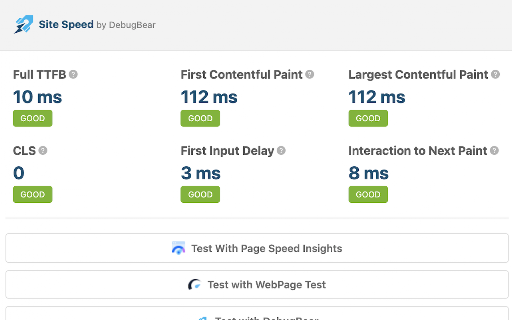
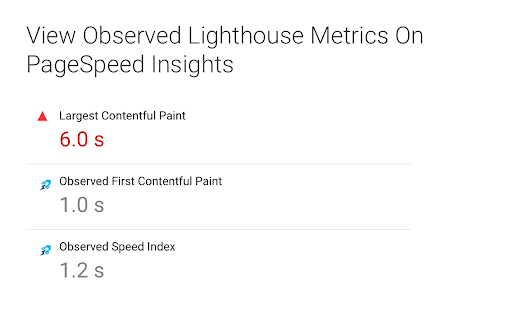
This extension tracks performance metrics including TTFB, First Contentful Paint, Largest Contentful Paint, and Cumulative Layout Shift. It provides developers with immediate visibility into page performance and integrates with external testing services.

Developer:DebugBear
Version:1.0.8
Size:94.03KiB
Last updated:

Overview

Installs

9K+

Rating

4.8

4 reviews

Languages

1 locales

Includes English

Market analysis

Review-backed positioning, friction, and market signals for this Chrome extension.

Backed by review samples

Macro category

Developer & Designer Tools

Pricing friction

Low review signal

Complaint intensity

Low review signal

Listing & review signals
Observed signals from store listing text and review samples.

Listing positioning

Site Speed by DebugBear positions itself as a lightweight utility for real-time monitoring of Web Vitals metrics directly in the browser. It serves as both a standalone diagnostic tool and an entry point into the more comprehensive DebugBear performance testing platform.

Inferred product pattern

Free lead-generation/value-add utility for a broader performance SaaS platform.

Review-backed pain points

Reviewers have expressed a desire for integration with GTMetrix, suggesting the current toolset is perceived as incomplete by some power users.

Observed feature gaps

The extension currently lacks support for non-DebugBear proprietary testing services like GTMetrix, which users have explicitly requested.

Tags
Web VitalsPage SpeedPerformance MonitoringCore Web VitalsDebugBear
Target users

- Web Developers

- SEO Specialists

- Performance Engineers

Primary use cases

- Monitoring Web Vitals in real-time

- Quick access to web performance testing tools

Positive themes

- Fast preview of website performance

- Useful tool for quick performance snapshots

Negative themes

- Feature requests for additional service integrations

Observed friction

- No pricing friction observed; the extension functions as a free utility for developers.

Evidence boundary: Evidence is based on the store description and a small sample of user reviews focusing on feature requests and general utility satisfaction. The review sample size is very small, which may not capture the full range of potential technical issues or long-term user sentiment.
Complaint summaries
Review-backed complaint signals grouped by operational area.

Support

No support or account complaints found.

Reliability

No reliability or performance complaints found.

Privacy

No privacy or security complaints found.

Access & pricing

- Free usage observed

- No account requirement observed

- Free plan or free usage claimed

Store listing facts

Listing assets

- Screenshots: 2

- Videos: 0

- Languages: 1

Trust signals

- Privacy policy

- Developer contact

- Official website

Store metadata

- Version: 1.0.8

- Size: 94.03KiB

- Last updated:

Listing SEO keywords

Search intent keywords
Keyword signals for evaluating how users may discover, compare, or search for this extension category.

Core discovery

Web Vitals extensionLCP checkerCLS monitorPageSpeed insights Chrome

Comparison

Lighthouse alternativeWeb Vitals extension comparison

Problem

slow website diagnosticwebsite performance checker

Alternative

PageSpeed Insights extensionWeb Vitals plugin

Similar extensions

Jump to related discovery paths:

Screenshots

Site Speed by DebugBear screenshot

Links

Recommended Chrome extensions

Related listings from the same category, trending peers, and the same publisher portfolio.

Browse developer