Camera Picture In Picture (PIP Overlay) icon

Camera Picture In Picture (PIP Overlay) Chrome Extension Analysis

Automation & Workflow Efficiency

Chrome extension ID: pgejmpeimhjncennkkddmdknpgfblbcl

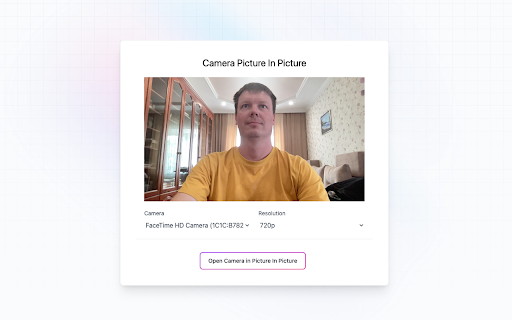
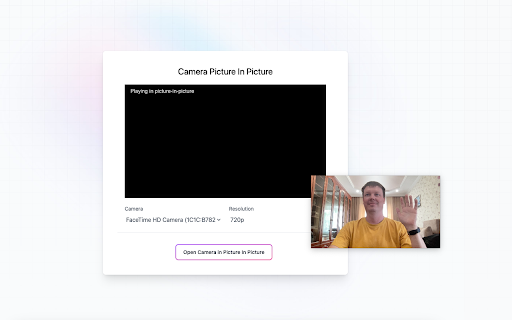
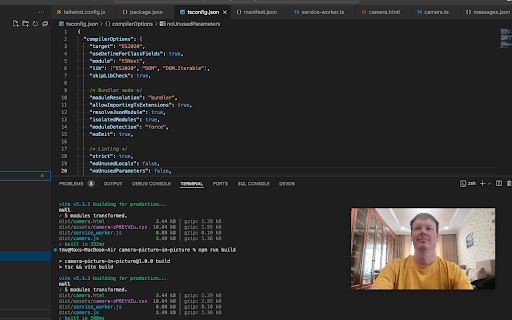
This tool enables users to create a floating picture-in-picture window for their camera. It allows for configuration of camera resolution, position, and size to facilitate multitasking or video content creation.

Version:1.0.1
Size:372KiB
Last updated:

Overview

Installs

2K+

Rating

4.4

9 reviews

Languages

55 locales

Includes Deutsch, English, English (Australia), English (United Kingdom)...

Market analysis

Review-backed positioning, friction, and market signals for this Chrome extension.

Backed by review samples

Macro category

Automation & Workflow Efficiency

Pricing friction

Low review signal

Complaint intensity

Low review signal

Listing & review signals
Observed signals from store listing text and review samples.

Listing positioning

The extension is positioned as a lightweight, one-click solution to overlay a webcam feed on top of any application. It emphasizes simplicity and the removal of the need for complex desktop software like OBS.

Inferred product pattern

A specialized utility tool providing a lightweight webcam overlay for multitasking and video production.

Review-backed pain points

Users expressed a need for the ability to flip or mirror the camera view and requested free resizing options that do not force a fixed aspect ratio.

Observed feature gaps

The product currently lacks a camera mirror/flip feature and flexible resizing without aspect ratio constraints.

Tags
Webcam OverlayPicture In PictureVideo Productivity
Target users

- Content Creators

- Presenters

- Educators

- Customer Support Professionals

Primary use cases

- Screencasting

- Online Presentations

- Educational Recordings

- Creating FAQ Videos

Positive themes

- Ease of use

- Floating window functionality

- Effective replacement for complex software

Negative themes

- Missing camera mirroring

- Aspect ratio limitations

Observed friction

- No pricing friction observed; the extension is claimed to be free.

Evidence boundary: Data derived from the Chrome Web Store description and user reviews highlighting specific feature requests for mirroring and resizing. The review sample size is small, limiting the statistical significance of the sentiment analysis.
Complaint summaries
Review-backed complaint signals grouped by operational area.

Support

No support complaints observed.

Reliability

No reliability or performance complaints observed.

Privacy

No privacy complaints observed; the listing claims local operation with no data collection.

Access & pricing

- Free usage observed

- No account requirement observed

- Free plan or free usage claimed

Store listing facts

Listing assets

- Screenshots: 3

- Videos: 0

- Languages: 55

Trust signals

- Developer contact

- Official website

- Support link

Store metadata

- Version: 1.0.1

- Size: 372KiB

- Last updated:

Listing SEO keywords

Search intent keywords
Keyword signals for evaluating how users may discover, compare, or search for this extension category.

Core discovery

webcam picture in picturecamera overlay extensionfloating webcamPIP camera overlay

Comparison

OBS alternativedesktop webcam overlay

Problem

complex video softwarecomplicated desktop video tools

Alternative

OBSexternal PIP software

Similar extensions

Jump to related discovery paths:

Screenshots

Camera Picture In Picture (PIP Overlay) screenshot

Links

Recommended Chrome extensions

Related listings from the same category, trending peers, and the same publisher portfolio.

Browse workflow
Noise Cancelling App icon

Noise Cancelling App

AI Webcam Effects

AI mic noise cancellation for calls, streams, and recording. Share with friends to enjoy clear sound in every conversation!

Installs

40K+

Rating

4.7

AI Webcam Effects + Recorder: Google Meet, Zoom, Discord & Other Meetings icon

AI Webcam Effects + Recorder: Google Meet, Zoom, Discord & Other Meetings

AI Webcam Effects

Improves camera quality, adds 15+ visual effects and filters and allows screen or live video recording

Installs

20K+

Rating

3.7

Adobe Acrobat: PDF edit, convert, sign tools icon

Adobe Acrobat: PDF edit, convert, sign tools

Adobe Inc.

Do more in Google Chrome with Adobe Acrobat PDF tools. View, fill, comment, sign, and try convert and compress tools.

Installs

307.0M+

Rating

4.4

AdBlock — block ads across the web icon

AdBlock — block ads across the web

AdBlock

Block ads on YouTube and your favorite sites for free

Installs

59.0M+

Rating

4.5

Adblock Plus - free ad blocker icon

Adblock Plus - free ad blocker

eyeo GmbH

Remove ads on YouTube and everywhere else you browse.

Installs

37.0M+

Rating

4.4

Chrome Remote Desktop icon

Chrome Remote Desktop

Chrome Remote Desktop Release Managers

Chrome Remote Desktop extension

Installs

34.0M+

Rating

3.1

Microsoft Single Sign On icon

Microsoft Single Sign On

Microsoft

Sign in to supported websites with your Microsoft work or school accounts on Windows and macOS platforms.

Installs

32.0M+

Rating

2.2

Free VPN for Chrome - VPN Proxy VeePN icon

Free VPN for Chrome - VPN Proxy VeePN

www.veepn.com

Fast, ultra secure, and easy to use VPN service to protect your privacy online. Enjoy Unlimited Traffic and Bandwidth!

Installs

14.0M+

Rating

4.5

MetaMask icon

MetaMask

metamask

The world's most trusted crypto wallet

Installs

12.0M+

Rating

2.7

Microsoft Power Automate icon

Microsoft Power Automate

Microsoft Corporation

Add-on for enabling web automation. This web extension is compatible with Power Automate for desktop version 2.27 or later.

Installs

11.0M+

Rating

2.1