Image Resizer Extension icon

Image Resizer Extension Chrome Extension Analysis

Video & Image Downloaders

Chrome extension ID: pjfbjgmjonkfdjkgplflnaeojcjeoimn

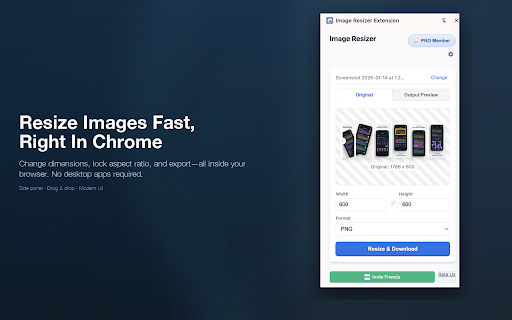
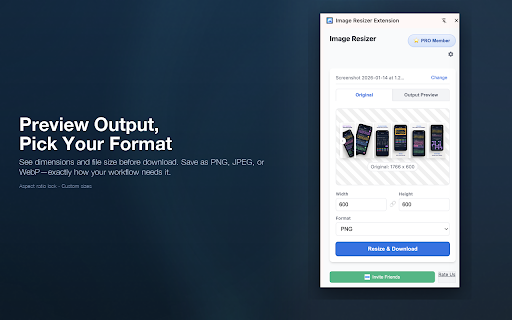
This tool allows users to resize, format-convert, and manage image dimensions directly within the browser. It features aspect ratio locking and live previews to streamline image preparation without external software.

Developer:EBM Group
Version:5.5.7
Size:202KiB
Last updated:

Overview

Installs

858

Rating

3.1

10 reviews

Languages

1 locales

Includes English (United States)

Market analysis

Review-backed positioning, friction, and market signals for this Chrome extension.

Backed by review samples

Macro category

Video & Image Downloaders

Pricing friction

Moderate review signal

Complaint intensity

High review signal

Listing & review signals
Observed signals from store listing text and review samples.

Listing positioning

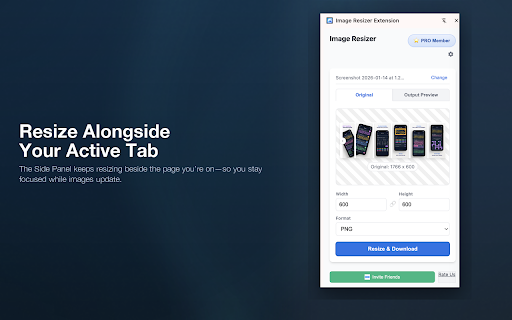
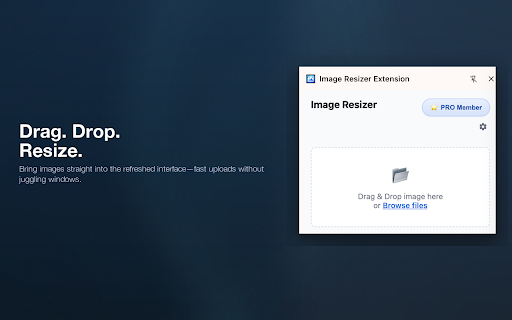
The extension is positioned as a lightweight, privacy-focused browser tool for quick image resizing and format conversion. It highlights a modern side-panel interface and drag-and-drop functionality to simplify workflow for social media and e-commerce tasks.

Inferred product pattern

Utility-focused browser extension providing local image manipulation with a consumption-based upgrade path.

Review-backed pain points

Users report that the extension occasionally fails to launch entirely, produces unexpected visual artifacts like black bars, and resets settings every time it is opened.

Observed feature gaps

The product lacks persistent configuration settings, which hampers the efficiency of repeated tasks.

Tags
Image ResizerBrowser ToolImage EditorWeb Utility
Target users

- Social Media Managers

- E-commerce Sellers

- Casual Web Users

Primary use cases

- Resizing images for social media

- Converting image formats

- Quick image dimension adjustments

Positive themes

- Simple, straightforward design

- Useful core functionality for basic tasks

Negative themes

- Total functional failure (app not opening)

- Inconsistent performance including visual artifacts (black bars)

- Failure to save user preferences/settings

Observed friction

- Payment required for meaningful usage

- Performance complaints detected

- The listing clearly identifies a paywall after 5 free resizes, though negative reviews focus on technical breakage rather than pricing.

Evidence boundary: Data gathered from Chrome Web Store public listing details and 7 user review samples provided in the input. Review sample size is small relative to the total user base, potentially favoring vocal users with extreme negative or positive experiences.
Complaint summaries
Review-backed complaint signals grouped by operational area.

Support

No specific support interaction complaints identified; reviews are focused on product instability.

Reliability

Several users report the tool has become non-functional or fails to open in recent versions.

Privacy

None; the extension claims local processing, which is not contradicted by user feedback.

Access & pricing

- Free entry with paid features

- No account requirement observed

- Limited free usage observed

Store listing facts

Listing assets

- Screenshots: 5

- Videos: 1

- Languages: 1

Trust signals

- Privacy policy

- Developer contact

- Official website

Store metadata

- Version: 5.5.7

- Size: 202KiB

- Last updated:

Listing SEO keywords

Search intent keywords
Keyword signals for evaluating how users may discover, compare, or search for this extension category.

Core discovery

chrome image resizerbrowser image editorresize images fast

Comparison

online image resizer vs chrome extension

Problem

image resizer not workingextension doesn't open

Alternative

free bulk image resizerbrowser resize tool

Similar extensions

Jump to related discovery paths:

Screenshots

Image Resizer Extension screenshot

Links

Recommended Chrome extensions

Related listings from the same category, trending peers, and the same publisher portfolio.

Browse tools
AutoScroll icon

AutoScroll

EBM Group

Stop Fighting the Scroll Wheel If you spend hours reading scripts, recording tutorials, practicing guitar, reviewing documents, or…

Installs

1K+

Rating

3.4

Ecosia - The search engine that plants trees icon

Ecosia - The search engine that plants trees

Ecosia GmbH

This extension sets your search engine to Ecosia and customizes your new tab page so you can plant trees with every search.

Installs

1.0M+

Rating

4.7

Video Downloader Plus icon

Video Downloader Plus

Video Downloader Plus

Download and save videos from any website instantly. A fast, simple video downloader that just works.

Installs

1.0M+

Rating

4.5

Wordtune: AI Paraphrasing and Grammar Tool icon

Wordtune: AI Paraphrasing and Grammar Tool

Wordtune

Unlock your potential with Wordtune's free AI writer – paraphrase, rewrite, translate, fix grammar, and more.

Installs

1.0M+

Rating

4.6

Keep Awake your System or Display icon

Keep Awake your System or Display

Dorian Hiller

Keep your system or display from going to sleep with just one click!

Installs

1.0M+

Rating

5.0

Поиск Яндексa icon

Поиск Яндексa

Yandex

Вводите запросы в адресную строку и получайте ответы от Яндекса

Installs

1.0M+

Rating

3.2

Bing Search and Homepage icon

Bing Search and Homepage

Microsoft Corporation

Set Microsoft Bing as your default homepage and default search engine

Installs

1.0M+

Rating

2.3

uberAgent icon

uberAgent

Cloud Software Group, Inc.

Enables uberAgent to collect web app usage and performance data (e.g., foreground tab, page load duration) from Chrome.

Installs

1.0M+

Rating

3.0

Ace Script icon

Ace Script

Ace Stream

Everything can be scripted, allowing your browser to do more!

Installs

1.0M+

Rating

3.4

MSN + Bing for Chrome icon

MSN + Bing for Chrome

Microsoft Corporation

Set MSN as your homepage and Bing as your search engine

Installs

1.0M+

Rating

4.1