Attachment Preview for Gmail: View PDFs & Images Without Downloading icon

Attachment Preview for Gmail Chrome Extension Analysis

Automation & Workflow Efficiency

Store listing title: Attachment Preview for Gmail: View PDFs & Images Without Downloading

Chrome extension ID: pkabennjneilldamjhfdkoihanblnijg

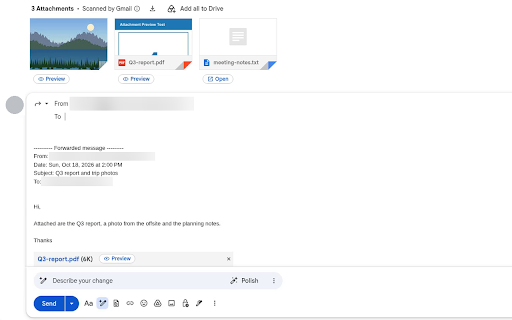
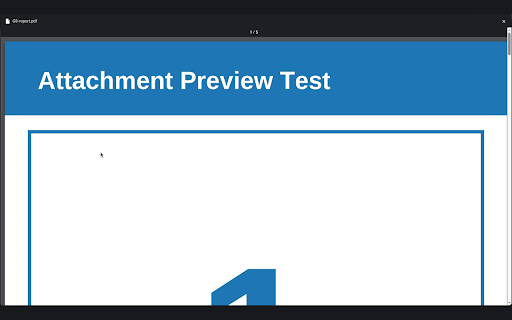
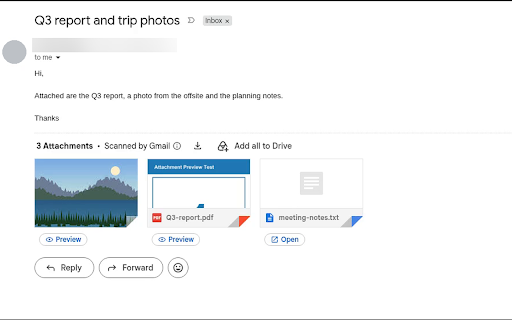
Attachment Preview is a Chrome extension designed to enable users to quickly preview documents, PDFs, or images directly from Gmail's compose window. It aims to prevent users from sending incorrect files by providing an instant, in-browser viewing option before an email is sent, without requiring downloads.

Developer:8 O'Clock
Version:1.1
Size:2.38MiB
Last updated:

Overview

Installs

352

Rating

★ 2.8

4 reviews

Languages

1 locales

Includes English (United States)

Market analysis

Review-backed positioning, friction, and market signals for this Chrome extension.

Backed by review samples

Macro category

Automation & Workflow Efficiency

Pricing friction

Low review signal

Complaint intensity

High review signal

Listing & review signals
Observed signals from store listing text and review samples.

Listing positioning

The store listing positions this product as a solution to 'attachment anxiety,' promising peace of mind by allowing users to instantly preview attachments directly within Gmail's compose window. It highlights benefits like avoiding wrong attachments, reducing download clutter, and seamless in-browser integration without third-party apps.

Inferred product pattern

A simple, privacy-focused utility tool for Gmail to enhance email workflow by allowing local, in-browser previews of attachments.

Review-backed pain points

The most significant pain point is that the extension reportedly 'does not work' for multiple users, failing to provide any functionality. Additionally, for users where it does function, a usability limitation exists where the preview button only works in Gmail's pop-out compose window and not in full-screen mode.

Observed feature gaps

A key feature gap is the stated inability for the preview button to function when composing an email in full-screen view, only working in the pop-out window. For some users, the fundamental inability for the extension to work at all represents a complete feature gap.

Tags
Gmail EnhancerAttachment ViewerEmail ProductivityFile PreviewWorkflow Tool
Target users

- Gmail users who frequently send attachments

- Professionals seeking to avoid email errors

- Individuals concerned about download clutter

Primary use cases

- Verifying correct attachments before sending emails

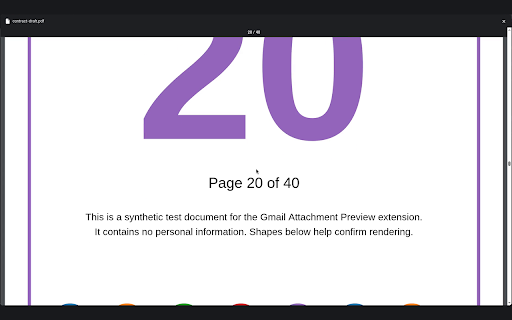
- Previewing various file types (documents, PDFs, images) without downloading them

- Streamlining email workflow to prevent errors and reduce clutter

Positive themes

- Provides a good option for quick attachment viewing without downloading

Negative themes

- The extension does not function at all for some users

- The preview button only works in pop-out view, not full-screen mode

Observed friction

- Performance complaints detected

- No pricing information or complaints are available in the provided data.

Evidence boundary: The analysis is based on the Chrome Web Store listing's title, descriptions, and a total of three user reviews, including both low-rating and high-rating samples. The evidence is limited by a very small number of user reviews, which may not fully represent the overall user experience or sentiment distribution.
Complaint summaries
Review-backed complaint signals grouped by operational area.

Support

No support or account-related complaints were found in the provided reviews.

Reliability

Multiple users explicitly report that the extension 'does not work' despite installation and reinstallation, indicating severe reliability and functional issues for a portion of its user base.

Privacy

The listing explicitly states files are previewed locally and do not leave the device; no privacy or security complaints were found in the reviews.

Access & pricing

- No clear monetization signal

- No account requirement observed

- No clear pricing signal

Store listing facts

Listing assets

- Screenshots: 5

- Videos: 1

- Languages: 1

Trust signals

- Privacy policy

- Developer contact

- Support link

Store metadata

- Version: 1.1

- Size: 2.38MiB

- Last updated:

Listing SEO keywords

Search intent keywords
Keyword signals for evaluating how users may discover, compare, or search for this extension category.

Core discovery

Gmail attachment previewpreview files in Gmailemail attachment viewerin-browser file previewemail productivity tool

Comparison

Gmail attachment toolsemail productivity extensionsin-browser file viewers

Problem

send wrong attachmentattachment anxietyclutter downloadsGmail file error

Alternative

Gmail file viewer alternativeemail attachment previewer alternativeno-download attachment viewer alternative

Similar extensions

Jump to related discovery paths:

Screenshots

Attachment Preview for Gmail: View PDFs & Images Without Downloading screenshot

Links

Recommended Chrome extensions

Related listings from the same category, trending peers, and the same publisher portfolio.

Browse communication
Reply Guy icon

Reply Guy

8 O'Clock

Filter X.com For You feed to only show recent tweets and from users with sufficient followers

Installs

6

Rating

★ —

Notifier for Gmail™ icon

Notifier for Gmail™

InBasic

Multiple label and account notifier for Google Mail (Gmail™)

Installs

200K+

Rating

★ 3.8

Gmail App - Mail Application for Gmail™ icon

Gmail App - Mail Application for Gmail™

andre_amper220

Use Gmail app for Windows and Mac to boost productivity. Get notifications and read emails in Gmail desktop app for macOS and PC.

Installs

200K+

Rating

★ 4.4

RingCentral for Google icon

RingCentral for Google

RingCentral

For organizations powered by Google Chrome, Workspace and ChromeOS, the browser is the primary engine of productivity. However,…

Installs

200K+

Rating

★ 1.8

Linguist - web page translator icon

Linguist - web page translator

Vitonsky

Web page translation, text translation, dictionary, history, custom translators, all you need to break language barriers

Installs

200K+

Rating

★ 4.3

Magical: Text Expander & Autofill icon

Magical: Text Expander & Autofill

Magical

Magical is a text expander and autofill automation app used by over 100K companies. Expand text like magic and auto-fill forms.

Installs

200K+

Rating

★ 3.1

ScreenPal - Screen Recorder & Video Editor icon

ScreenPal - Screen Recorder & Video Editor

ScreenPal (formerly Screencast-O-Matic)

Record your screen & webcam, take screenshots, edit videos & images - easy & free!

Installs

200K+

Rating

★ 3.7

ViiTor Translate - AI Translation & Real-Time Bilingual Subtitles & Free icon

ViiTor Translate - AI Translation & Real-Time Bilingual Subtitles & Free

ViiTor

The ViiTor translation provides translation for live audio & video, realizing bilingual subtitle functions.

Installs

100K+

Rating

★ 4.2

Superhuman Mail icon

Superhuman Mail

Superhuman

The most productive email app ever made.

Installs

100K+

Rating

★ 4.1

Ddict: AI Translation & Writing Assistant icon

Ddict: AI Translation & Writing Assistant

Ddo

Translate text and enhance writing with AI for seamless language learning and communication in your browser.

Installs

100K+

Rating

★ 3.1