Mockingbird - API Mock & Interceptor icon

Mockingbird Chrome Extension Analysis

Developer & Designer Tools

Store listing title: Mockingbird - API Mock & Interceptor

Chrome extension ID: plamcailaoliaebdjlnleiegenkehbld

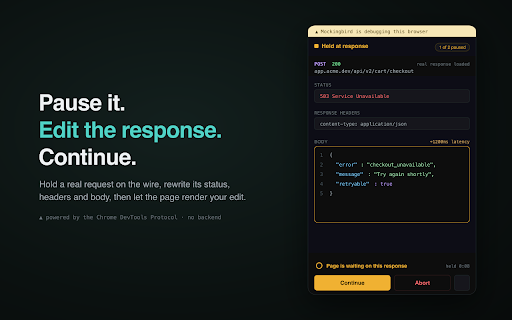
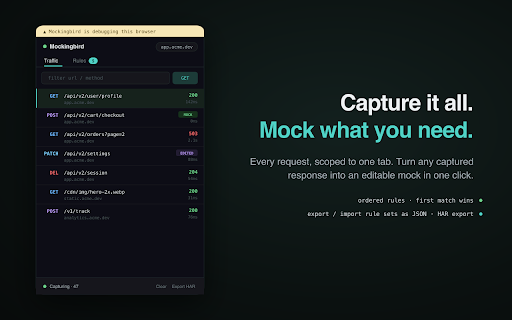
This extension acts as an intercept proxy within the Chrome browser, allowing users to modify HTTP requests and responses in real-time. It leverages Chrome's debugger protocol to provide features like request breaking, JSON path rewriting, and response mocking directly within a browser sidebar.

Developer:Sharaj
Version:1.3
Size:108KiB
Last updated:

Overview

Installs

5

Rating

0 reviews

Languages

1 locales

Includes English

Market analysis

Review-backed positioning, friction, and market signals for this Chrome extension.

No review samples found

Macro category

Developer & Designer Tools

Pricing friction

Low review signal

Complaint intensity

Low review signal

Listing & review signals
Observed signals from store listing text and review samples.

Listing positioning

Mockingbird positions itself as a specialized, local-only network debugging utility for developers and QA engineers. It emphasizes a side-panel workflow that requires no backend setup or user accounts to capture, intercept, and mock HTTP(S) traffic.

Inferred product pattern

Browser-based network debugging utility focusing on local interception and modification of HTTP traffic.

Review-backed pain points

Review-backed data is not available.

Observed feature gaps

Review-backed data is not available.

Tags
Network DebuggerHTTP MockingWeb DevelopmentAPI TestingDevTools
Target users

- Frontend Developers

- QA Engineers

- API Developers

Primary use cases

- Intercepting and modifying HTTP traffic

- Testing edge cases by mocking API responses

- Debugging CORS issues

- Simulating network latency for stress testing

Positive themes

No positive theme data.

Negative themes

No negative theme data.

Observed friction

- No pricing friction observed; the extension is positioned as a free, local-only utility.

Evidence boundary: Data extracted from the Chrome Web Store listing page; includes functional descriptions of debugger-based permissions and feature sets. The product lacks user reviews, meaning no real-world performance or usability sentiment data is available.
Complaint summaries
Review-backed complaint signals grouped by operational area.

Support

No support or account-related complaints found.

Reliability

No reliability complaints found.

Privacy

No privacy complaints found; listing explicitly claims local-only data storage.

Access & pricing

- Free usage observed

- No account requirement observed

- Free plan or free usage claimed

Store listing facts

Listing assets

- Screenshots: 4

- Videos: 0

- Languages: 1

Trust signals

- Privacy policy

- Developer contact

- Official website

Store metadata

- Version: 1.3

- Size: 108KiB

- Last updated:

Listing SEO keywords

Search intent keywords
Keyword signals for evaluating how users may discover, compare, or search for this extension category.

Core discovery

chrome network debuggermock http requestsintercept api callsdebug http requests chrome

Comparison

Mockingbird vs Postmanbrowser network proxy

Problem

slow network simulationapi response mockingtest api errors

Alternative

Charles Proxy alternativeFiddler alternative

Similar extensions

Jump to related discovery paths:

Screenshots

Mockingbird - API Mock & Interceptor screenshot

Links

Recommended Chrome extensions

Related listings from the same category, trending peers, and the same publisher portfolio.

Browse developer