CSSViewer icon

CSSViewer Chrome Extension Analysis

Developer & Designer Tools

Chrome extension ID: plnialnlnbaodbmoedcppffmgfmmghbj

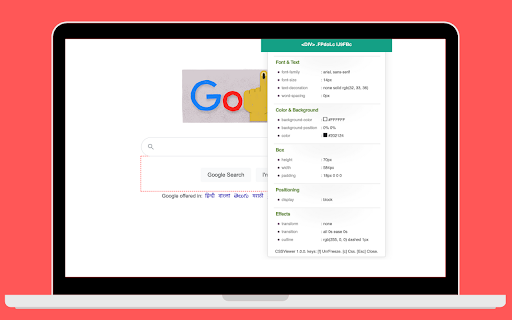
CSSViewer is a browser extension that allows users to view the CSS properties of any element on a webpage by simply hovering over it after activating the extension. It serves as an alternative to the standard browser 'Inspect' tool for quick design reference.

Developer:SelectorsHub
Version:0.0.5
Size:73.26KiB
Last updated:

Overview

Installs

7K+

Rating

4.3

12 reviews

Languages

1 locales

Includes English (United States)

Market analysis

Review-backed positioning, friction, and market signals for this Chrome extension.

Backed by review samples

Macro category

Developer & Designer Tools

Pricing friction

Low review signal

Complaint intensity

Moderate review signal

Listing & review signals
Observed signals from store listing text and review samples.

Listing positioning

CSSViewer is positioned as a lightweight, straightforward utility for inspecting CSS properties directly on a webpage. It emphasizes its heritage as a classic tool, focusing on simplicity and ease of use for web developers.

Inferred product pattern

Legacy-inspired utility extension providing a single-purpose developer shortcut.

Review-backed pain points

Some users report that the extension fails to activate or function entirely on specific browser configurations.

Observed feature gaps

Users have requested the ability to modify page CSS directly within the popup interface to facilitate real-time testing.

Tags
CSS InspectorFrontend DevelopmentWeb DesignDeveloper Tool
Target users

- Frontend Developers

- Web Designers

- UI/UX Professionals

Primary use cases

- Quick CSS property inspection

- Checking element styles without opening DevTools

- Analyzing web design layouts

Positive themes

- High utility for daily workflow

- Time-saving alternative to standard browser inspection

- Intuitive and easy-to-use interface

Negative themes

- Incompatibility with specific browsers like Vivaldi

- Failure to activate on certain pages

- General performance inconsistency

Observed friction

- Performance complaints detected

- None; the tool is presented as a free, open-source-style utility.

Evidence boundary: Data is derived from public Web Store metadata and a sample of user reviews highlighting both high satisfaction with utility and occasional functionality bugs. Review sample size is relatively small, which may not fully represent the stability across all Chrome-based browser versions.
Complaint summaries
Review-backed complaint signals grouped by operational area.

Support

No specific support complaints noted; technical issues appear to be related to browser compatibility.

Reliability

Minor reports of the extension not triggering on certain websites or non-Chrome browsers.

Privacy

None; the listing explicitly addresses data collection, stating it does not transmit private information.

Access & pricing

- Free usage observed

- No account requirement observed

- Free plan or free usage claimed

Store listing facts

Listing assets

- Screenshots: 1

- Videos: 0

- Languages: 1

Trust signals

- Privacy policy

- Developer contact

- Official website

- Support link

Store metadata

- Version: 0.0.5

- Size: 73.26KiB

- Last updated:

Listing SEO keywords

Search intent keywords
Keyword signals for evaluating how users may discover, compare, or search for this extension category.

Core discovery

CSS viewer extensioninspect CSS chromefrontend development toolCSS property inspector

Comparison

CSSViewer vs Inspect elementbrowser style inspector

Problem

CSS not showingextension not working

Alternative

Chrome DevTools alternativesCSS inspection tools

Similar extensions

Jump to related discovery paths:

Screenshots

CSSViewer screenshot

Links

Recommended Chrome extensions

Related listings from the same category, trending peers, and the same publisher portfolio.

Browse developer