HTML Tree Generator — DOM Tree Viewer icon

HTML Tree Generator Chrome Extension Analysis

Developer & Designer Tools

Store listing title: HTML Tree Generator — DOM Tree Viewer

Chrome extension ID: pmbkbcldheemdfhfimhflpapcocdgiad

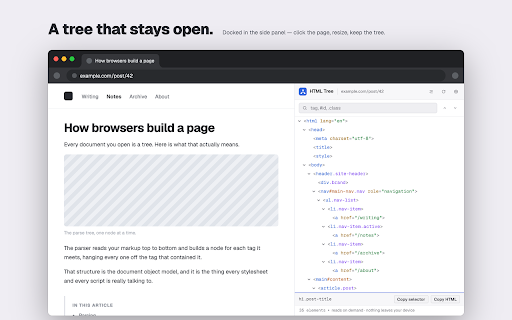
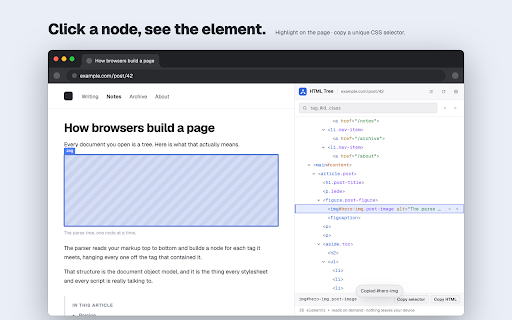
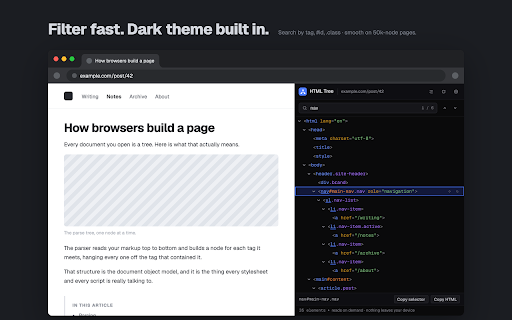
HTML Tree Generator provides a visual, interactive representation of a webpage's DOM structure within the browser's side panel. It allows users to inspect element hierarchies, search for specific tags or classes, identify CSS selectors, and highlight elements on the active page without relying on standard DevTools.

Developer:Red Digits
Version:2.0.0
Size:318KiB
Last updated:

Overview

Installs

146

Rating

★ —

0 reviews

Languages

52 locales

Includes Deutsch, English, Filipino, Indonesia...

Market analysis

Review-backed positioning, friction, and market signals for this Chrome extension.

No review samples found

Macro category

Developer & Designer Tools

Pricing friction

Low review signal

Complaint intensity

Low review signal

Listing & review signals
Observed signals from store listing text and review samples.

Listing positioning

The extension positions itself as a modernized, high-performance successor to legacy DOM tree viewers, specifically leveraging the Chrome side panel to address usability flaws of older tools. It emphasizes speed for large documents, stability through Manifest V3 compliance, and a privacy-first approach.

Inferred product pattern

Utility-focused developer tool rebuild leveraging new browser APIs (Side Panel/MV3).

Review-backed pain points

Review-backed data is not available.

Observed feature gaps

Review-backed data is not available.

Tags
DOM TreeWeb DevelopmentHTML InspectorCSS SelectorsSide Panel
Target users

- Front-end developers

- QA engineers

- Students learning HTML

- Web designers

Primary use cases

- Visualizing page element hierarchy

- Generating unique CSS selectors

- Debugging page structure

- Navigating large document DOM trees

Positive themes

No positive theme data.

Negative themes

No negative theme data.

Observed friction

- Review-backed data is not available.

Evidence boundary: Data is based exclusively on the provided store listing descriptions and technical specifications. The analysis is limited by a lack of user-generated review content, preventing assessment of real-world reliability or sentiment.
Complaint summaries
Review-backed complaint signals grouped by operational area.

Support

Review-backed data is not available.

Reliability

Review-backed data is not available.

Privacy

Review-backed data is not available.

Access & pricing

- Free usage observed

- No account requirement observed

- Free plan or free usage claimed

Store listing facts

Listing assets

- Screenshots: 3

- Videos: 0

- Languages: 52

Trust signals

- Developer contact

Store metadata

- Version: 2.0.0

- Size: 318KiB

- Last updated:

Listing SEO keywords

Search intent keywords
Keyword signals for evaluating how users may discover, compare, or search for this extension category.

Core discovery

DOM tree viewerHTML structure inspectorChrome side panel DOMget CSS selector

Comparison

HTML Tree Generator alternativeDevTools DOM tree extension

Problem

visualize DOM structurelarge HTML file freeze

Alternative

DOM inspector extensionHTML tree visualizer

Similar extensions

Jump to related discovery paths:

Screenshots

HTML Tree Generator — DOM Tree Viewer screenshot

Recommended Chrome extensions

Related listings from the same category, trending peers, and the same publisher portfolio.

Browse developer
Custom Headers - Modify HTTP Headers icon

Custom Headers - Modify HTTP Headers

Red Digits

🛠️ Modify HTTP headers, redirect URLs & block requests. Provably local MV3 ModHeader alternative — no account, no telemetry.

Installs

1K+

Rating

★ 5.0

Font Inspector – Font Finder for Any Website icon

Font Inspector – Font Finder for Any Website

Red Digits

Find the font on any website. Point at text to see its family, size, weight and the font actually rendered, then copy CSS.

Installs

846

Rating

★ 4.0

Cookie-Editor icon

Cookie-Editor

cgagnier

Simple yet powerful Cookie Editor that allow you to quickly create, edit and delete cookies without leaving your tab.

Installs

2.0M+

Rating

★ 4.5

Stylus icon

Stylus

stylus.openstyles

Redesign the web with Stylus, a user styles manager. Stylus allows you to easily install themes and skins for many popular sites.

Installs

1.0M+

Rating

★ 4.5

SEOquake: On-Page SEO Checker icon

SEOquake: On-Page SEO Checker

SEOquake

Run SEO audits, check technical issues, analyze links and keyword density, and see Semrush metrics as you browse and search.

Installs

1.0M+

Rating

★ 3.6

Mobile Simulator – Responsive Testing Tool icon

Mobile Simulator – Responsive Testing Tool

Mobile FIRST

Phone Simulator – Free Chrome Extension to test and preview your site on 80+ devices.

Installs

1.0M+

Rating

★ 4.9

Vue.js devtools icon

Vue.js devtools

vuejs-dev

DevTools browser extension for Vue.js

Installs

1.0M+

Rating

★ 2.1

Clear Cache icon

Clear Cache

Little Void LLC (Ben Bojko)

Powerful, user-friendly browser data management, right from your toolbar.

Installs

1.0M+

Rating

★ 4.2

Redux DevTools icon

Redux DevTools

Redux DevTools

Redux DevTools for debugging application's state changes.

Installs

1.0M+

Rating

★ 4.3

Similarweb - Website Traffic, AI Traffic & SEO Checker icon

Similarweb - Website Traffic, AI Traffic & SEO Checker

Similarweb

Instant website analysis, AI traffic insights, and SEO metrics at your fingertips.

Installs

1.0M+

Rating

★ 4.5