Change Subject Line for Gmail icon

Change Subject Line for Gmail Chrome Extension Analysis

Automation & Workflow Efficiency

Chrome extension ID: pmjlipnncdepghljlhhlhlmeajinmmio

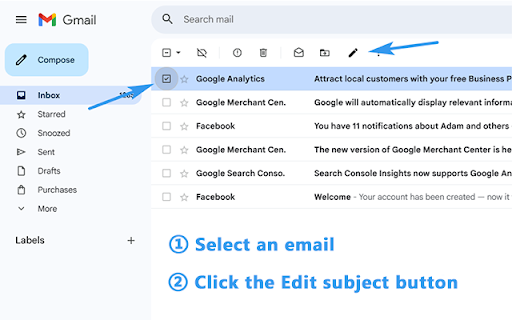
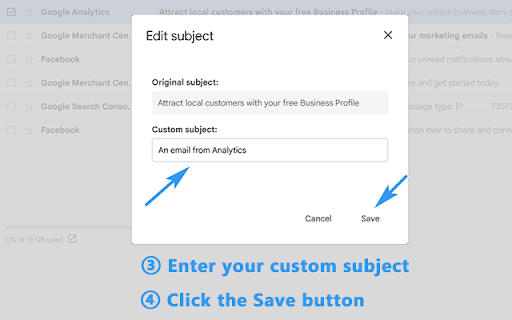
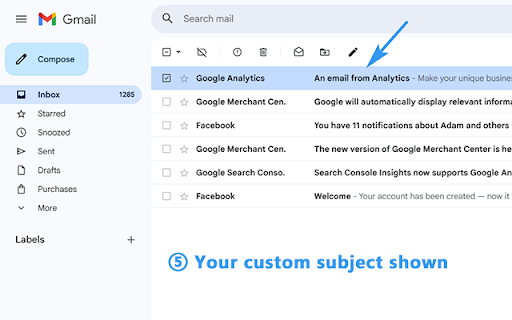
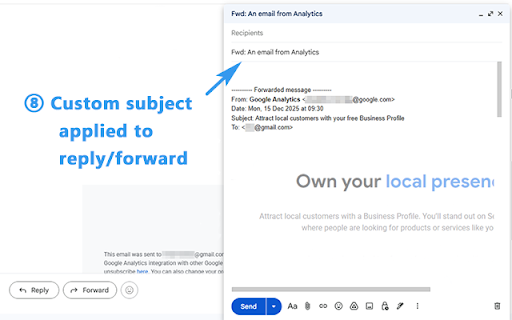
Change Subject Line for Gmail is a browser-based utility that enables users to edit subject lines for emails in their inbox. It helps users organize threads, track tasks, and improve inbox clarity without changing the underlying data stored on Gmail's servers.

Developer:Emmett Sun
Version:1.6.3
Size:488KiB
Last updated:

Overview

Installs

164

Rating

5.0

2 reviews

Languages

25 locales

Includes Deutsch, English, Nederlands, dansk...

Market analysis

Review-backed positioning, friction, and market signals for this Chrome extension.

Backed by review samples

Macro category

Automation & Workflow Efficiency

Pricing friction

Low review signal

Complaint intensity

Low review signal

Listing & review signals
Observed signals from store listing text and review samples.

Listing positioning

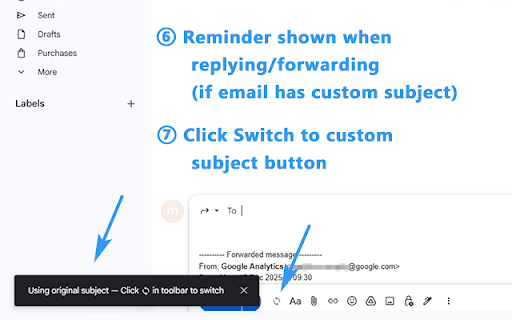
The product positions itself as a visual enhancement tool that allows users to rename email subject lines directly within the Gmail interface. It emphasizes privacy by clarifying that it performs no server-side modifications and requires minimal permissions.

Inferred product pattern

Single-function UI overlay tool for Gmail productivity.

Review-backed pain points

No review-backed pain points identified.

Observed feature gaps

As a visual-only enhancement, the extension does not allow searching by custom subjects outside of the browser interface where the extension is active.

Tags
GmailInbox OrganizationEmail ManagementProductivity Tool
Target users

- Busy Professionals

- Sales Teams

- Support Teams

- Project Managers

Primary use cases

- Renaming email subject lines in Gmail

- Organizing email threads by project name

- Clarifying email previews for faster triage

Positive themes

- Increased workflow speed compared to standard Gmail processes

- Improved email organization efficiency

Negative themes

- None reported

Observed friction

- No pricing friction reported; the extension currently offers its functionality without stated payment requirements.

Evidence boundary: Evidence is based on the Chrome Web Store listing and one high-rating user review confirming the tool's effectiveness. The limited sample size of reviews (one) provides a positive but narrow view of user satisfaction.
Complaint summaries
Review-backed complaint signals grouped by operational area.

Support

No support or account complaints found.

Reliability

No reliability or performance complaints found.

Privacy

No privacy complaints found; the listing explicitly notes minimal access and no server-side email content storage.

Access & pricing

- No clear monetization signal

- No account requirement observed

- Free plan or free usage claimed

Store listing facts

Listing assets

- Screenshots: 5

- Videos: 0

- Languages: 25

Trust signals

- Privacy policy

- Developer contact

Store metadata

- Version: 1.6.3

- Size: 488KiB

- Last updated:

Listing SEO keywords

Search intent keywords
Keyword signals for evaluating how users may discover, compare, or search for this extension category.

Core discovery

edit gmail subject linerename gmail emailschange email subject gmail

Comparison

gmail subject line modifiergmail organization extension

Problem

unorganized gmail inboxconfusing email threads

Alternative

gmail productivity toolsemail management extension

Similar extensions

Jump to related discovery paths:

Screenshots

Change Subject Line for Gmail screenshot

Links

Recommended Chrome extensions

Related listings from the same category, trending peers, and the same publisher portfolio.

Browse communication
Docs to PDF (Bulk Convert for Google Drive) icon

Docs to PDF (Bulk Convert for Google Drive)

Emmett Sun

Bulk convert Google Docs & Word files to PDF directly in Google Drive.

Installs

113

Rating

5.0

Loom – Screen Recorder & Screen Capture icon

Loom – Screen Recorder & Screen Capture

Loom

Record your screen and camera with one click. Share that content in an instant with a link.

Installs

7.0M+

Rating

4.6

Quillbot: AI Writing Assistant to Grammar Check, Paraphrase & Translate icon

Quillbot: AI Writing Assistant to Grammar Check, Paraphrase & Translate

quillbot

Write better emails, essays and messages with Quillbot's Grammar Checker, Paraphrasing Tool, Generative AI, Summarizer and more!

Installs

5.0M+

Rating

4.7

DeepL: translate and write with AI icon

DeepL: translate and write with AI

team-browser-extensions

Translate while you read and write with DeepL Translate, the world’s most accurate translator.

Installs

4.0M+

Rating

4.7

Mailtrack® – Email Tracker for Gmail icon

Mailtrack® – Email Tracker for Gmail

Mailsuite

The original Mailtrack®: free, unlimited email tracking for Gmail. Trusted by millions, GDPR-compliant and Google-audited.

Installs

3.0M+

Rating

4.4

HubSpot Sales icon

HubSpot Sales

signals-extension-publishing

Email tracking, CRM for Gmail, and sales productivity tools in your inbox

Installs

1.0M+

Rating

4.4

Connecteur Antidote icon

Connecteur Antidote

Druide informatique

Intégrez Antidote à votre navigateur pour corriger vos textes en temps réel et consulter ses dictionnaires et guides linguistiques.

Installs

800K+

Rating

3.0

Fathom AI Note Taker for Google Meet icon

Fathom AI Note Taker for Google Meet

Fathom

Records, transcribes & summarizes meetings FREE

Installs

500K+

Rating

4.9

GMass: Powerful mail merge for Gmail icon

GMass: Powerful mail merge for Gmail

GMass, Inc.

A powerful mass email and mail merge system for Gmail.

Installs

400K+

Rating

4.8

L.O.C icon

L.O.C

Loc Mai

L.O.C is a collection of automation tools.

Installs

300K+

Rating

4.3