SuperTools for QuickBooks Online icon

SuperTools for QuickBooks Online Chrome Extension Analysis

Automation & Workflow Efficiency

Chrome extension ID: pmpdamjalggaoafofijifjappededfko

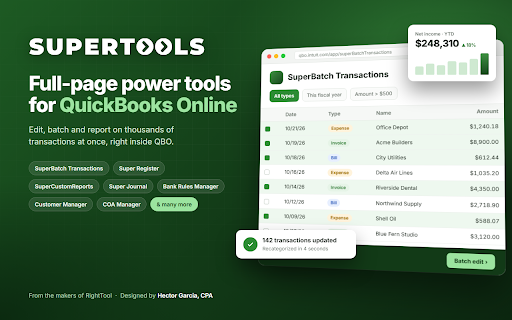
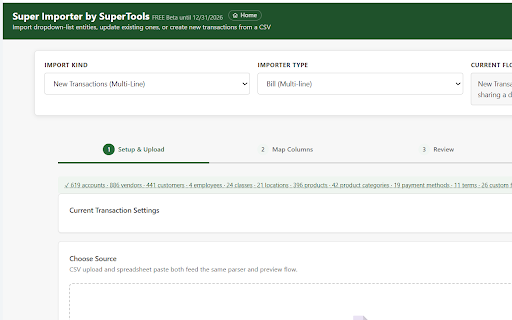
SuperTools for QuickBooks Online is a browser extension that integrates additional functional pages directly into the QBO session. It provides utilities for importing transactions, bulk editing, chart of accounts management, and AI integration via Claude/Codex.

Version:0.1.9.111726.2149
Size:14.63MiB
Last updated:

Overview

Installs

535

Rating

★ 5.0

3 reviews

Languages

1 locales

Includes English (United States)

Market analysis

Review-backed positioning, friction, and market signals for this Chrome extension.

No review samples found

Macro category

Automation & Workflow Efficiency

Pricing friction

Moderate review signal

Complaint intensity

Low review signal

Listing & review signals
Observed signals from store listing text and review samples.

Listing positioning

The product is positioned as a comprehensive suite of 'power tools' designed specifically for professionals who spend their workday in QuickBooks Online. It emphasizes efficiency through bulk actions, spreadsheet-style interfaces, and advanced reporting not natively available in QBO.

Inferred product pattern

Professional utility layer that extends the functionality of a core enterprise SaaS platform.

Review-backed pain points

Review-backed data is not available.

Observed feature gaps

No review data available; however, the Backup & Restore feature is explicitly noted as being in early alpha.

Tags
QuickBooks OnlineAccounting ToolsBookkeeping AutomationFinancial ManagementCPA Tools
Target users

- Accountants

- Bookkeepers

- Business Owners

Primary use cases

- Bulk transaction and line editing

- Importing spreadsheet data into QBO

- Cleaning up chart of accounts

- Generating advanced reports and allocations

Positive themes

- Review-backed data is not available

Negative themes

- Review-backed data is not available

Observed friction

- Payment required for meaningful usage

- The extension requires a RightTool PRO subscription, although it is currently listed as free in beta until December 31, 2026.

Evidence boundary: Data extracted exclusively from the store listing description and metadata. No user reviews were available to validate performance, sentiment, or real-world usability.
Complaint summaries
Review-backed complaint signals grouped by operational area.

Support

Review-backed data is not available.

Reliability

Review-backed data is not available.

Privacy

Review-backed data is not available.

Access & pricing

- Subscription model observed

- Account required for core usage

- Limited free usage observed

Store listing facts

Listing assets

- Screenshots: 2

- Videos: 0

- Languages: 1

Trust signals

- Privacy policy

- Developer contact

Store metadata

- Version: 0.1.9.111726.2149

- Size: 14.63MiB

- Last updated:

Listing SEO keywords

Search intent keywords
Keyword signals for evaluating how users may discover, compare, or search for this extension category.

Core discovery

QuickBooks Online power toolsQBO bulk transaction editorQuickBooks data importeraccounting productivity extension

Comparison

SuperTools vs RightToolQuickBooks Online automation alternatives

Problem

how to bulk edit QuickBooks transactionsimport spreadsheet to QBOQuickBooks reporting limitations

Alternative

QuickBooks Online additivesQBO bookkeeping tools

Similar extensions

Jump to related discovery paths:

Screenshots

SuperTools for QuickBooks Online screenshot

Links

Recommended Chrome extensions

Related listings from the same category, trending peers, and the same publisher portfolio.

Browse tools
RightTool for QuickBooks Online icon

RightTool for QuickBooks Online

Accounting Pro Tools

RightTool increases your productivity with QuickBooks Online. Designed by Hector Garcia CPA, not associated with Intuit, Inc.

Installs

50K+

Rating

★ 5.0

BlockSite Block Websites & Stay Focused icon

BlockSite Block Websites & Stay Focused

BlockSite

Stay focused and boost productivity: Custom blocklist, Scheduled site blocking, and Password protection.

Installs

1.0M+

Rating

★ 4.5

Screen Recorder & Screenshot App for Chrome | Scrnli icon

Screen Recorder & Screenshot App for Chrome | Scrnli

scrnli

Screen recorder for Chrome: capture, edit, share screenshots and videos instantly

Installs

1.0M+

Rating

★ 4.8

AIPRM for ChatGPT icon

AIPRM for ChatGPT

AIPRM

AIPRM is your cheat code for ChatGPT. Adds a list of curated prompt templates and advanced features. Try today.

Installs

1.0M+

Rating

★ 4.4

Britannica School Insights icon

Britannica School Insights

Encyclopædia Britannica

Are you a Britannica School subscriber?

Installs

1.0M+

Rating

★ 3.1

Transpose: pitch ▸ speed ▸ loop icon

Transpose: pitch ▸ speed ▸ loop

Transpose

Change pitch and speed, loop sections and practice music directly on YouTube, Spotify and other supported sites.

Installs

1.0M+

Rating

★ 4.2

Keywords Everywhere - Keyword Tool icon

Keywords Everywhere - Keyword Tool

Axeman Technology Solutions LLP

Keyword search volume, cpc and competition for 15+ websites like Google™ Search Console, YouTube™, Amazon™ & more

Installs

1.0M+

Rating

★ 3.3

CSFloat Market Checker icon

CSFloat Market Checker

CSFloat Inc.

Shows the float value, paint seed, and more of Counter-Strike (CS:GO & CS2) items on the Steam Market or Inventories

Installs

1.0M+

Rating

★ 4.1

Citrix Experience Insights icon

Citrix Experience Insights

Cloud Software Group, Inc.

Enables Citrix Experience Insights to collect web app usage and performance data (e.g., foreground tab) from Chrome.

Installs

1.0M+

Rating

★ 3.0

Ecosia - The search engine that plants trees icon

Ecosia - The search engine that plants trees

Ecosia GmbH

This extension sets your search engine to Ecosia and customizes your new tab page so you can plant trees with every search.

Installs

1.0M+

Rating

★ 4.4