Canvas Betterizer icon

Canvas Betterizer Chrome Extension Analysis

Automation & Workflow Efficiency

Chrome extension ID: pndigbfohhechaafblmjdicbbahgigfg

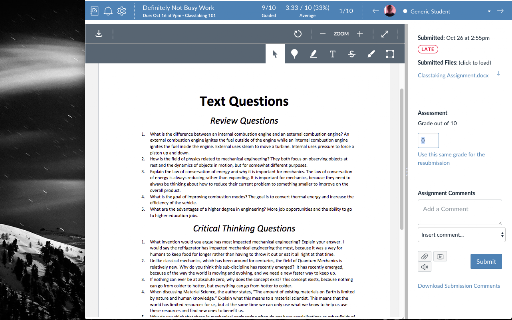
A productivity extension for educators that streamlines the grading workflow in Canvas. It provides keyboard shortcuts and autofocus capabilities to reduce the time spent manually navigating the SpeedGrader interface.

Developer:Rob Noorda
Version:0.0.0.4
Size:25.53KiB
Last updated:

Overview

Installs

7K+

Rating

3.5

13 reviews

Languages

1 locales

Includes English (United States)

Market analysis

Review-backed positioning, friction, and market signals for this Chrome extension.

Backed by review samples

Macro category

Automation & Workflow Efficiency

Pricing friction

Low review signal

Complaint intensity

Moderate review signal

Listing & review signals
Observed signals from store listing text and review samples.

Listing positioning

The product is positioned as a quality-of-life improvement tool for teachers using Canvas by Instructure. It focuses on increasing efficiency during the grading process, specifically within the SpeedGrader interface.

Inferred product pattern

A UX-enhancement utility that adds a productivity layer over a specific third-party enterprise platform (Canvas LMS).

Review-backed pain points

Users frequently report that the 'Enter' key functionality to submit grades and move to the next student stops working after Canvas updates.

Observed feature gaps

Lack of clear documentation or onboarding regarding specific features like 'Enable Autofocus Gradebox'.

Tags
Canvas LMSEducation ToolGrading AssistantProductivitySpeedGrader
Target users

- Teachers

- Educators

- Academic Graders

Primary use cases

- Faster grade entry in SpeedGrader

- Keyboard-driven submission and navigation

- Automated focus on grade input boxes

Positive themes

- Significant time-saver during grading

- Reduction of grading frustration

- High utility and ease of use when functioning

Negative themes

- Frequent breakage following Canvas platform updates

- Lack of detailed usage instructions

- Core features becoming non-functional

Observed friction

- Performance complaints detected

- No pricing friction observed as the product appears to be free.

Evidence boundary: Analysis based on the store listing and 10 user review samples. Limited review volume (13 total) and reliance on user-reported breakage timings.
Complaint summaries
Review-backed complaint signals grouped by operational area.

Support

Some users expressed difficulty finding a way to contact the developer, though some have had successful direct communication.

Reliability

Strong signals of reliability issues tied to third-party platform updates, leading to periodic complete failure of core features.

Privacy

No privacy complaints observed; listing claims no data collection.

Access & pricing

- Free usage observed

- No account requirement observed

- Free plan or free usage claimed

Store listing facts

Listing assets

- Screenshots: 1

- Videos: 0

- Languages: 1

Trust signals

- Privacy policy

- Developer contact

Store metadata

- Version: 0.0.0.4

- Size: 25.53KiB

- Last updated:

Listing SEO keywords

Search intent keywords
Keyword signals for evaluating how users may discover, compare, or search for this extension category.

Core discovery

Canvas SpeedGrader extensionCanvas grading shortcutsCanvas LMS productivity tools

Comparison

Canvas Betterizer vs default SpeedGraderbest Canvas grading extensions

Problem

Canvas grading too slowSpeedGrader efficiencyhow to grade faster in Canvas

Alternative

Canvas Betterizer alternativesCanvas productivity extensions

Similar extensions

Jump to related discovery paths:

Screenshots

Canvas Betterizer screenshot

Links

Recommended Chrome extensions

Related listings from the same category, trending peers, and the same publisher portfolio.

Browse education