NetSuite Chrome Extension Analysis
Developer & Designer ToolsStore listing title: NetSuite: Show Field IDs
Chrome extension ID: pnhdmfiakolonplgblabffnpfhfplmbh
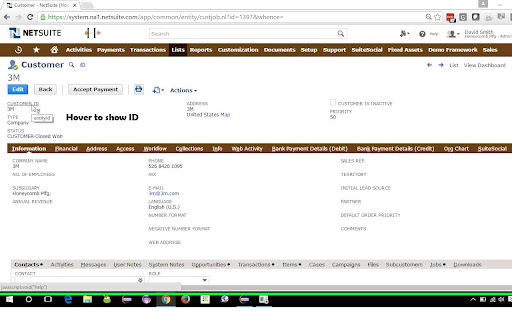
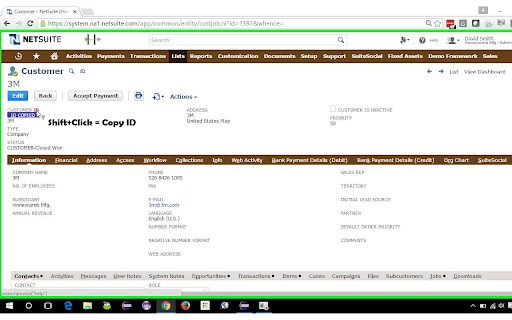
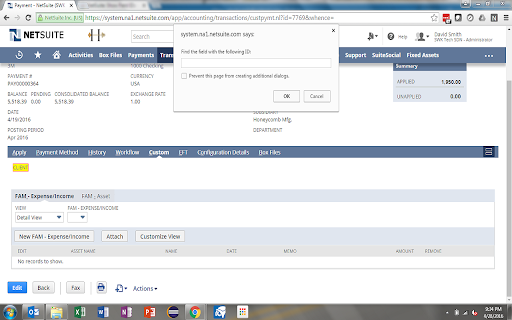
This Chrome extension provides functionalities to easily discover and manage NetSuite field IDs and labels. Users can hover over fields to view their IDs, use Shift+Click to copy IDs, and employ keyboard shortcuts (Ctrl+Shift+F for ID, Ctrl+Shift+L for Label) to search for fields on the current page, streamlining data identification processes within NetSuite.
Overview
Installs
10K+
Rating
★ 4.9
28 reviews
Languages
1 locales
Includes English (United States)
Market analysis
Review-backed positioning, friction, and market signals for this Chrome extension.
Macro category
Developer & Designer Tools
Pricing friction
Low review signal
Complaint intensity
Low review signal
Listing positioning
The store listing positions this extension as an indispensable tool for NetSuite users, particularly developers, by enabling quick identification and copying of field IDs and labels directly on NetSuite record pages. It emphasizes efficiency and time-saving for tasks requiring access to specific field information.
Inferred product pattern
A specialized, free utility extension designed to integrate with a specific enterprise SaaS platform (NetSuite) to enhance productivity for power users and developers by providing quick access to crucial technical metadata (field IDs and labels).
Review-backed pain points
Users encounter pain points primarily related to keyboard shortcut conflicts with their browser's native commands, which can make accessing certain extension features challenging or require inconvenient workarounds. There's also a expressed need for more advanced search functionalities, such as partial string matching, and a noted concern about the extension's continued compatibility with NetSuite's ongoing UI updates.
Observed feature gaps
Observed feature gaps include the lack of customizable keyboard shortcuts, the absence of more advanced string matching options (like 'contains' or 'begins with'), and the need for more frequent updates to maintain compatibility with NetSuite's evolving user interface, particularly for new or updated record types.
- NetSuite developers
- NetSuite administrators
- NetSuite consultants
- NetSuite power users
- Quickly identifying NetSuite field IDs and labels
- Copying NetSuite field IDs to the clipboard
- Searching for specific fields by ID or label on NetSuite pages
- Streamlining NetSuite customization, scripting, and data management tasks
- Significantly saves time and improves efficiency for NetSuite users
- Works exactly as described and is highly reliable
- Considered a great and very useful tool for developers
- The find function is a standout and favorite feature
- Simple yet effective solution for a common NetSuite pain point
- Keyboard shortcut conflicts with native browser functions (e.g., Ctrl+F, Ctrl+L) in some environments like Vivaldi or Edge
- Desire for more flexible string matching options beyond exact matching (e.g., 'contains', 'begins with')
- Concerns about compatibility and need for updates with NetSuite's evolving UI (e.g., new record types)
- Difficulty triggering label search functionality in certain browsers due to shortcut clashes
- The store listing and review data do not indicate any payment requirements or pricing friction for this extension, suggesting it is offered for free.
Support
No complaints regarding customer support, account management, or refund processes were observed in the available review data.
Reliability
Minor reliability issues include keyboard shortcut conflicts with browser functions and the potential for functionality to be impacted by NetSuite UI updates. However, there are no claims of severe product breakage or consistent non-functionality.
Privacy
No privacy or security-related complaints were found in the provided review samples or store listing information.
- Free usage observed
- No account requirement observed
- Free plan or free usage claimed
Store listing facts
- Screenshots: 3
- Videos: 0
- Languages: 1
- Developer contact
- Version: 2.0
- Size: 49.09KiB
- Last updated:
Listing SEO keywords
Core discovery
Comparison
Problem
Alternative
Similar extensions
Jump to related discovery paths:
Screenshots