Grade Grabber icon

Grade Grabber Chrome Extension Analysis

Automation & Workflow Efficiency

Chrome extension ID: pnlbiecokmfmgeflbcmpohkjjfjjemfe

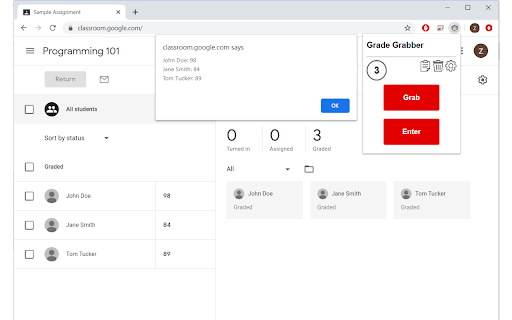
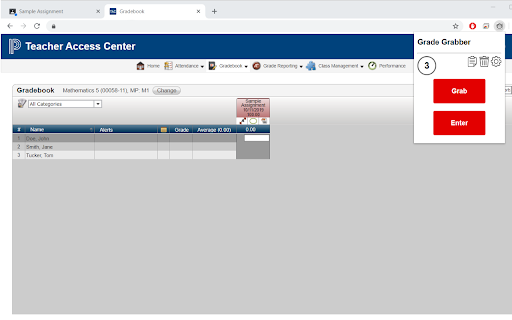
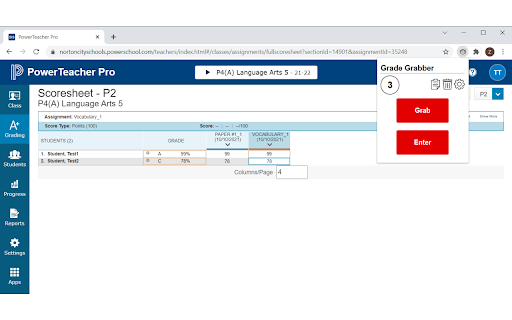
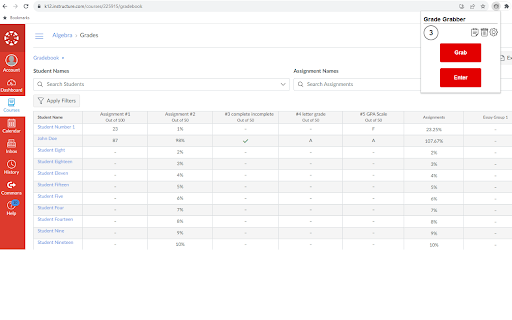
This extension allows teachers to 'grab' grades from multiple online educational tools and enter them directly into gradebook interfaces. It includes features for manual name mapping, grade scaling, and handling missing or late assignments.

Version:1.2.16
Size:427KiB
Last updated:

Overview

Installs

10K+

Rating

4.3

6 reviews

Languages

1 locales

Includes English (United States)

Market analysis

Review-backed positioning, friction, and market signals for this Chrome extension.

Backed by review samples

Macro category

Automation & Workflow Efficiency

Pricing friction

Low review signal

Complaint intensity

Moderate review signal

Listing & review signals
Observed signals from store listing text and review samples.

Listing positioning

Grade Grabber is positioned as a time-saving utility designed to automate the manual transfer of student grades between educational platforms. It emphasizes seamless integration between various LMS sources like Google Classroom or Canvas and gradebook systems like PowerSchool.

Inferred product pattern

Automated data-scraping and field-population utility for educational SaaS.

Review-backed pain points

Recent updates have caused functionality issues, specifically regarding name recognition errors when source and destination platforms format student names differently.

Observed feature gaps

Lack of automated name formatting normalization when syncing between systems with disparate naming conventions.

Tags
EducationGradebookTeacher ToolsData TransferProductivity
Target users

- K-12 Teachers

- Educators

- School Administrators

Primary use cases

- Transferring grades from Google Classroom to PowerTeacher

- Importing grades from spreadsheets to gradebooks

- Scaling grades between different school grading systems

Positive themes

- Significant time savings for teachers

- Easier work-life balance

- Simple to learn and use

- Seamless grade synchronization

Negative themes

- Breakage after system updates

- Issues with student name matching logic when name formats differ between platforms

Observed friction

- Performance complaints detected

- No pricing friction identified; users appear satisfied with current value.

Evidence boundary: Evidence is derived from 6 user reviews and the Chrome Web Store description, highlighting high satisfaction regarding time-saving benefits and recent concerns about update-related bugs. The sample size of 6 reviews is very small, which may not represent the entire user base experience.
Complaint summaries
Review-backed complaint signals grouped by operational area.

Support

No specific complaints regarding support, though users flagged recent technical bugs.

Reliability

Users reported recent performance issues following an update, specifically regarding name matching accuracy.

Privacy

No privacy complaints found.

Access & pricing

- No clear monetization signal

- No account requirement observed

- No clear pricing signal

Store listing facts

Listing assets

- Screenshots: 4

- Videos: 1

- Languages: 1

Trust signals

- Privacy policy

- Developer contact

- Official website

Store metadata

- Version: 1.2.16

- Size: 427KiB

- Last updated:

Listing SEO keywords

Search intent keywords
Keyword signals for evaluating how users may discover, compare, or search for this extension category.

Core discovery

transfer grades to PowerSchoolGoogle Classroom to TAC extensionautomate gradebook entryteacher grade transfer tool

Comparison

Grade Grabber vs manual entry

Problem

slow grade entrycopying grades manuallygradebook data mismatch

Alternative

classroom automation toolsteacher productivity extensions

Similar extensions

Jump to related discovery paths:

Screenshots

Grade Grabber screenshot

Links

Recommended Chrome extensions

Related listings from the same category, trending peers, and the same publisher portfolio.

Browse education
eSchool Copy Student ID icon

eSchool Copy Student ID

Ideal Technlolgy Solutions

Copy Student ID in eSchool

Installs

15

Rating

rikaikun icon

rikaikun

Erek Speed

rikaikun shows the reading and English definition of Japanese words when you hover over Japanese text in the browser.

Installs

200K+

Rating

4.7

Revision History: Writing Process Visibility for Google Docs & Slides icon

Revision History: Writing Process Visibility for Google Docs & Slides

Revision History

Built for teachers: See how students write, not just what they wrote. View the writing process in Google Docs & Slides.

Installs

200K+

Rating

3.7

Mouse Tooltip Translator - PDF & Netflix YouTube dual subs icon

Mouse Tooltip Translator - PDF & Netflix YouTube dual subs

ttop324

Mouse Tooltip Translator translate mouseover text using google translate. Support OCR, TTS, manga translator & pdf translator.

Installs

200K+

Rating

4.6

Paperpile Extension icon

Paperpile Extension

Paperpile

Collect, organize, annotate and cite your research papers in Chrome.

Installs

200K+

Rating

4.6

ExCITATION – Journal Ranking & Impact Factor for Google Scholar™ icon

ExCITATION – Journal Ranking & Impact Factor for Google Scholar™

Excitation Journal

Show SJR, ABS & ABDC journal rankings in Google Scholar. Sort by citations, detect predatory journals & preview abstracts — free.

Installs

200K+

Rating

4.5

OpenDyslexic for Chrome icon

OpenDyslexic for Chrome

OpenDyslexic

Format pages using the OpenDyslexic font and low contrast help

Installs

200K+

Rating

4.1

Reverso – Translation, dictionary icon

Reverso – Translation, dictionary

Reverso Technologies Inc.

Translate and learn languages while reading or watching movies online. It's free.

Installs

200K+

Rating

4.6

Rapid Journal Quality Check icon

Rapid Journal Quality Check

jrk.devgit

Displays rankings and h-index for academic journals next to Google Scholar search results.

Installs

200K+

Rating

4.2

Google Meet Breakout by Robert Hudek icon

Google Meet Breakout by Robert Hudek

Unknown developer

Only the teacher needs to install. Completely Free and your Data is Private. Google Classroom integration, Slider Control.

Installs

200K+

Rating

4.3