Free Typing Tutor for Beginners icon

Free Typing Tutor for Beginners Chrome Extension Analysis

Automation & Workflow Efficiency

Chrome extension ID: pocfppdnnempahbmmnphmnefhcnikkjc

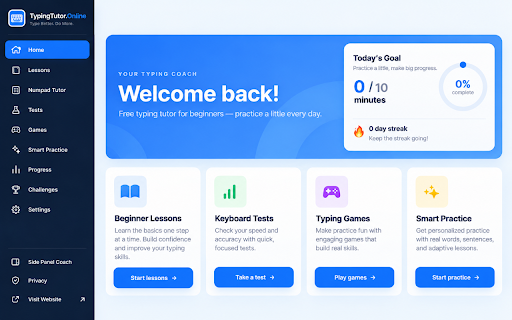
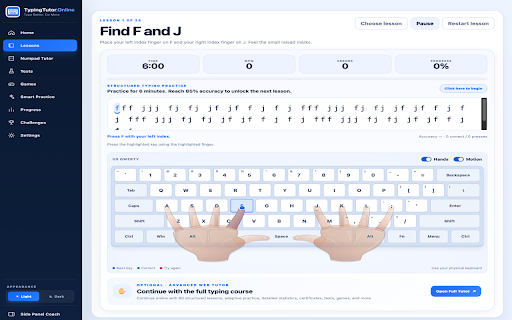
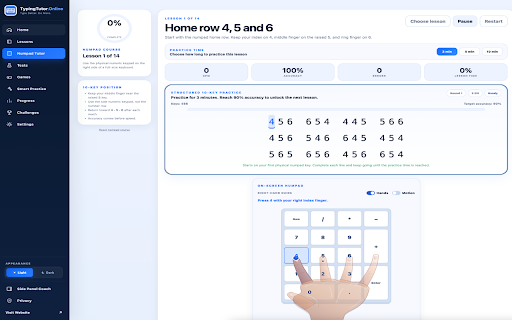
A Chrome extension designed to teach and improve touch typing speed and accuracy. It features guided lessons with finger hints, an on-screen keyboard, and tools for tracking progress via streaks and daily goals.

Developer:SemiOffice
Version:2.3.9
Size:176KiB
Last updated:

Overview

Installs

1K+

Rating

★ 2.0

1 reviews

Languages

1 locales

Includes English

Market analysis

Review-backed positioning, friction, and market signals for this Chrome extension.

No review samples found

Macro category

Automation & Workflow Efficiency

Pricing friction

Low review signal

Complaint intensity

Low review signal

Listing & review signals
Observed signals from store listing text and review samples.

Listing positioning

The product positions itself as a comprehensive solution for both beginners and experienced users to master touch typing. It emphasizes a structured 24-lesson curriculum and the flexibility to practice with custom or webpage-selected text.

Inferred product pattern

Local-first educational utility for skill acquisition.

Review-backed pain points

Review-backed data is not available.

Observed feature gaps

Review-backed data is not available.

Tags
Typing TutorTouch TypingEducationProductivityTyping Practice
Target users

- Complete beginners

- Users seeking to increase WPM

- Students

- Professionals improving data entry speed

Primary use cases

- Step-by-step touch typing education

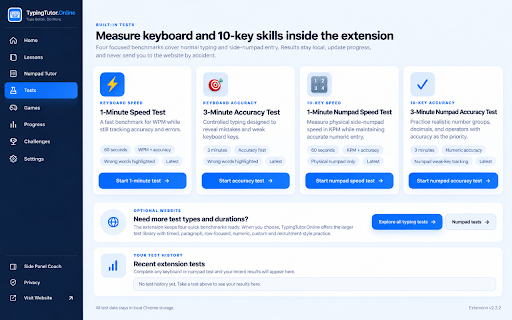
- Timed typing speed tests

- Practicing specific text snippets from the web

- Daily typing habit maintenance

Positive themes

No positive theme data.

Negative themes

No negative theme data.

Observed friction

- No pricing friction observed in the listing; review data is unavailable.

Evidence boundary: Information extracted solely from the public store listing. No user reviews were available to validate store claims or identify performance issues.
Complaint summaries
Review-backed complaint signals grouped by operational area.

Support

Review-backed data is not available.

Reliability

Review-backed data is not available.

Privacy

The listing claims a privacy-first design with local storage and no monitoring of browsing history.

Access & pricing

- Free usage observed

- No account requirement observed

- Free plan or free usage claimed

Store listing facts

Listing assets

- Screenshots: 5

- Videos: 0

- Languages: 1

Trust signals

- Privacy policy

- Developer contact

- Support link

Store metadata

- Version: 2.3.9

- Size: 176KiB

- Last updated:

Listing SEO keywords

Search intent keywords
Keyword signals for evaluating how users may discover, compare, or search for this extension category.

Core discovery

learn touch typingtyping tutor chrome extensionincrease typing speedtyping accuracy practice

Comparison

TypingTutor.Online vs TypingClubbest chrome extension for typing

Problem

slow typing speedhow to touch typetyping mistakes help

Alternative

free typing tutortouch typing alternatives

Similar extensions

Jump to related discovery paths:

Screenshots

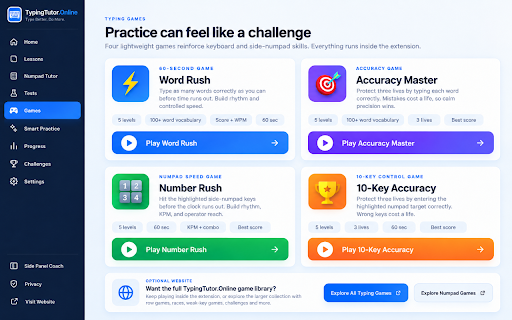
Free Typing Tutor for Beginners screenshot

Links

Recommended Chrome extensions

Related listings from the same category, trending peers, and the same publisher portfolio.

Browse education
SemiOffice Tasks icon

SemiOffice Tasks

SemiOffice

Manage daily tasks, reminders, notes and productivity reports in a full-size Chrome side panel.

Installs

385

Rating

★ 4.3

OpenDyslexic for Chrome icon

OpenDyslexic for Chrome

OpenDyslexic

Format pages using the OpenDyslexic font and low contrast help

Installs

800K+

Rating

★ 4.3

Voice In - Voice Typing & Speech-to-Text Dictation icon

Voice In - Voice Typing & Speech-to-Text Dictation

Dictanote

Voice typing in ChatGPT, Gmail, Google Docs & 10,000+ sites. Dictate emails, notes & AI prompts in 50+ languages.

Installs

700K+

Rating

★ 4.2

eJOY AI Dictionary icon

eJOY AI Dictionary

ejoy-english.com

Your ultimate knowledge and English learning tool to discover the world and upskill yourself. Translate video, websites and PDF.

Installs

700K+

Rating

★ 4.1

You Shall Not Pass by TeacherMagic.org icon

You Shall Not Pass by TeacherMagic.org

JamesTyler

Blocks proxy sites, filter evasion exploits, tab spam, and Google Sites abuse on student Chromebooks. Free forever.

Installs

700K+

Rating

★ 1.9

edpuzzle icon

edpuzzle

Edpuzzle

Import your favorite educational YouTube video into Edpuzzle with a click!

Installs

600K+

Rating

★ 4.1

Cite This For Me: Web Citer icon

Cite This For Me: Web Citer

Chegg Writing Tools

Automatically create website citations in the APA, MLA, Chicago, or Harvard referencing styles at the click of a button.

Installs

600K+

Rating

★ 3.5

GPTZero: AI Detection & Writing Replay icon

GPTZero: AI Detection & Writing Replay

chrome-extension-publisher

Bring AI detection, citation checks, live essay feedback, and writing replays directly into Google Docs and your workflow.

Installs

500K+

Rating

★ 4.6

Translate for Chrome -Translator, Dictionary icon

Translate for Chrome -Translator, Dictionary

Translator App.

Translate words, phrases or text on any webpage. Full page translator and dictionary, text to speech (TTS) using Google Translate.

Installs

500K+

Rating

★ 4.2

オクリンクプラス Webページスクリーンショット機能 icon

オクリンクプラス Webページスクリーンショット機能

ベネッセコーポレーション

オクリンクプラスのカードにWebページのスクリーンショットを挿入し、リンクを埋め込むことができます!

Installs

500K+

Rating

★ 3.0