Scrape Path icon

Scrape Path Chrome Extension Analysis

Web Scraping & Data Extraction

Chrome extension ID: pocmibobgmkdofammkmhealcbobghefd

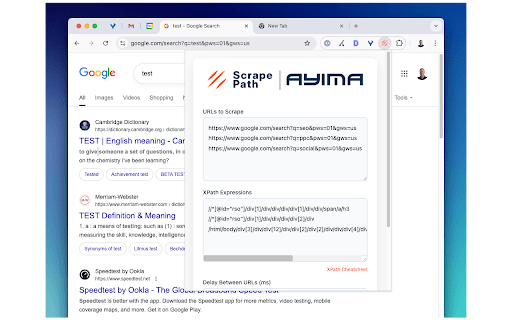
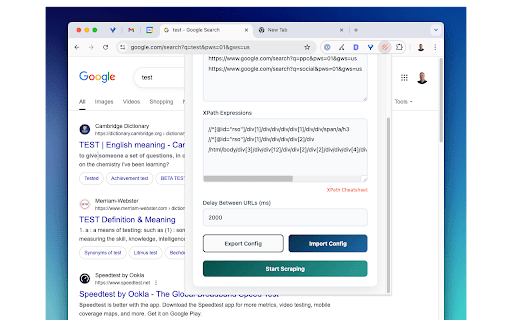
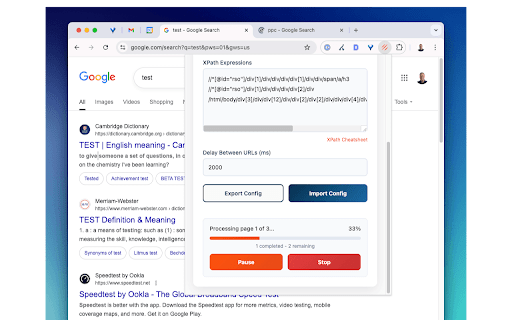
Scrape Path is a Chrome extension designed to extract structured data from web pages. It allows users to define data points using XPath expressions, process data from multiple URLs in batches, and download the extracted information as a CSV file.

Developer:Ayima
Version:1.2
Size:64.13KiB
Last updated:

Overview

Installs

147

Rating

0 reviews

Languages

1 locales

Includes English

Market analysis

Review-backed positioning, friction, and market signals for this Chrome extension.

No review samples found

Macro category

Web Scraping & Data Extraction

Pricing friction

Low review signal

Complaint intensity

Low review signal

Listing & review signals
Observed signals from store listing text and review samples.

Listing positioning

The extension is positioned as an easy-to-use tool for extracting data from any website using XPath expressions. It emphasizes its capability to batch process multiple URLs and export structured results to CSV, specifically highlighting its effectiveness on complex JavaScript, login-required, and internal/VPN-restricted sites.

Inferred product pattern

A Chrome extension enabling data extraction from web pages using XPath, with capabilities for batch URL processing and CSV export, designed to handle challenging website structures including complex JavaScript and restricted access sites.

Review-backed pain points

No review-backed data available.

Observed feature gaps

The listing focuses on XPath for extraction and CSV for export. Potential feature gaps not mentioned include visual scraping capabilities (without requiring XPath knowledge), integration with other data analysis tools or APIs, or support for additional export formats beyond CSV.

Tags
Web ScraperData ExtractionXPathCSV ExportBatch Processing
Target users

- Developers

- Data Analysts

- Researchers needing structured web data

- Professionals scraping internal company data

Primary use cases

- Extracting specific data fields from websites using XPath

- Batch processing and scraping data from multiple URLs simultaneously

- Exporting scraped web data to CSV format

- Scraping data from complex sites including JavaScript-heavy pages, member-only portals, and intranet sites

Positive themes

No positive theme data.

Negative themes

No negative theme data.

Observed friction

- No review-backed data available. The store listing does not provide any information regarding pricing or monetization.

Evidence boundary: Store listing description, title, and category information. No user reviews are available, limiting insights into user sentiment, specific pain points, or popular use cases.
Complaint summaries
Review-backed complaint signals grouped by operational area.

Support

No review-backed data available.

Reliability

No review-backed data available.

Privacy

No review-backed data available.

Access & pricing

- No clear monetization signal

- No account requirement observed

- No clear pricing signal

Store listing facts

Listing assets

- Screenshots: 3

- Videos: 0

- Languages: 1

Trust signals

- Privacy policy

- Developer contact

- Official website

Store metadata

- Version: 1.2

- Size: 64.13KiB

- Last updated:

Listing SEO keywords

Search intent keywords
Keyword signals for evaluating how users may discover, compare, or search for this extension category.

Core discovery

xpath data extractorweb scraping toolcsv data exportbatch url scrapingwebsite data scraper chrome extension

Comparison

Scrape Path vs Web ScraperScrape Path vs OctoparseScrape Path alternatives

Problem

how to extract data from websitescrape data multiple urlsxpath for web scrapingexport web data to csvscrape js heavy site

Alternative

data extraction extensionsweb scraping chrome extensionxpath scraper tools

Similar extensions

Jump to related discovery paths:

Screenshots

Scrape Path screenshot

Links

Recommended Chrome extensions

Related listings from the same category, trending peers, and the same publisher portfolio.

Browse developer