Full Page Screenshot & Screen Capture - CaptureAPI icon

Full Page Screenshot & Screen Capture Chrome Extension Analysis

Developer & Designer Tools

Store listing title: Full Page Screenshot & Screen Capture - CaptureAPI

Chrome extension ID: ppgnmecncgafcagagjbidcofpnooepin

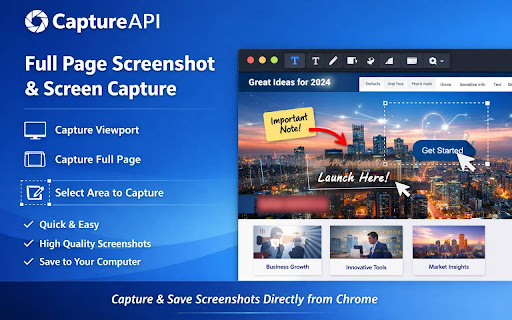
CaptureAPI allows users to easily take and instantly download screenshots of any webpage. It offers three distinct capture modes: full page (with automated stitching), visible viewport, and custom-selected areas. Captured files are saved directly to the user's computer with organized naming conventions.

Developer:meetsohail
Version:1.0.1
Size:110KiB
Last updated:

Overview

Installs

9

Rating

★ —

0 reviews

Languages

1 locales

Includes English

Market analysis

Review-backed positioning, friction, and market signals for this Chrome extension.

No review samples found

Macro category

Developer & Designer Tools

Pricing friction

Low review signal

Complaint intensity

Low review signal

Listing & review signals
Observed signals from store listing text and review samples.

Listing positioning

CaptureAPI is positioned as a fast, lightweight, and powerful screen capture tool that operates directly within Chrome. It highlights its capability to capture full-page scrolling screenshots, visible viewports, or selected areas with high-resolution PNG outputs. The listing focuses on offering a simple, elegant user experience with zero bloat and a strong emphasis on user privacy.

Inferred product pattern

A local browser-based utility tool offering instant file generation with no cloud backend dependencies.

Review-backed pain points

Review-backed data is not available as no user reviews have been published for this extension yet.

Observed feature gaps

No review-backed feature gaps are available. Based on the store listing, the tool lacks built-in annotation tools, cloud sharing integration, and alternative output formats like PDF.

Tags
Screen CaptureFull Page ScreenshotDeveloper ToolsDesign Utilities
Target users

- Web Developers

- UI/UX Designers

- QA Testers

- Product Managers

- Digital Marketers

Primary use cases

- Visual bug reporting and QA documentation

- Saving complete webpage layouts for UI inspiration

- Capturing specific charts or content blocks for visual references

- Archiving long articles and landing pages

Positive themes

No positive theme data.

Negative themes

No negative theme data.

Observed friction

- No review-backed pricing friction available.

Evidence boundary: The analysis is based entirely on the official Chrome Web Store listing, including the short description, detailed feature breakdown, target audience descriptions, and developer declarations. The extension has 4 users and 0 reviews, meaning all feature assessments, target user segments, and privacy statements are derived solely from the developer's claims without user verification.
Complaint summaries
Review-backed complaint signals grouped by operational area.

Support

No review-backed support complaints available.

Reliability

No review-backed reliability complaints available.

Privacy

No review-backed privacy complaints available.

Access & pricing

- Free usage observed

- No account requirement observed

- Free plan or free usage claimed

Store listing facts

Listing assets

- Screenshots: 2

- Videos: 0

- Languages: 1

Trust signals

- Privacy policy

- Developer contact

- Official website

- Support link

Store metadata

- Version: 1.0.1

- Size: 110KiB

- Last updated:

Listing SEO keywords

Search intent keywords
Keyword signals for evaluating how users may discover, compare, or search for this extension category.

Core discovery

chrome screenshot extensionfull page screen captureselected area screenshotscrolling screen capture

Comparison

captureapi vs gofullpagecaptureapi vs awesome screenshot

Problem

how to screenshot entire webpagecapture scrolling webpage chromesave webpage as png

Alternative

gofullpage alternativeawesome screenshot alternativefireshot alternative

Similar extensions

Jump to related discovery paths:

Screenshots

Full Page Screenshot & Screen Capture - CaptureAPI screenshot

Links

Recommended Chrome extensions

Related listings from the same category, trending peers, and the same publisher portfolio.

Browse tools
Snaptik - Tiktok Video Downloader icon

Snaptik - Tiktok Video Downloader

meetsohail

You can download any tiktok video with watermark and without watermark, as well as background music mp3.

Installs

2K+

Rating

★ 5.0

Stylish Fonts Generator(𝓒𝓸𝓹𝔂/𝓟𝓪𝓼𝓽𝓮) icon

Stylish Fonts Generator(𝓒𝓸𝓹𝔂/𝓟𝓪𝓼𝓽𝓮)

meetsohail

You can generate stylish/fancy font for social networking website or any gaming app.

Installs

2K+

Rating

★ 4.3

Sider: Chat with all AI: GPT-5, Claude, DeepSeek, Gemini, Grok icon

Sider: Chat with all AI: GPT-5, Claude, DeepSeek, Gemini, Grok

ChatGPT Sidebar

ChatGPT, DeepSeek, Gemini, Claude, Grok all in one AI sidebar, for AI search, read, and write.

Installs

5.0M+

Rating

★ 4.9

Norton Safe Search icon

Norton Safe Search

NortonLifeLock Inc

Search safely online by enabling Norton Safe Search as your default search provider for maximum protection on Chrome.

Installs

5.0M+

Rating

★ 2.7

Shazam: Find song names from your browser icon

Shazam: Find song names from your browser

Shazam

Identify music, search lyrics & more

Installs

5.0M+

Rating

★ 4.7

Google Input Tools icon

Google Input Tools

cloud-input-team

Input Tools lets you type in the language of your choice.

Installs

4.0M+

Rating

★ 3.7

IE Tab icon

IE Tab

Blackfish Software

Display web pages using IE within Chrome. Use Java, Silverlight, ActiveX, Sharepoint, and more.

Installs

4.0M+

Rating

★ 4.0

Ad Blocker: Stands AdBlocker icon

Ad Blocker: Stands AdBlocker

Stands

Stands AdBlocker – it's a free ad blocker for YouTube, Twitch, Pop-Ups, Video Ads, and websites. Block ads everywhere with Stands!

Installs

4.0M+

Rating

★ 4.8

Google Dictionary (by Google) icon

Google Dictionary (by Google)

dictionary-extension-dev

View definitions easily as you browse the web.

Installs

4.0M+

Rating

★ 3.8

Microsoft Bing Search with Rewards icon

Microsoft Bing Search with Rewards

Microsoft Corporation

Use the Microsoft Rewards extension to find new ways to earn every day, easily track your points and set your default search to Bing

Installs

4.0M+

Rating

★ 4.4