YouTube™ Stop Button icon

YouTube™ Stop Button Chrome Extension Analysis

Niche Lifestyle & Gaming Hacks

Chrome extension ID: ahcnccjmpopcpcfhpoddjiglaoiaeaad

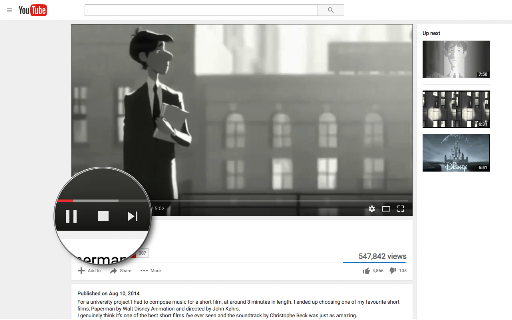
YouTube™ Stop Button adds an interface element to the YouTube player intended to stop video playback and disconnect the stream. It is designed to save data for users who wish to stay on a page without preloading video content.

Developer:unixeco
Version:0.2.9
Size:63.95KiB
Last updated:

Overview

Installs

1K+

Rating

3.6

38 reviews

Languages

11 locales

Includes Deutsch, English, Nederlands, español...

Market analysis

Review-backed positioning, friction, and market signals for this Chrome extension.

Backed by review samples

Macro category

Niche Lifestyle & Gaming Hacks

Pricing friction

Low review signal

Complaint intensity

High review signal

Listing & review signals
Observed signals from store listing text and review samples.

Listing positioning

The extension positions itself as a utility to optimize internet bandwidth by unloading the YouTube video player. It promises to halt buffering and background network activity without requiring a page refresh.

Inferred product pattern

Single-function browser utility vulnerable to platform DOM changes.

Review-backed pain points

Users frequently report the extension stops working after YouTube layout updates, causes black screens, or triggers unexpected redirects. High privacy concerns exist regarding the 'read browsing history' permission.

Observed feature gaps

Lack of support for embedded YouTube videos on third-party websites and inconsistent performance on channel result pages.

Tags
YouTubeBandwidth SaverVideo Controller
Target users

- Bandwidth-conscious users

- YouTube power users

Primary use cases

- Preventing YouTube video buffering

- Saving internet data usage

- Stopping autoplay

Positive themes

- Effective when functional

- Useful concept for bandwidth management

Negative themes

- Frequent breakage due to YouTube site updates

- Permissions concerns regarding browsing history

- Functionality failure resulting in black screens or page reloads

- Unsolicited adware behavior

Observed friction

- Performance complaints detected

- Privacy complaints detected

- None; the extension is free, but reliability issues are high.

Evidence boundary: Based on 38 total reviews and a subset of user feedback samples identifying recurring compatibility issues with YouTube's interface updates and permission concerns. Review data spans several years, including legacy complaints that may relate to older versions of the extension.
Complaint summaries
Review-backed complaint signals grouped by operational area.

Support

Users express frustration over unmaintained code and broken features following YouTube site changes.

Reliability

High; reviews consistently cite that the extension often fails to stop videos, creates visual glitches, or stops working entirely.

Privacy

Users are suspicious of the required permission to read browsing history, citing it as unnecessary for the extension's core functionality.

Access & pricing

- Free usage observed

- No account requirement observed

- Free plan or free usage claimed

Store listing facts

Listing assets

- Screenshots: 1

- Videos: 0

- Languages: 11

Trust signals

- Privacy policy

- Developer contact

- Official website

Store metadata

- Version: 0.2.9

- Size: 63.95KiB

- Last updated:

Listing SEO keywords

Search intent keywords
Keyword signals for evaluating how users may discover, compare, or search for this extension category.

Core discovery

stop youtube bufferingdisable youtube autoplaystop youtube playerbandwidth saver chrome

Comparison

youtube control extensionvideo stop button

Problem

youtube loading slowlyhigh data usage youtube

Alternative

youtube optimization extension

Similar extensions

Jump to related discovery paths:

Screenshots

YouTube™ Stop Button screenshot

Links

Recommended Chrome extensions

Related listings from the same category, trending peers, and the same publisher portfolio.

Browse workflow