Prompt Menu icon

Prompt Menu Chrome Extension Analysis

Automation & Workflow Efficiency

Chrome extension ID: aiidaafhljimodahclndbgdfkpjcihdn

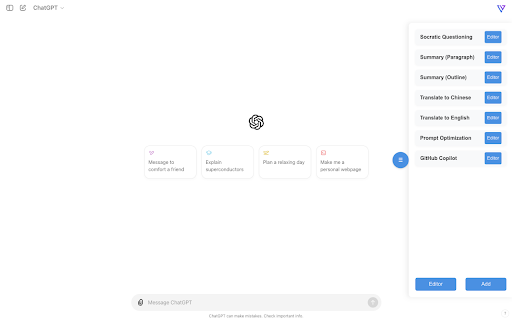
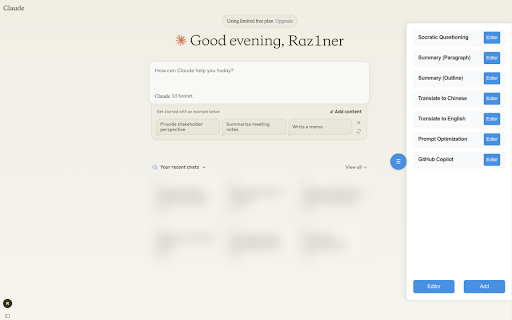
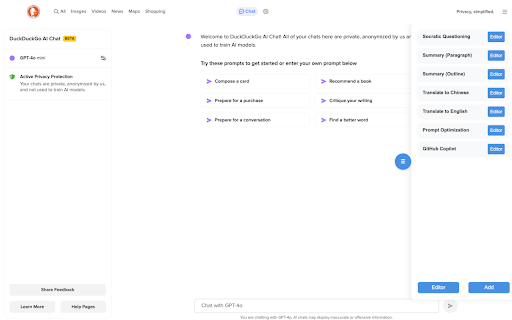
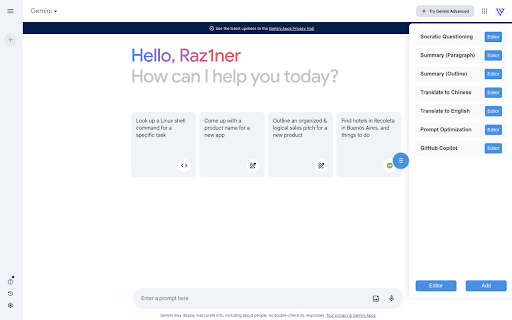
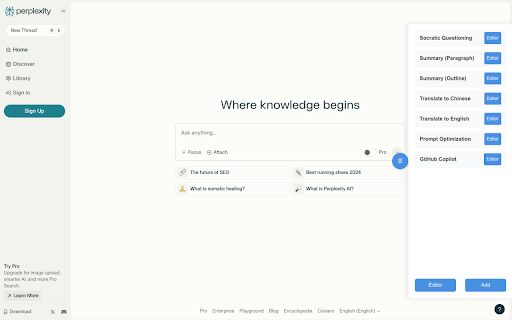
Prompt Menu is a Chrome extension that provides a collapsible right-side drawer for saving frequently used text, code snippets, or AI queries. Users can organize their custom template list and insert saved items directly into text boxes on any webpage with a single click.

Developer:Raz1ner
Version:1.0.2
Size:39.54KiB
Last updated:

Overview

Installs

249

Rating

★ —

0 reviews

Languages

2 locales

Includes English, 中文(中国)

Market analysis

Review-backed positioning, friction, and market signals for this Chrome extension.

No review samples found

Macro category

Automation & Workflow Efficiency

Pricing friction

Low review signal

Complaint intensity

Low review signal

Listing & review signals
Observed signals from store listing text and review samples.

Listing positioning

Prompt Menu positions itself as a convenient floating sidebar utility designed to manage and quickly access customizable text prompts. It highlights features like drag-and-drop reordering, local prompt editing, and instant one-click insertion of saved text into web input fields.

Inferred product pattern

A local-first, floating sidebar utility for text snippet storage and direct input field insertion.

Review-backed pain points

Review-backed pain points are not available because no public user reviews exist for this extension.

Observed feature gaps

No user-reported feature gaps are available due to a lack of reviews. Based on the store listing, potential gaps include the lack of cloud synchronization, folder-based organization, or dynamic variable insertion.

Tags
Prompt ManagerSidebar UtilityText TemplatesWorkflow Productivity
Target users

- AI prompt engineers

- Developers saving code snippets

- Customer support agents handling repetitive responses

- Content creators managing repetitive text templates

Primary use cases

- Quickly inserting custom prompts into LLM and AI chat interfaces

- Storing and organizing frequently used code snippets directly in the browser

- Deploying repetitive text replies in web forms or social media fields

Positive themes

- No review-backed positive themes available

Negative themes

- No review-backed negative themes available

Observed friction

- No pricing friction or monetization issues have been reported since there are no user reviews and no paid tiers are declared in the listing.

Evidence boundary: The analysis is based entirely on the official Chrome Web Store listing metadata, developer-provided functional descriptions, and the absence of reviews on the public store page. No real-world performance metrics, user-satisfaction signals, or potential software bugs can be verified due to the zero-review status.
Complaint summaries
Review-backed complaint signals grouped by operational area.

Support

No support or account issues have been reported as no user reviews are available.

Reliability

No performance or reliability complaints are available due to the absence of user reviews.

Privacy

No privacy or data security complaints are available as no user reviews have been published.

Access & pricing

- Free usage observed

- No account requirement observed

- Free plan or free usage claimed

Store listing facts

Listing assets

- Screenshots: 5

- Videos: 0

- Languages: 2

Trust signals

- Privacy policy

- Developer contact

- Official website

Store metadata

- Version: 1.0.2

- Size: 39.54KiB

- Last updated:

Listing SEO keywords

Search intent keywords
Keyword signals for evaluating how users may discover, compare, or search for this extension category.

Core discovery

prompt sidebar menu chromesave custom prompts extensionfloating prompt managerpreset prompts sidebar utility

Comparison

prompt menu vs text expander

Problem

how to save chatgpt promptsinsert saved text into web form

Alternative

ai prompt helper extensionchrome text templates sidebar

Similar extensions

Jump to related discovery paths:

Screenshots

Prompt Menu screenshot

Links

Recommended Chrome extensions

Related listings from the same category, trending peers, and the same publisher portfolio.

Browse tools
Easy Clean icon

Easy Clean

Raz1ner

Easily clear browser cache with one click and automatically clean it after closing the browser for enhanced privacy and security.

Installs

100K+

Rating

★ 4.1

Background Color Post icon

Background Color Post

Raz1ner

Post with a color background.

Installs

6K+

Rating

★ —

Ruffle - Flash Emulator icon

Ruffle - Flash Emulator

ruffle

Puts Flash back on the web where it belongs.

Installs

1.0M+

Rating

★ 4.7

PrintFriendly: Print, PDF Editor & Full Page Screenshot icon

PrintFriendly: Print, PDF Editor & Full Page Screenshot

PrintFriendly

Print clean web pages, save as PDF, edit PDFs, and capture full-page screenshots. Integrates with ChatGPT, Claude, and Gemini.

Installs

1.0M+

Rating

★ 4.9

NaturalReader - AI Text to Speech icon

NaturalReader - AI Text to Speech

NaturalSoft Limited

NaturalReader reads text aloud on the pages you browse, including emails, online documents, PDFs and ebooks.

Installs

1.0M+

Rating

★ 4.1

Kimi icon

Kimi

Kimi

Kimi Browser Extension — for AI agents. AI can open pages, click, fill forms, extract info, and automate web tasks.

Installs

1.0M+

Rating

★ 3.9

Chat with all AI models (Gemini, Claude, DeepSeek…) & AI Agents | AITOPIA icon

Chat with all AI models (Gemini, Claude, DeepSeek…) & AI Agents | AITOPIA

AITOPIA AI Sidebar

AI Agent Marketplace & AI Sidebar with all AI models (Gemini, Claude, DeepSeek & more) and hundreds of AI Agents

Installs

1.0M+

Rating

★ 4.8

BlockSite Block Websites & Stay Focused icon

BlockSite Block Websites & Stay Focused

BlockSite

Stay focused and boost productivity: Custom blocklist, Scheduled site blocking, and Password protection.

Installs

1.0M+

Rating

★ 4.5

Screen Recorder & Screenshot App for Chrome | Scrnli icon

Screen Recorder & Screenshot App for Chrome | Scrnli

scrnli

Screen recorder for Chrome: capture, edit, share screenshots and videos instantly

Installs

1.0M+

Rating

★ 4.8

AIPRM for ChatGPT icon

AIPRM for ChatGPT

AIPRM

AIPRM is your cheat code for ChatGPT. Adds a list of curated prompt templates and advanced features. Try today.

Installs

1.0M+

Rating

★ 4.4