Make DevTool icon

Make DevTool Chrome Extension Analysis

Developer & Designer Tools

Chrome extension ID: ainnemkhpnjgkhcdkfbhmlenkhehmfhi

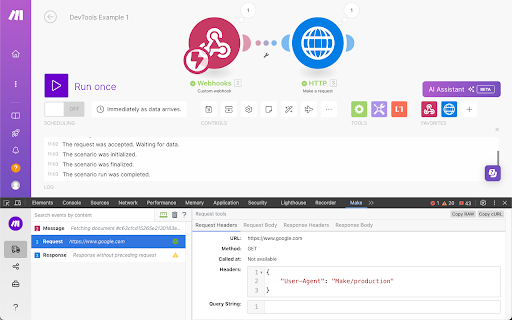
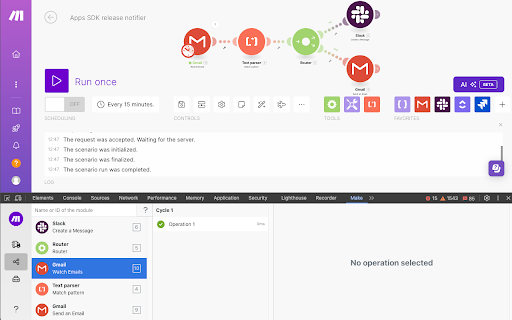
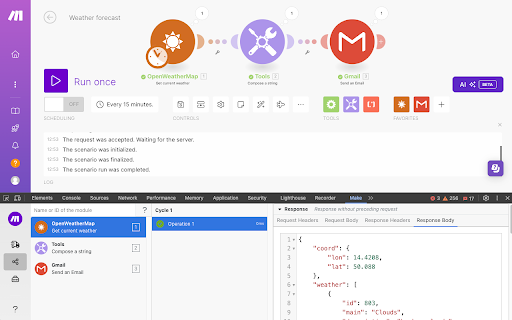
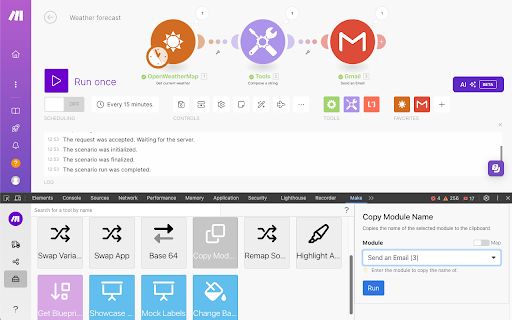
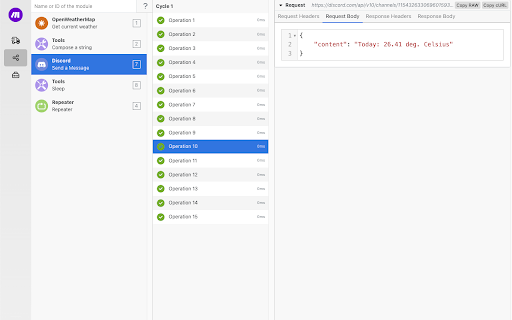
Make DevTool is a Chrome extension that integrates an extra pane into the browser's Developer tools. It allows users to monitor and debug their automated workflows built on the Make platform, providing insights into manual scenario runs, performed operations, and details of API requests. The tool is designed to assist developers in troubleshooting and optimizing their Make applications.

Developer:Make
Version:2.7.0
Size:924KiB
Last updated:

Overview

Installs

20K+

Rating

3.8

21 reviews

Languages

1 locales

Includes English (United States)

Market analysis

Review-backed positioning, friction, and market signals for this Chrome extension.

Backed by review samples

Macro category

Developer & Designer Tools

Pricing friction

Low review signal

Complaint intensity

High review signal

Listing & review signals
Observed signals from store listing text and review samples.

Listing positioning

The store listing positions 'Make DevTool' as an essential Chrome Developer tool for users of the Make automation platform. It highlights its ability to debug Make scenarios, review operations, and inspect API calls. The product aims to enhance the developer experience by providing quicker and more seamless debugging for Make scenarios, modules, and apps.

Inferred product pattern

A companion developer tool for the Make workflow automation platform, offering in-browser debugging and API monitoring capabilities.

Review-backed pain points

Users experience critical functionality breakdowns, such as integrations no longer working or core features like 'Live Stream' failing. There are complaints about the tool not keeping pace with the Make platform's updates, leading to outdated branding and perceived uselessness. Performance issues, specifically slow page reloads when the debug panel is active, also create a frustrating workflow.

Observed feature gaps

Reviews suggest a lack of timely updates to align with the 'Make' rebrand and platform changes, leading to broken integrations and features. There's also a noted desire for better integration of error messages directly within the main Make tool, reducing reliance on a 'finicky' add-on for basic debugging that other tools like Postman handle more efficiently.

Tags
Developer ToolsDebuggingWorkflow AutomationAPI MonitoringMake Scenarios
Target users

- Make platform developers

- Automation engineers

- API developers

- Workflow troubleshooters

Primary use cases

- Debugging Make scenarios

- Reviewing API calls and operations

- Troubleshooting Make Apps

- Monitoring workflow execution

Positive themes

- Effective for scenario debugging and troubleshooting

- Helpful for seeing actual traffic sent to 3rd party APIs

- Valuable for API development background users to see backend activity

- Useful for speeding up workflows with module and filter mapping tools

Negative themes

- Outdated branding still referencing Integromat instead of Make

- Functionality issues such as Live Stream not working or integration breakage (e.g., Google Spreadsheet)

- Performance problems including slow page reloads when the panel is open

- General perceived uselessness or not updating properly for current tools

- Inconsistent functionality, especially when developing new modules

Observed friction

- Performance complaints detected

- Review-backed pricing friction data is not available as the extension does not appear to have a direct payment model.

Evidence boundary: Analyzed store listing descriptions (short & long) and 10 review samples, including a mix of high-rating (4-5 stars) and low-rating (1-3 stars) feedback. The total number of reviews is small (21), limiting the breadth and depth of user sentiment and feature requests. Several review timestamps appear to be in the future, which were treated as past-tense observations due to the context.
Complaint summaries
Review-backed complaint signals grouped by operational area.

Support

Review-backed support, account, or refund complaints are not available.

Reliability

Users report significant reliability issues, including features no longer working (e.g., Google Spreadsheet integration, Live Stream), and the tool failing to update with platform changes. Performance suffers, with slow page reloads once the DevTool panel is open.

Privacy

Review-backed privacy or security complaints are not available.

Access & pricing

- Free usage observed

- Account required for core usage

- Free plan or free usage claimed

Store listing facts

Listing assets

- Screenshots: 5

- Videos: 0

- Languages: 1

Trust signals

- Privacy policy

- Developer contact

- Official website

- Support link

Store metadata

- Version: 2.7.0

- Size: 924KiB

- Last updated:

Listing SEO keywords

Search intent keywords
Keyword signals for evaluating how users may discover, compare, or search for this extension category.

Core discovery

Make debuggingworkflow automation developer toolsAPI monitoring ChromeIntegromat dev toolscenario troubleshooting

Comparison

Make DevTool vs PostmanMake debugger alternativeIntegromat debugging tools comparison

Problem

Make scenario not workingIntegromat debugging issuesslow Make DevToolMake API call errorsworkflow automation troubleshooting

Alternative

Make DevTool alternativesIntegromat debugging extension alternativesworkflow automation inspection tools

Similar extensions

Jump to related discovery paths:

Screenshots

Make DevTool screenshot

Links

Recommended Chrome extensions

Related listings from the same category, trending peers, and the same publisher portfolio.

Browse developer
Window Resizer icon

Window Resizer

Ionuț Botizan

Resize the browser window to emulate various screen resolutions.

Installs

700K+

Rating

4.3

Talend API Tester - Free Edition icon

Talend API Tester - Free Edition

Qlik

Visually interact with REST, SOAP and HTTP APIs.

Installs

600K+

Rating

4.8

Detailed SEO Extension icon

Detailed SEO Extension

ahrefsseotoolbar

Get SEO insights at the click of a button to any website you're currently on. Built by full-time SEO's for daily analysis.

Installs

600K+

Rating

4.9

TikTok Pixel Helper icon

TikTok Pixel Helper

TikTok For Business

The TikTok Pixel Helper is a plug-in that monitors whether your TikTok Pixel is functioning properly.

Installs

600K+

Rating

2.6

Google Analytics Debugger icon

Google Analytics Debugger

Google Analytics

Prints useful information to the JavaScript console by enabling the debug version of the Google Analytics Javascript.

Installs

600K+

Rating

4.2

Salesforce Inspector Reloaded icon

Salesforce Inspector Reloaded

Thomas Prouvot

Productivity tools for Salesforce administrators and developers to inspect data and metadata directly from the Salesforce UI.

Installs

500K+

Rating

4.8

Tag Assistant Companion icon

Tag Assistant Companion

Google

The Tag Assistant Companion extension works with Tag Assistant to help troubleshoot installation of gtag.js and Google Tag Manager.

Installs

500K+

Rating

3.1

Axure RP Extension for Chrome icon

Axure RP Extension for Chrome

Axure Software Solutions, Inc.

An extension that allows viewing of locally published Axure RP prototypes (HTML files) from Google Chrome.

Installs

500K+

Rating

3.3

daily.dev | Where developers discover what's next icon

daily.dev | Where developers discover what's next

Daily Dev Ltd.

Developer news, personalized to your stack, in every new tab. Join 400,000+ developers. Free and open source.

Installs

400K+

Rating

4.8

Angular DevTools icon

Angular DevTools

Angular

Angular DevTools extends Chrome DevTools adding Angular specific debugging and profiling capabilities.

Installs

400K+

Rating

3.7