
Amazon Review Request Tool Chrome Extension Analysis
E-commerce & Dropshipping UtilitiesChrome extension ID: akaobgcedoikjgdlbecjejhdfhdmobph
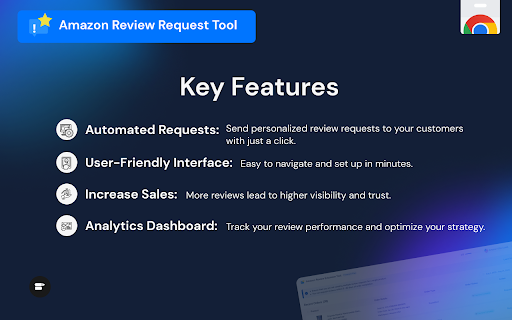
A browser utility that connects with Amazon Seller Central to facilitate bulk review requests. The tool displays eligible orders delivered within a 4-to-30-day window, allowing merchants to check multiple orders and initiate requests with a single click. It relies on Amazon's standard, uncustomizable review email template to solicit buyer feedback.
Overview
Installs
6K+
Rating
★ 3.5
81 reviews
Languages
1 locales
Includes English
Market analysis
Review-backed positioning, friction, and market signals for this Chrome extension.
Macro category
E-commerce & Dropshipping Utilities
Pricing friction
Moderate review signal
Complaint intensity
High review signal
Listing positioning
SellerApp's Amazon Review Request Tool is positioned as a free, single-step bulk automator designed to streamline feedback collection for Amazon sellers. The listing emphasizes time savings, increased trustworthiness, and improved organic rankings by automating review solicitation. It highlights simple integration directly within Amazon Seller Central without requiring additional user permissions.
Inferred product pattern
A DOM-manipulation automation script that hooks into active Amazon Seller Central order tables to simulate manual 'Request Review' clicks in bulk.
Review-backed pain points
The most severe pain point is silent failure, where the extension reports a successful review request, but manual inspection reveals the request was never sent. Additionally, the lack of filter controls means sellers risk sending review requests to refunded customers, which can actively trigger negative reviews. Users also struggle with an unreliable interface that displays inconsistent request statuses when navigating pages.
Observed feature gaps
Key feature gaps include the lack of an ASIN or refund filter to prevent bad reviews, a broken or limited date-range selector that only allows selecting a single day, the absence of a search bar to verify specific orders, and zero conversion tracking or logging to verify which requests were successfully processed.
- Amazon Sellers
- FBA Merchants
- E-commerce Brand Managers
- Bulk requesting customer reviews inside Amazon Seller Central
- Filtering and identifying orders eligible for reviews based on delivery date
- Automating repetitive click tasks to boost organic product rankings
- Allows users to request multiple reviews (e.g., up to 100) with minimal clicks
- Simple user interface that integrates directly into the browser
- False positive indicators where reviews show as sent but remain unrequested in Seller Central
- Hidden monthly request limits despite being marketed as a free tool
- Lack of essential filters, specifically the inability to exclude refunded orders
- Status inconsistency when navigating between order pages
- Free-tier complaints detected
- Performance complaints detected
- While advertised as a completely free tool, user feedback indicates a strict hidden limitation of only 5 review requests per month on the free tier, creating significant friction for sellers who expect unlimited bulk automation.
Support
There are no direct complaints about customer support interactions or refunds, as the core issues lie within the functional limits of the extension itself.
Reliability
Users report major reliability issues, including status indicators showing green light 'Requested' when Amazon side is still open for manual requests, requiring double clicks for the automator to trigger, and status displays reverting when moving back and forth between pages.
Privacy
No privacy or data leakage complaints were found in the reviews; the tool operates within the seller's active browser session.
- Free entry with paid features
- Login needed for core features
- Limited free usage observed
Store listing facts
- Screenshots: 2
- Videos: 1
- Languages: 1
- Privacy policy
- Developer contact
- Official website
- Support link
- Version: 3.0.5
- Size: 4.14MiB
- Last updated:
Listing SEO keywords
Core discovery
Comparison
Problem
Alternative
Similar extensions
Jump to related discovery paths:
Screenshots
Links
Website: sellerapp.com
Privacy policy: https://www.sellerapp.com/privacy.html
Support links: https://www.sellerapp.com/contact.html
Videos: Watch