Permanent Inspect Element icon

Permanent Inspect Element Chrome Extension Analysis

Developer & Designer Tools

Chrome extension ID: alfgclaljdbleenfjjnkefddlgbknllp

This tool enables local, persistent modifications to a web page's DOM. It is designed to save HTML/CSS changes made through the browser's developer tools so they remain active upon subsequent visits to the same URL.

Developer:Mehran Jalali
Version:0.1.2
Size:99.34KiB
Last updated:

Overview

Installs

90K+

Rating

★ 3.1

276 reviews

Languages

1 locales

Includes English

Market analysis

Review-backed positioning, friction, and market signals for this Chrome extension.

Backed by review samples

Macro category

Developer & Designer Tools

Pricing friction

Low review signal

Complaint intensity

High review signal

Listing & review signals
Observed signals from store listing text and review samples.

Listing positioning

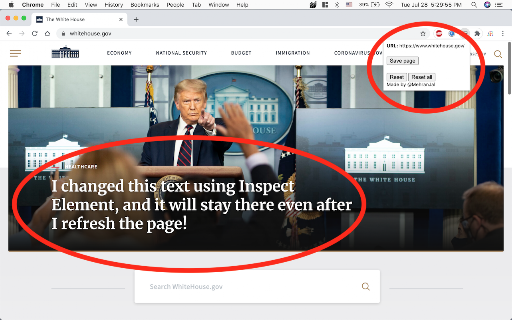
The extension positions itself as a tool to make manual Inspect Element changes permanent. It claims to allow users to modify page content, such as removing intrusive banners, and retain those changes even after refreshing the page.

Inferred product pattern

A developer utility for persistent DOM manipulation that currently faces significant reliability and site-interactivity challenges.

Review-backed pain points

Users frequently report that changes do not persist after a refresh, rendering the tool non-functional. Additionally, users noted that the extension often breaks the interactivity of buttons and other page elements.

Observed feature gaps

Lack of domain-wide pattern matching (globbing) to apply changes across all pages of a site, and the inability to save only modified elements rather than the entire page.

Tags
Inspect ElementWeb DevelopmentDOM ManipulationPersistent Edits
Target users

- Web Developers

- UI/UX Designers

- Power Users

Primary use cases

- Removing intrusive website elements

- Customizing page layouts for readability

- Local web page prototyping

Positive themes

- Provides a foundation for persistent edits

- Useful for simple modifications on certain static sites

Negative themes

- Core functionality failure to save changes

- Breaking page interactivity and buttons

- Limited to specific URLs rather than entire domains

Observed friction

- No pricing information is provided in the listing or reviews.

Evidence boundary: Evidence is based on the product description and user reviews detailing functionality failures and interactivity breakage. Analysis is limited to the provided Chrome Web Store data and review samples.
Complaint summaries
Review-backed complaint signals grouped by operational area.

Support

No support-related complaints were observed.

Reliability

Significant reliability issues reported regarding the primary feature of saving changes and the secondary issue of breaking website functionality.

Privacy

No privacy or security complaints were observed.

Access & pricing

- No clear monetization signal

- No account requirement observed

- No clear pricing signal

Store listing facts

Listing assets

- Screenshots: 1

- Videos: 0

- Languages: 1

Trust signals

- Developer contact

Store metadata

- Version: 0.1.2

- Size: 99.34KiB

- Last updated:

Listing SEO keywords

Search intent keywords
Keyword signals for evaluating how users may discover, compare, or search for this extension category.

Core discovery

permanent inspect elementsave inspect element changespersistent DOM editsmodify web page locally

Comparison

Inspect ElementChrome DevTools

Problem

inspect element not savingedit html persistremove website banners

Alternative

StylusTampermonkeyUser CSS

Similar extensions

Jump to related discovery paths:

Screenshots

Permanent Inspect Element screenshot

Recommended Chrome extensions

Related listings from the same category, trending peers, and the same publisher portfolio.

Browse developer
GoFullPage - Full Page Screen Capture icon

GoFullPage - Full Page Screen Capture

GoFullPage

Capture a screenshot of your current page in entirety and reliably—without requesting any extra permissions!

Installs

11.0M+

Rating

★ 4.9

TouchEn PC보안 확장 icon

TouchEn PC보안 확장

라온시큐어

브라우저에서 라온시큐어의 PC보안 기능을 사용하기 위한 확장 프로그램입니다.

Installs

8.0M+

Rating

★ 1.2

React Developer Tools icon

React Developer Tools

React Foundation

Adds React debugging tools to the Chrome Developer Tools. Created from revision 1d34f91dfd.

Installs

5.0M+

Rating

★ 3.5

ColorZilla icon

ColorZilla

colorzilla.com

Advanced Eyedropper, Color Picker, Gradient Generator and other colorful goodies

Installs

4.0M+

Rating

★ 4.7

Full Page Screenshot & PDF - Web Capture by FireShot icon

Full Page Screenshot & PDF - Web Capture by FireShot

Evgeny Vokilsus

Capture full-page screenshots. Save as PDF or image. Trusted since 2010. Your screenshots stay private. Minimal permissions.

Installs

3.0M+

Rating

★ 4.9

Meta Ads Data Advisor icon

Meta Ads Data Advisor

Meta

Meta Ads Data Advisor automates connecting your website and marketing data to Meta for better ad performance. No developers needed.

Installs

3.0M+

Rating

★ 2.0

Tag Assistant icon

Tag Assistant

Google

The Tag Assistant extension works with Tag Assistant to help troubleshoot installation of gtag.js and Google Tag Manager.

Installs

3.0M+

Rating

★ 3.5

Wappalyzer - Technology profiler icon

Wappalyzer - Technology profiler

Wappalyzer

Identify web technologies

Installs

3.0M+

Rating

★ 4.0

WhatFont icon

WhatFont

Chengyin Liu

The easiest way to identify fonts on web pages.

Installs

3.0M+

Rating

★ 3.8

Device Recovery Utility icon

Device Recovery Utility

google.com

Create recovery media for your Chromebook or Googlebook device.

Installs

2.0M+

Rating

★ 2.7