Page Screenshot icon

Page Screenshot Chrome Extension Analysis

Automation & Workflow Efficiency

Chrome extension ID: aoifpkjpdcfpdphnncjhgljdhpolajii

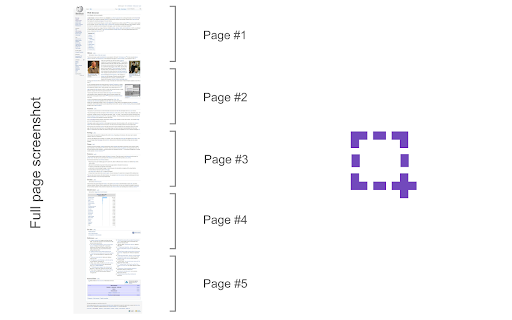
Page Screenshot is a browser extension that allows users to capture full-page screenshots of websites. It supports keyboard shortcuts (Alt+Shift+D) and saves images directly to the browser's default download folder.

Developer:MeryDev
Version:0.1.9
Size:45.47KiB
Last updated:

Overview

Installs

10K+

Rating

★ 3.6

8 reviews

Languages

1 locales

Includes English

Market analysis

Review-backed positioning, friction, and market signals for this Chrome extension.

Backed by review samples

Macro category

Automation & Workflow Efficiency

Pricing friction

Low review signal

Complaint intensity

Low review signal

Listing & review signals
Observed signals from store listing text and review samples.

Listing positioning

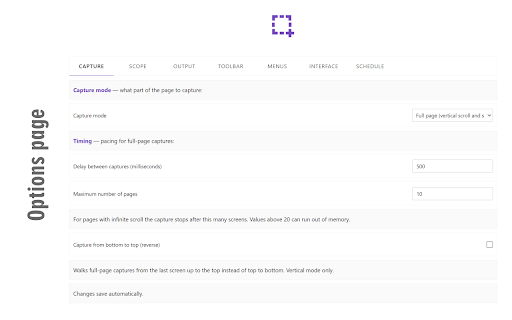
The product is positioned as a simple, one-click solution for capturing entire websites. It emphasizes customization of image format and quality, as well as automatic vertical scrolling for long pages.

Inferred product pattern

Single-purpose utility focusing on a streamlined, no-frills user experience for a specific task.

Review-backed pain points

Users have noted that the extension does not function when attempting to screenshot locally stored HTML files.

Observed feature gaps

The product lacks horizontal scrolling for wide pages (disclosed in listing) and does not support local file capture (reported in reviews).

Tags
Full Page ScreenshotWeb CaptureProductivity ToolScreenshot Utility
Target users

- Web designers

- Content researchers

- Digital archivists

- General web users

Primary use cases

- Saving long-form web content as images

- Visual documentation of websites

- Web page archiving

Positive themes

- Simplicity and ease of use

- Lack of unnecessary menu options

- Effective core functionality

Negative themes

- Incompatibility with local HTML files

Observed friction

- No pricing friction observed; the tool appears to be free.

Evidence boundary: Extracted from the official store listing and a sample of high-rating user reviews. Review sample size is very small compared to the total number of users.
Complaint summaries
Review-backed complaint signals grouped by operational area.

Support

No support or account-related complaints found in the provided review samples.

Reliability

The tool is generally viewed as reliable, though it fails to work on local HTML files.

Privacy

No privacy or security complaints found in the provided review samples.

Access & pricing

- Free usage observed

- No account requirement observed

- Free plan or free usage claimed

Store listing facts

Listing assets

- Screenshots: 2

- Videos: 1

- Languages: 1

Trust signals

- Privacy policy

- Developer contact

- Official website

Store metadata

- Version: 0.1.9

- Size: 45.47KiB

- Last updated:

Listing SEO keywords

Search intent keywords
Keyword signals for evaluating how users may discover, compare, or search for this extension category.

Core discovery

full page screenshot extensioncapture entire websitechrome screenshot toolautomatic web page capture

Comparison

best full page screenshot extensionPage Screenshot vs competitors

Problem

how to screenshot long webpagecapture whole website as image

Alternative

Page Screenshot alternativesfull page screen capture tool

Similar extensions

Jump to related discovery paths:

Screenshots

Page Screenshot screenshot

Links

Recommended Chrome extensions

Related listings from the same category, trending peers, and the same publisher portfolio.

Browse tools
Download All Images icon

Download All Images

MeryDev

Easily save images with a wide range of customization features, such as file size, dimensions, and image type.

Installs

200K+

Rating

★ 4.0

Tab Auto Refresh icon

Tab Auto Refresh

MeryDev

Automatically refresh tabs based on custom time intervals

Installs

100K+

Rating

★ 4.2

AnyDoc Translator - Translate Web and PDF icon

AnyDoc Translator - Translate Web and PDF

www.wps.com

Handwritten notes, course reading, creased scans, TED/Coursera lectures: layout kept, bilingual subtitles. Web instant, auto match.

Installs

6.0M+

Rating

★ 4.6

WPS PDF - Read, Edit, Fill, Convert, and AI Chat PDF with Ease icon

WPS PDF - Read, Edit, Fill, Convert, and AI Chat PDF with Ease

www.wps.com

Easy-to-use PDF tools to view, edit, convert, fill, e-sign PDF files, and more in your browser.

Installs

6.0M+

Rating

★ 4.5

Sider: Chat with all AI: GPT-5, Claude, DeepSeek, Gemini, Grok icon

Sider: Chat with all AI: GPT-5, Claude, DeepSeek, Gemini, Grok

ChatGPT Sidebar

ChatGPT, DeepSeek, Gemini, Claude, Grok all in one AI sidebar, for AI search, read, and write.

Installs

5.0M+

Rating

★ 4.9

Norton Safe Search icon

Norton Safe Search

NortonLifeLock Inc

Search safely online by enabling Norton Safe Search as your default search provider for maximum protection on Chrome.

Installs

5.0M+

Rating

★ 2.7

Shazam: Find song names from your browser icon

Shazam: Find song names from your browser

Shazam

Identify music, search lyrics & more

Installs

5.0M+

Rating

★ 4.7

Google Input Tools icon

Google Input Tools

cloud-input-team

Input Tools lets you type in the language of your choice.

Installs

4.0M+

Rating

★ 3.7

IE Tab icon

IE Tab

Blackfish Software

Display web pages using IE within Chrome. Use Java, Silverlight, ActiveX, Sharepoint, and more.

Installs

4.0M+

Rating

★ 4.0

Ad Blocker: Stands AdBlocker icon

Ad Blocker: Stands AdBlocker

Stands

Stands AdBlocker – it's a free ad blocker for YouTube, Twitch, Pop-Ups, Video Ads, and websites. Block ads everywhere with Stands!

Installs

4.0M+

Rating

★ 4.8