Qui-Quo icon

Qui-Quo Chrome Extension Analysis

Automation & Workflow Efficiency

Chrome extension ID: bcfkiidkpkfdmdnmafkkhffacoeapeed

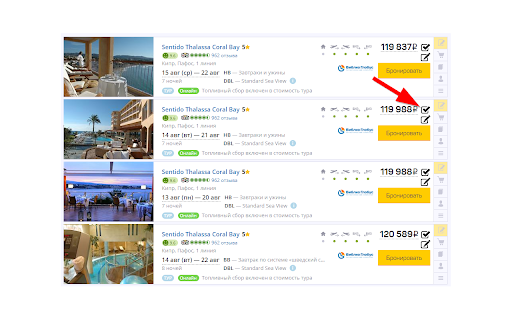
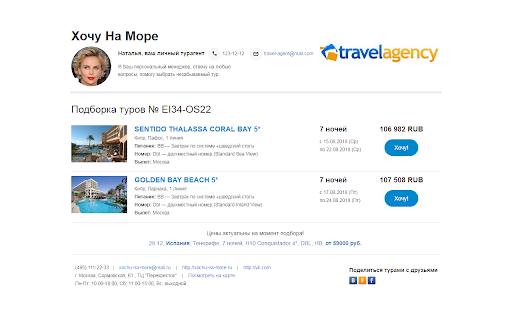
This extension adds interactive controls directly to tour operator websites, enabling agents to select and bundle multiple tour options. Users can then distribute these collections via email, SMS, or social messaging platforms to facilitate client decision-making.

Developer:Qui-Quo
Version:2.3.5
Size:4.84MiB
Last updated:

Overview

Installs

90K+

Rating

★ 4.2

25 reviews

Languages

2 locales

Includes English, русский

Market analysis

Review-backed positioning, friction, and market signals for this Chrome extension.

Backed by review samples

Macro category

Automation & Workflow Efficiency

Pricing friction

Low review signal

Complaint intensity

Moderate review signal

Listing & review signals
Observed signals from store listing text and review samples.

Listing positioning

Qui-Quo is positioned as a specialized productivity tool for travel agents to streamline the client selection process. It allows users to quickly aggregate tour search results from various operator websites into a single professional list for client sharing.

Inferred product pattern

Vertical-specific browser-based scraping and workflow automation utility.

Review-backed pain points

Users report chronic reliability issues necessitating frequent browser extension re-installs and difficulties with user authentication on tour operator portals.

Observed feature gaps

The UI for tour list generation is described as outdated, with users requesting modern design updates or more customization options for branding and layout.

Tags
Travel Agent ToolTour SelectionWorkflow AutomationData Aggregation
Target users

- Travel agents

- Tour operators

Primary use cases

- Aggregating tour offers from multiple websites

- Creating professional tour proposals for clients

- Sharing tour selections via communication channels

Positive themes

- Significant time savings on manual data entry

- Improved organization of work processes

- Professional quality of generated tour lists

- Frequent updates and new operator support

Negative themes

- Frequent installation/re-installation required

- Login authentication failures on specific operator sites

- Unwanted promotional notifications

- Dated UI design

Observed friction

- Performance complaints detected

- No specific pricing complaints observed; users primarily focus on technical reliability.

Evidence boundary: Analysis is based on user reviews highlighting workflow efficiency benefits contrasted with recent reports of technical instability and authentication errors. Review data is limited to a small sample size and may not represent the entire user base's experience.
Complaint summaries
Review-backed complaint signals grouped by operational area.

Support

Users report technical roadblocks with the extension's ability to maintain session connectivity.

Reliability

Frequent reports of the extension breaking and requiring re-installation; login issues on partner websites.

Privacy

One complaint regarding the injection of promotional notifications into the browser.

Access & pricing

- No clear monetization signal

- Account required for core usage

- No clear pricing signal

Store listing facts

Listing assets

- Screenshots: 2

- Videos: 1

- Languages: 2

Trust signals

- Privacy policy

- Developer contact

- Official website

- Support link

Store metadata

- Version: 2.3.5

- Size: 4.84MiB

- Last updated:

Listing SEO keywords

Search intent keywords
Keyword signals for evaluating how users may discover, compare, or search for this extension category.

Core discovery

Qui-Quo travel extensiontour aggregator for agentstour selection softwareautomate tour proposal creation

Comparison

best tools for travel agentsQui-Quo vs manual tour booking

Problem

tour agent workflow automationslow tour selection process

Alternative

travel agency softwareworkflow tools for tour agents

Similar extensions

Jump to related discovery paths:

Screenshots

Qui-Quo screenshot
Qui-Quo screenshot

Links

Recommended Chrome extensions

Related listings from the same category, trending peers, and the same publisher portfolio.

Browse workflow
Content Server Browser Web Extension icon

Content Server Browser Web Extension

OpenText Corporation

Content Server Browser Web Extension for Chrome

Installs

3.0M+

Rating

★ 2.8

Sound Booster - increase volume up icon

Sound Booster - increase volume up

Sound-ultimate.com

Volume Booster helps boost sound video or music on any tab! Increase volume and bass booster, equalizer. Volume control.

Installs

2.0M+

Rating

★ 4.5

Адаптер Рутокен Коннект icon

Адаптер Рутокен Коннект

АО "Актив-Софт"

Защищенное TLS-соединение в браузере по ГОСТу с Рутокен

Installs

2.0M+

Rating

★ 1.6

Pop up blocker for Chrome™ - Poper Blocker icon

Pop up blocker for Chrome™ - Poper Blocker

dingosolutions

Block popups, ads, cookie requests, trackers, notifications, ads on social media & more. A clean browsing experience starts today.

Installs

2.0M+

Rating

★ 4.8

AI Grammar Checker & Paraphraser – LanguageTool icon

AI Grammar Checker & Paraphraser – LanguageTool

lt-extension-publisher

Instantly Enhance Your Texts with LanguageTool’s Grammar Checker and Paraphrasing Tool

Installs

2.0M+

Rating

★ 4.7

Momentum icon

Momentum

Momentum

Transform your browser into a beautifully designed tab that helps you feel calm, keep focus, and stay energized.

Installs

2.0M+

Rating

★ 4.5

My Apps Secure Sign-in Extension icon

My Apps Secure Sign-in Extension

Microsoft

My Apps Secure Sign-in Extension

Installs

2.0M+

Rating

★ 2.2

Web Signer icon

Web Signer

Softplan Websigner Developers

Extensão para assinatura digital no browser

Installs

2.0M+

Rating

★ 3.0

Evernote Web Clipper icon

Evernote Web Clipper

Evernote

Use the Evernote extension to save things you see on the web into your Evernote account.

Installs

2.0M+

Rating

★ 4.7

Google Scholar PDF Reader icon

Google Scholar PDF Reader

scholar-chrome-extensions

Supercharge your paper reading: follow references, skim outline, jump to figures, cite and save.

Installs

2.0M+

Rating

★ 4.1