Ruler — Measure Pixel Distance icon

Ruler Chrome Extension Analysis

Developer & Designer Tools

Store listing title: Ruler — Measure Pixel Distance

Chrome extension ID: bfjjnjkgfnjmfofacopblkcelnibmlec

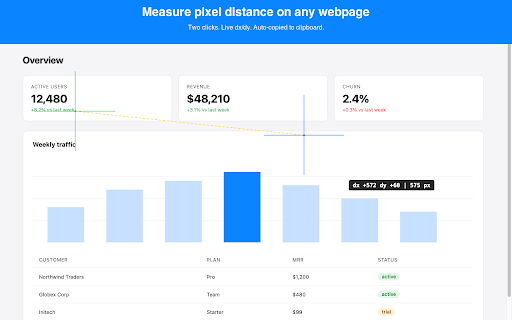
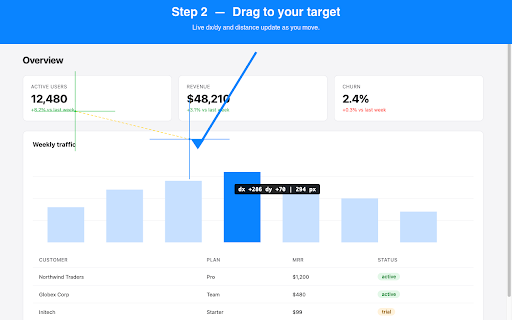
Ruler is a Chrome extension that enables users to measure the exact pixel distance and coordinate offsets between two points on a webpage. It features a real-time crosshair overlay and automatically copies measurement data to the clipboard upon completion.

Version:0.1.0
Size:8.66KiB
Last updated:

Overview

Installs

7

Rating

★ —

0 reviews

Languages

1 locales

Includes English

Market analysis

Review-backed positioning, friction, and market signals for this Chrome extension.

No review samples found

Macro category

Developer & Designer Tools

Pricing friction

Low review signal

Complaint intensity

Low review signal

Listing & review signals
Observed signals from store listing text and review samples.

Listing positioning

The product is positioned as a lightweight and precise tool for measuring pixel distances and X/Y offsets on web pages. It emphasizes efficiency through auto-copying results and a strong focus on user privacy with no account or tracking requirements.

Inferred product pattern

A minimalist, privacy-first utility for precise web measurement and coordinate extraction.

Review-backed pain points

Review-backed data is not available.

Observed feature gaps

Review-backed data is not available.

Tags
Pixel MeasurementDeveloper UtilityDesign ToolSpacing Checker
Target users

- Front-end Developers

- UI/UX Designers

- QA Engineers

Primary use cases

- Measuring pixel distance between elements

- Checking X/Y coordinate offsets

- Verifying design spacing accuracy

- Grabbing coordinates for automation scripts

Positive themes

- Review-backed data is not available

Negative themes

- Review-backed data is not available

Observed friction

- No pricing friction observed; the tool is claimed to be free.

Evidence boundary: Evidence is based entirely on the provided Chrome Web Store product listing. No user reviews were available to validate product performance, sentiment, or feature gaps.
Complaint summaries
Review-backed complaint signals grouped by operational area.

Support

No support complaints found as no reviews are available.

Reliability

No reliability or performance complaints found as no reviews are available.

Privacy

No privacy complaints found; the listing explicitly claims no tracking or host permissions.

Access & pricing

- Free usage observed

- No account requirement observed

- Free plan or free usage claimed

Store listing facts

Listing assets

- Screenshots: 2

- Videos: 0

- Languages: 1

Trust signals

- Privacy policy

- Developer contact

Store metadata

- Version: 0.1.0

- Size: 8.66KiB

- Last updated:

Listing SEO keywords

Search intent keywords
Keyword signals for evaluating how users may discover, compare, or search for this extension category.

Core discovery

measure pixel distanceweb pixel rulerX/Y offset toolbrowser measurement extension

Comparison

pixel rulerweb inspector ruler

Problem

measure distance on websiteget pixel coordinatescheck web element spacing

Alternative

browser developer toolsdesign inspector

Similar extensions

Jump to related discovery paths:

Screenshots

Ruler — Measure Pixel Distance screenshot

Links

Recommended Chrome extensions

Related listings from the same category, trending peers, and the same publisher portfolio.

Browse developer
A-B Loop — Video Repeat icon

A-B Loop — Video Repeat

dolphinstudio101

Loop any part of a video on YouTube or any HTML5 player. Set A–B, slow to 0.25x, save loops. For music, language & dance practice.

Installs

427

Rating

★ 4.7

YouTube Monetization Checker icon

YouTube Monetization Checker

dolphinstudio101

Check YouTube video/channel monetization status and estimated revenue at a glance

Installs

207

Rating

★ 3.0

React Developer Tools icon

React Developer Tools

React Foundation

Adds React debugging tools to the Chrome Developer Tools. Created from revision 1d34f91dfd.

Installs

5.0M+

Rating

★ 3.5

ColorZilla icon

ColorZilla

colorzilla.com

Advanced Eyedropper, Color Picker, Gradient Generator and other colorful goodies

Installs

4.0M+

Rating

★ 4.7

Full Page Screenshot & PDF - Web Capture by FireShot icon

Full Page Screenshot & PDF - Web Capture by FireShot

Evgeny Vokilsus

Capture full-page screenshots. Save as PDF or image. Trusted since 2010. Your screenshots stay private. Minimal permissions.

Installs

3.0M+

Rating

★ 4.9

Meta Ads Data Advisor icon

Meta Ads Data Advisor

Meta

Meta Ads Data Advisor automates connecting your website and marketing data to Meta for better ad performance. No developers needed.

Installs

3.0M+

Rating

★ 2.0

Tag Assistant icon

Tag Assistant

Google

The Tag Assistant extension works with Tag Assistant to help troubleshoot installation of gtag.js and Google Tag Manager.

Installs

3.0M+

Rating

★ 3.5

Wappalyzer - Technology profiler icon

Wappalyzer - Technology profiler

Wappalyzer

Identify web technologies

Installs

3.0M+

Rating

★ 4.0

WhatFont icon

WhatFont

Chengyin Liu

The easiest way to identify fonts on web pages.

Installs

3.0M+

Rating

★ 3.8

Device Recovery Utility icon

Device Recovery Utility

google.com

Create recovery media for your Chromebook or Googlebook device.

Installs

2.0M+

Rating

★ 2.7