EditAnywhere icon

EditAnywhere Chrome Extension Analysis

Automation & Workflow Efficiency

Chrome extension ID: cgibfhdbildnijleamjimmoonipcogld

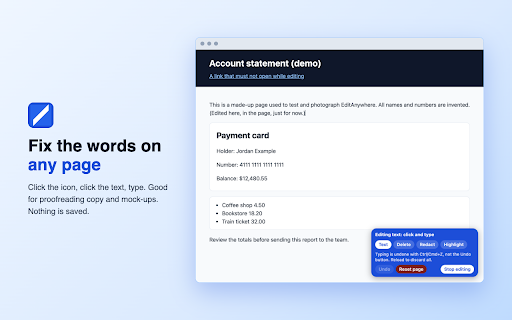
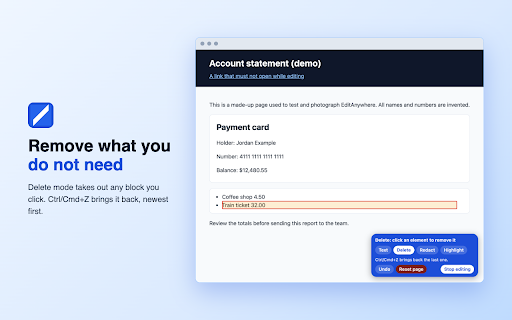
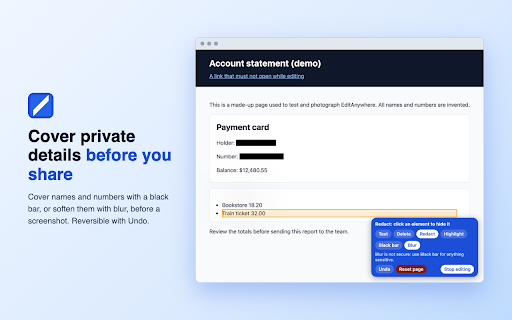
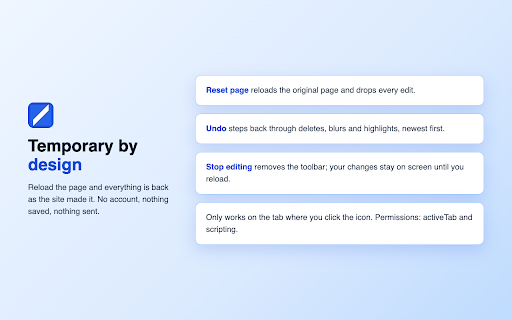
This extension allows users to make temporary visual changes to a web page, such as editing text, deleting elements, or blurring sensitive data for the purpose of taking screenshots or printing. Changes are purely local and vanish upon page reload, serving as a tool for quick mocks, proofreading, or data privacy before sharing images.

Version:0.2.2
Size:11.64KiB
Last updated:

Overview

Installs

0

Rating

★ —

0 reviews

Languages

1 locales

Includes English

Market analysis

Review-backed positioning, friction, and market signals for this Chrome extension.

No review samples found

Macro category

Automation & Workflow Efficiency

Pricing friction

Low review signal

Complaint intensity

Low review signal

Listing & review signals
Observed signals from store listing text and review samples.

Listing positioning

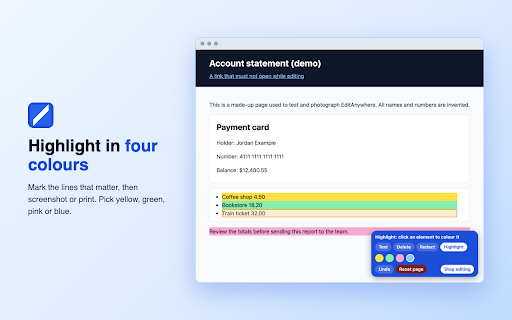
EditAnywhere positions itself as a temporary, client-side web page editor that enables users to modify text, redact sensitive info, and highlight elements without coding. It emphasizes privacy by highlighting that it performs no data transmission and maintains no server-side state.

Inferred product pattern

Local-only DOM manipulation utility for visual content preparation.

Review-backed pain points

Review-backed data is not available.

Observed feature gaps

The extension explicitly notes it cannot edit content within embedded frames (iframes) and is restricted from functioning on Chrome internal pages or the Chrome Web Store itself.

Tags
Content EditorScreenshot ToolWeb Page EditorRedaction Tool
Target users

- Content Marketers

- Designers

- QA Testers

- Privacy-conscious Users

Primary use cases

- Redacting sensitive information in screenshots

- Proofreading web copy in context

- Creating design mock-ups

- Preparing web pages for clean printing

Positive themes

No positive theme data.

Negative themes

No negative theme data.

Observed friction

- No pricing friction; the tool is presented as a free, local-only utility.

Evidence boundary: Analysis based on the store listing long description and technical capability descriptions provided by the developer. Review-backed data is not available due to the lack of user feedback in the provided dataset.
Complaint summaries
Review-backed complaint signals grouped by operational area.

Support

Review-backed data is not available.

Reliability

Review-backed data is not available.

Privacy

Review-backed data is not available.

Access & pricing

- Free usage observed

- No account requirement observed

- Free plan or free usage claimed

Store listing facts

Listing assets

- Screenshots: 5

- Videos: 0

- Languages: 1

Trust signals

- Privacy policy

- Developer contact

Store metadata

- Version: 0.2.2

- Size: 11.64KiB

- Last updated:

Listing SEO keywords

Search intent keywords
Keyword signals for evaluating how users may discover, compare, or search for this extension category.

Core discovery

edit website textblur sensitive informationscreenshot redaction toolweb page editor extension

Comparison

EditAnywhere vs Chrome DevToolsedit website visual content

Problem

hide text on websiteedit web page for screenshot

Alternative

web page editorDOM editor chrome

Similar extensions

Jump to related discovery paths:

Screenshots

EditAnywhere screenshot

Links

Recommended Chrome extensions

Related listings from the same category, trending peers, and the same publisher portfolio.

Browse tools
SEO LinkChecker — Follows, External & Internal icon

SEO LinkChecker — Follows, External & Internal

extensionsforseo

Find nofollow, dofollow, broken, internal & external links on any page. Export CSV/JSON with color-coded highlights.

Installs

3K+

Rating

★ 5.0

SerpLift - Google SERP Scraper icon

SerpLift - Google SERP Scraper

extensionsforseo

Scrape Google search results from All and News tabs, up to 20 pages

Installs

670

Rating

★ 3.0

IE Tab icon

IE Tab

Blackfish Software

Display web pages using IE within Chrome. Use Java, Silverlight, ActiveX, Sharepoint, and more.

Installs

4.0M+

Rating

★ 4.0

Ad Blocker: Stands AdBlocker icon

Ad Blocker: Stands AdBlocker

Stands

Stands AdBlocker – it's a free ad blocker for YouTube, Twitch, Pop-Ups, Video Ads, and websites. Block ads everywhere with Stands!

Installs

4.0M+

Rating

★ 4.8

Google Dictionary (by Google) icon

Google Dictionary (by Google)

dictionary-extension-dev

View definitions easily as you browse the web.

Installs

4.0M+

Rating

★ 3.8

Microsoft Bing Search with Rewards icon

Microsoft Bing Search with Rewards

Microsoft Corporation

Use the Microsoft Rewards extension to find new ways to earn every day, easily track your points and set your default search to Bing

Installs

4.0M+

Rating

★ 4.4

Google Scholar Button icon

Google Scholar Button

scholar-chrome-extensions

Lookup scholarly articles as you browse the web.

Installs

4.0M+

Rating

★ 4.5

Immersive Translate: AI Web, PDF & Video Translator icon

Immersive Translate: AI Web, PDF & Video Translator

Immersive Translate

Free Translate Website, Translate PDF & Epub eBook, Translate Video Subtitles in Bilingual

Installs

3.0M+

Rating

★ 4.6

BetterTTV icon

BetterTTV

NightDev, LLC

BetterTTV enhances Twitch and YouTube with new features, emotes, and more.

Installs

3.0M+

Rating

★ 4.0

Monica: All-In-One AI Assist & Smartest  AI Agent icon

Monica: All-In-One AI Assist & Smartest AI Agent

Monica Team

One stop AI Assistant with GPT, Claude, Gemini: Chat, Write, Translate, Search, Summarize, image generator, video generation

Installs

3.0M+

Rating

★ 4.8