Screen Mint – Screen Recorder & Video Editor icon

Screen Mint Chrome Extension Analysis

Automation & Workflow Efficiency

Store listing title: Screen Mint – Screen Recorder & Video Editor

Chrome extension ID: cgmbklpaengcmbaebhojgjncobjbpfmi

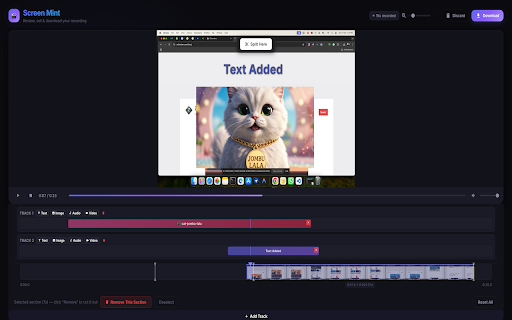
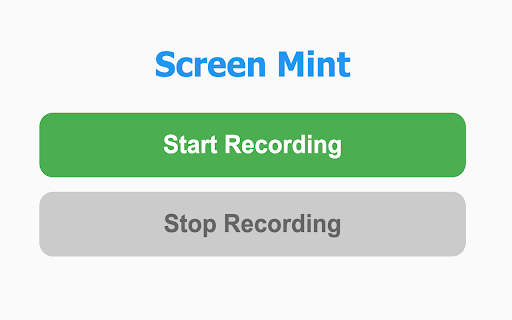
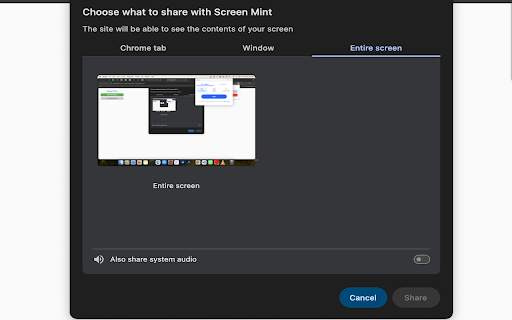
A Chrome extension that allows users to record browser tabs, windows, or the entire screen. It features a built-in non-linear video editor for trimming and adding text, image, audio, and video overlays.

Developer:Zahir Alam
Version:3.2
Size:514KiB
Last updated:

Overview

Installs

22

Rating

★ —

0 reviews

Languages

1 locales

Includes English

Market analysis

Review-backed positioning, friction, and market signals for this Chrome extension.

No review samples found

Macro category

Automation & Workflow Efficiency

Pricing friction

Low review signal

Complaint intensity

Low review signal

Listing & review signals
Observed signals from store listing text and review samples.

Listing positioning

Positioned as a lightweight, privacy-first screen recording and editing tool that operates entirely within the browser. It emphasizes local processing to eliminate the need for cloud uploads or account creation.

Inferred product pattern

Local-first browser-based screen recording and editing utility.

Review-backed pain points

Review-backed data is not available.

Observed feature gaps

No review data available to identify gaps; listing suggests a comprehensive local editing suite.

Tags
Screen RecorderVideo EditorLocal ProcessingMulti-track EditingProductivity Tool
Target users

- Content creators

- Tutorial makers

- Software testers

- Privacy-conscious users

Primary use cases

- Creating quick software demos

- Recording bug reports

- Making short instructional videos

- Local video trimming

Positive themes

- Review-backed data is not available

Negative themes

- Review-backed data is not available

Observed friction

- No pricing information is provided in the store listing.

Evidence boundary: Analysis based exclusively on the Chrome Web Store listing and long description. Zero user reviews available, meaning performance and user satisfaction cannot be validated.
Complaint summaries
Review-backed complaint signals grouped by operational area.

Support

Review-backed data is not available.

Reliability

Review-backed data is not available.

Privacy

Review-backed data is not available.

Access & pricing

- No clear monetization signal

- No account requirement observed

- No clear pricing signal

Store listing facts

Listing assets

- Screenshots: 3

- Videos: 0

- Languages: 1

Trust signals

- Privacy policy

- Developer contact

- Official website

- Support link

Store metadata

- Version: 3.2

- Size: 514KiB

- Last updated:

Listing SEO keywords

Search intent keywords
Keyword signals for evaluating how users may discover, compare, or search for this extension category.

Core discovery

chrome screen recorderbrowser video editorlocal screen recording extensionwebm screen capture

Comparison

Loom alternativeScreencastify alternativelocal screen recorder vs cloud

Problem

screen recording privacyvideo editor without accountlocal video trimming

Alternative

free screen recorder chromeprivacy-focused screen captureno-cloud video editor

Similar extensions

Jump to related discovery paths:

Screenshots

Screen Mint – Screen Recorder & Video Editor screenshot

Links

Recommended Chrome extensions

Related listings from the same category, trending peers, and the same publisher portfolio.

Browse tools
Web Table Extractor icon

Web Table Extractor

Zahir Alam

Effortlessly extract table data from websites and export it to Excel files.

Installs

6K+

Rating

★ 4.8

AdBlocker for Yandex Mail icon

AdBlocker for Yandex Mail

Zahir Alam

Enjoy a cleaner, ad-free Yandex Mail experience. This extension removes sidebar and in-message ads from all Yandex Mail domains.

Installs

754

Rating

★ 4.8

Lightshot (screenshot tool) icon

Lightshot (screenshot tool)

Skillbrains

Simple and convenient screenshot tool. Select an area, edit your screenshot and upload it to the server.

Installs

2.0M+

Rating

★ 3.4

Ruffle - Flash Emulator icon

Ruffle - Flash Emulator

ruffle

Puts Flash back on the web where it belongs.

Installs

1.0M+

Rating

★ 4.7

PrintFriendly: Print, PDF Editor & Full Page Screenshot icon

PrintFriendly: Print, PDF Editor & Full Page Screenshot

PrintFriendly

Print clean web pages, save as PDF, edit PDFs, and capture full-page screenshots. Integrates with ChatGPT, Claude, and Gemini.

Installs

1.0M+

Rating

★ 4.9

NaturalReader - AI Text to Speech icon

NaturalReader - AI Text to Speech

NaturalSoft Limited

NaturalReader reads text aloud on the pages you browse, including emails, online documents, PDFs and ebooks.

Installs

1.0M+

Rating

★ 4.1

Kimi icon

Kimi

Kimi

Kimi Browser Extension — for AI agents. AI can open pages, click, fill forms, extract info, and automate web tasks.

Installs

1.0M+

Rating

★ 3.9

Chat with all AI models (Gemini, Claude, DeepSeek…) & AI Agents | AITOPIA icon

Chat with all AI models (Gemini, Claude, DeepSeek…) & AI Agents | AITOPIA

AITOPIA AI Sidebar

AI Agent Marketplace & AI Sidebar with all AI models (Gemini, Claude, DeepSeek & more) and hundreds of AI Agents

Installs

1.0M+

Rating

★ 4.8

BlockSite Block Websites & Stay Focused icon

BlockSite Block Websites & Stay Focused

BlockSite

Stay focused and boost productivity: Custom blocklist, Scheduled site blocking, and Password protection.

Installs

1.0M+

Rating

★ 4.5

Screen Recorder & Screenshot App for Chrome | Scrnli icon

Screen Recorder & Screenshot App for Chrome | Scrnli

scrnli

Screen recorder for Chrome: capture, edit, share screenshots and videos instantly

Installs

1.0M+

Rating

★ 4.8