API Debugger - Capture & Debug HTTP Requests, Replay & Test icon

API Debugger Chrome Extension Analysis

Developer & Designer Tools

Store listing title: API Debugger - Capture & Debug HTTP Requests, Replay & Test

Chrome extension ID: cmajbkmfgikmenkdnanbfacbhgolamkl

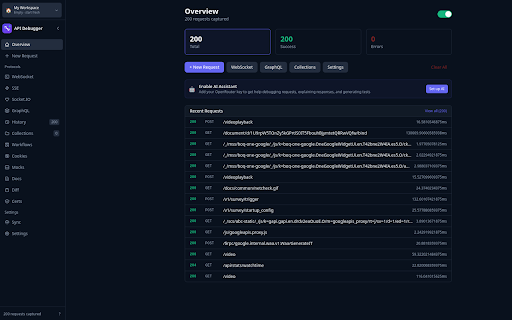
A Chrome extension designed to automatically capture and inspect HTTP requests made by the browser. It includes a request builder for various protocols (REST, WebSocket, GraphQL), collection management, and optional AI integration via user-provided API keys.

Developer:dracsharp
Version:2.5.5
Size:194KiB
Last updated:

Overview

Installs

40

Rating

★ —

0 reviews

Languages

1 locales

Includes English

Market analysis

Review-backed positioning, friction, and market signals for this Chrome extension.

No review samples found

Macro category

Developer & Designer Tools

Pricing friction

Low review signal

Complaint intensity

Low review signal

Listing & review signals
Observed signals from store listing text and review samples.

Listing positioning

The product positions itself as a privacy-first, friction-less alternative to complex API clients like Postman. It emphasizes immediate utility with no account requirements, no tracking, and local data storage.

Inferred product pattern

Local-first, privacy-centric utility designed to remove the onboarding friction associated with commercial API development tools.

Review-backed pain points

Review-backed data is not available.

Observed feature gaps

Review-backed data is not available.

Tags
API DebuggerHTTP CaptureDeveloper ToolsREST ClientPrivacy-Focused
Target users

- Web Developers

- API Engineers

- QA Testers

- Security Researchers

Primary use cases

- Debugging browser network requests

- Testing API endpoints without an account

- Converting captured requests to code

- Managing API collections locally

Positive themes

- Review-backed data not available

Negative themes

- Review-backed data not available

Observed friction

- No pricing friction reported; product explicitly claims to require no account or email verification.

Evidence boundary: Analysis based exclusively on the public Chrome Web Store listing and detailed product description. No user reviews were available to validate real-world performance, reliability, or user sentiment.
Complaint summaries
Review-backed complaint signals grouped by operational area.

Support

Review-backed data is not available.

Reliability

Review-backed data is not available.

Privacy

Review-backed data is not available.

Access & pricing

- Free usage observed

- No account requirement observed

- Free plan or free usage claimed

Store listing facts

Listing assets

- Screenshots: 1

- Videos: 0

- Languages: 1

Trust signals

- Privacy policy

- Developer contact

- Official website

Store metadata

- Version: 2.5.5

- Size: 194KiB

- Last updated:

Listing SEO keywords

Search intent keywords
Keyword signals for evaluating how users may discover, compare, or search for this extension category.

Core discovery

API debugger chrome extensionHTTP request captureREST client no accountcapture browser network requests

Comparison

Postman alternativeInsomnia alternativeChrome API debugger vs Postman

Problem

API email verification frustrationHTTP request loggingdebug API without account

Alternative

free API clientlocal API debuggerno-signup HTTP client

Similar extensions

Jump to related discovery paths:

Screenshots

API Debugger - Capture & Debug HTTP Requests, Replay & Test screenshot

Links

Recommended Chrome extensions

Related listings from the same category, trending peers, and the same publisher portfolio.

Browse developer
Auto Fullscreen - Fullscreen Any Page icon

Auto Fullscreen - Fullscreen Any Page

dracsharp

Auto fullscreen any page on load, navigation, or click-and-hold. Works everywhere - not just videos.

Installs

556

Rating

★ 3.8

Volume & Video Master 1000% — Sound Booster & Enhancer icon

Volume & Video Master 1000% — Sound Booster & Enhancer

dracsharp

Boost volume up to 1000%, amplify bass, clarify voice, and control video speed from 0x to 10x on any website.

Installs

365

Rating

★ 3.0

Meta Ads Data Advisor icon

Meta Ads Data Advisor

Meta

Meta Ads Data Advisor automates connecting your website and marketing data to Meta for better ad performance. No developers needed.

Installs

3.0M+

Rating

★ 3.9

Tag Assistant icon

Tag Assistant

Google

The Tag Assistant extension works with Tag Assistant to help troubleshoot installation of gtag.js and Google Tag Manager.

Installs

3.0M+

Rating

★ 3.9

Take Webpage Screenshots Entirely - FireShot icon

Take Webpage Screenshots Entirely - FireShot

Evgeny Vokilsus

Take FULL webpage screenshots. Capture, edit and save them to PDF/JPEG/GIF/PNG, upload, print, send to OneNote, clipboard or email.

Installs

3.0M+

Rating

★ 4.8

WhatFont icon

WhatFont

Chengyin Liu

The easiest way to identify fonts on web pages.

Installs

3.0M+

Rating

★ 4.0

JSON Formatter icon

JSON Formatter

Code Formatter

Makes JSON easy to read

Installs

2.0M+

Rating

★ 4.3

Cookie-Editor icon

Cookie-Editor

cgagnier

Simple yet powerful Cookie Editor that allow you to quickly create, edit and delete cookies without leaving your tab.

Installs

2.0M+

Rating

★ 4.4

Chromebook Recovery Utility icon

Chromebook Recovery Utility

google.com

Create recovery media for your Chromebook.

Installs

2.0M+

Rating

★ 2.6

SEOquake: On-Page SEO Checker icon

SEOquake: On-Page SEO Checker

SEOquake

Run SEO audits, check technical issues, analyze links and keyword density, and see Semrush metrics as you browse and search.

Installs

1.0M+

Rating

★ 4.5