
Download with Ant Download Manager Chrome Extension Analysis
Video & Image DownloadersChrome extension ID: dalgiebmfcjackkbjfbfmlnflbdfbekj
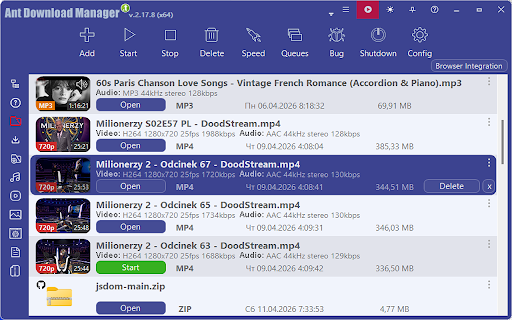
This Chrome extension serves as an auxiliary tool for the Ant Download Manager (AntDM) desktop software, enabling users to intercept and accelerate downloads directly from their Chrome browser. It adds convenient options to the browser's context menu, such as "Download Link", "Download Selected", and "Download All", to streamline the process of downloading various file types, including videos.
Overview
Installs
100K+
Rating
★ 4.7
1,248 reviews
Languages
14 locales
Includes Deutsch, English, Nederlands, Türkçe...
Market analysis
Review-backed positioning, friction, and market signals for this Chrome extension.
Macro category
Video & Image Downloaders
Pricing friction
High review signal
Complaint intensity
High review signal
Listing positioning
The store listing positions the product as an all-in-one download manager and accelerator that integrates with Chrome to speed up downloads of various files, including videos. It highlights features like multiple threads for speed, automatic/manual/batch downloads, and context menu integration. The listing emphasizes that it contains no ads, spy, or malware.
Inferred product pattern
A browser extension designed to complement and enhance a paid desktop download manager application, facilitating accelerated file and video downloads directly from the browser through context menu integrations and acting as a download accelerator.
Review-backed pain points
A significant pain point is the perceived deceptive monetization model, where users expect a free product but encounter paywalls or severely limited functionality after a trial period. Users also experience frustration with the product's reliability, including frequent crashes, inconsistent download buttons, and failures to download or problems with downloaded video playback. There's also confusion over its operation, especially requiring separate software, and issues with unwanted file type interception.
Observed feature gaps
Reviews indicate a gap in consistent functionality across all video sites (e.g., Niconico Douga). Users also reported a lack of control over site-specific access permissions, which was previously available, and the absence of an option to automatically download videos after selection. The core functionality of the download button itself is inconsistent.
- Users who frequently download large files or multiple files
- Individuals who download videos from various websites
- Users seeking to accelerate their browser downloads
- Accelerating downloads of files from websites via Chrome
- Downloading video content directly from web pages
- Managing multiple downloads with options for automation and batch processing
- Effective at downloading and accelerating files
- Generally works well on various sites
- Seen as a good alternative to other download managers (e.g., IDM)
- Found to be practical and useful for personal projects
- Ease of use in newer versions
- Misleading freemium model and perceived cost for core functionality
- Frequent bugs and crashes, especially after updates
- Inconsistent appearance or functionality of the download button
- Inability to download from specific popular video sites (e.g., Niconico Douga)
- Downloads video with playback issues (e.g., freezing)
- Automatic downloads of unwanted file types (e.g., Zip files)
- Changes in site access permissions affecting user privacy preferences
- Payment required for meaningful usage
- Free-tier complaints detected
- Refund complaints detected
- Performance complaints detected
- Privacy complaints detected
- Many users express strong dissatisfaction and anger over the pricing model, feeling misled by the 'free' offering that quickly transitions to a limited trial or requires payment for essential features. Complaints describe it as a 'scam' or 'joke' that has transitioned from being free to requiring payment, causing significant friction for users expecting no cost.
Support
No explicit complaints regarding customer support responsiveness were found in the review samples. However, one review mentioned paying for the product only to encounter errors and inability to download, implying a lack of resolution for product issues.
Reliability
The extension and its associated software exhibit significant reliability issues, including frequent crashes during or in the middle of downloads, the download button appearing inconsistently or in incorrect tabs, and complete failures to connect or download files, particularly for videos. Users report that bugs worsen with updates, leading to an unstable experience.
Privacy
One privacy complaint noted that a recent update removed the ability to set "On specific sites" access permissions for the extension, forcing an 'all sites' or manual activation model that users found less private and inconvenient.
- Free entry with paid features
- Account required for core usage
- Trial or limited free usage before paid plan
Store listing facts
- Screenshots: 1
- Videos: 0
- Languages: 14
- Privacy policy
- Developer contact
- Official website
- Support link
- Version: 0.5.2
- Size: 370KiB
- Last updated:
Listing SEO keywords
Core discovery
Comparison
Problem
Alternative
Similar extensions
Jump to related discovery paths:
Screenshots
Links
Website: antdownloadmanager.com
Privacy policy: https://antdownloadmanager.com/policy.php
Support links: https://antdownloadmanager.com/contact