Simple Ruler icon

Simple Ruler Chrome Extension Analysis

Developer & Designer Tools

Chrome extension ID: ddhlibhghnglpoacapkoffkcgfijcfkg

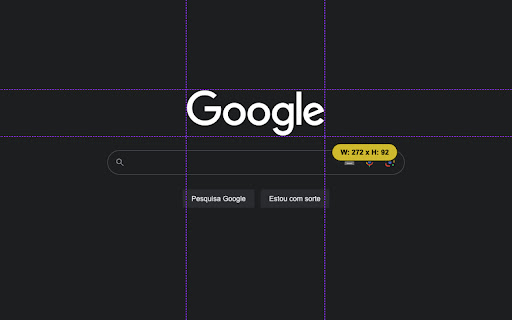
Simple Ruler is a lightweight Chrome extension that provides a visual measurement tool on any webpage. Users can determine the dimensions of elements by simply clicking and moving their mouse over the components.

Developer:danrnascimento
Version:32.0.0
Size:44.62KiB
Last updated:

Overview

Installs

7K+

Rating

4.4

9 reviews

Languages

1 locales

Includes English (United States)

Market analysis

Review-backed positioning, friction, and market signals for this Chrome extension.

Backed by review samples

Macro category

Developer & Designer Tools

Pricing friction

Low review signal

Complaint intensity

Low review signal

Listing & review signals
Observed signals from store listing text and review samples.

Listing positioning

The product positions itself as a minimalist, ad-free utility for measuring webpage components. It emphasizes convenience by allowing users to bypass the complexity of browser developer tools for simple width and height checks.

Inferred product pattern

Single-purpose utility tool designed to replace a specific manual workflow in browser developer tools.

Review-backed pain points

Users have noted that the extension's interface buttons can overlap and block the content they are trying to measure, specifically in the page header.

Observed feature gaps

Lack of movable or collapsible UI controls to prevent the ruler interface from obstructing the target measurement area.

Tags
On-screen RulerWeb DesignUI MeasurementDeveloper Tool
Target users

- Web Developers

- UI/UX Designers

- Web QA Testers

Primary use cases

- Measuring element width and height

- Checking component alignment

- Quick layout verification

Positive themes

- Simplicity and ease of use

- Effective for checking element sizes

- Clean, ad-free experience

Negative themes

- UI obstruction

- Difficulty measuring specific elements

Observed friction

- Privacy complaints detected

- No pricing friction observed; the listing claims the tool is provided without ads or hidden motives.

Evidence boundary: Analysis based on store listing data and 8 user review samples in English, Portuguese, Russian, and Italian. Very small review sample size limits the ability to generalize sentiment across the entire user base.
Complaint summaries
Review-backed complaint signals grouped by operational area.

Support

No support or account-related complaints found in the provided samples.

Reliability

No significant reliability issues reported, though some users found it difficult to measure specific elements.

Privacy

One user questioned the extension's access to browsing history, although they provided a high rating.

Access & pricing

- Free usage observed

- No account requirement observed

- Free plan or free usage claimed

Store listing facts

Listing assets

- Screenshots: 4

- Videos: 0

- Languages: 1

Trust signals

- Privacy policy

- Developer contact

- Official website

Store metadata

- Version: 32.0.0

- Size: 44.62KiB

- Last updated:

Listing SEO keywords

Search intent keywords
Keyword signals for evaluating how users may discover, compare, or search for this extension category.

Core discovery

chrome ruler extensionmeasure webpage elementson-screen pixel rulerweb design measurement tool

Comparison

simple ruler vs dev toolsbest chrome ruler extension

Problem

how to measure pixels on webpagecheck element width and height

Alternative

page ruler alternativeweb measurement tool

Similar extensions

Jump to related discovery paths:

Screenshots

Simple Ruler screenshot

Links

Recommended Chrome extensions

Related listings from the same category, trending peers, and the same publisher portfolio.

Browse developer