Trupeer - AI Screen Recorder for Video Documentation, SOPs & Screenshots icon

Trupeer Chrome Extension Analysis

AI & Writing Assistants

Store listing title: Trupeer - AI Screen Recorder for Video Documentation, SOPs & Screenshots

Chrome extension ID: doedlfgeilocafjipkkhegndbhlkoedo

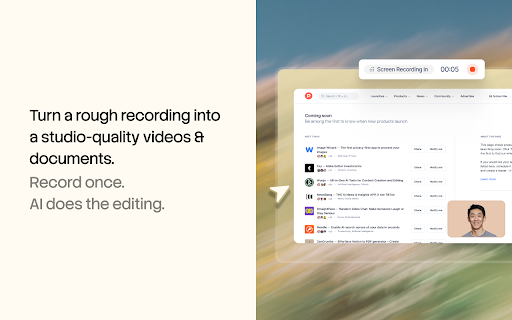
Trupeer is a Chrome-based screen recording utility that integrates with a web application to transform screen captures into structured instructional assets. It automatically generates written documentation, applies professional video effects, and utilizes AI avatars for narration.

Version:3.0.6
Size:1.16MiB
Last updated:

Overview

Installs

10K+

Rating

4.8

39 reviews

Languages

47 locales

Includes Deutsch, English, English (Australia), English (United Kingdom)...

Market analysis

Review-backed positioning, friction, and market signals for this Chrome extension.

Backed by review samples

Macro category

AI & Writing Assistants

Pricing friction

Moderate review signal

Complaint intensity

Moderate review signal

Listing & review signals
Observed signals from store listing text and review samples.

Listing positioning

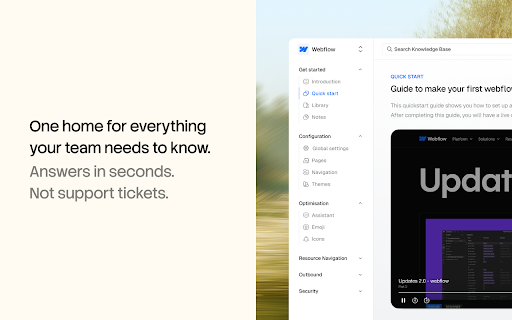
Trupeer positions itself as an all-in-one AI platform that converts raw screen recordings into polished video tutorials and step-by-step SOP guides. It emphasizes time-saving features like AI voiceovers, avatars, automated editing, and multi-language translation to replace manual production workflows.

Inferred product pattern

Chrome extension as a capture trigger for an AI-powered SaaS backend for video and documentation processing.

Review-backed pain points

Users have reported critical issues regarding the failure of paid plan credits to provision after purchase and occasional aggressive automated editing that impacts video flow.

Observed feature gaps

Some users find the automated silence-trimming logic overly aggressive, suggesting a need for more granular user control over the AI editing pacing.

Tags
AI Video RecorderSOP GeneratorScreen RecorderTraining DocumentationProduct Demos
Target users

- QA Engineers

- Developer Advocates

- Product Marketers

- Remote Teams

- Technical Trainers

Primary use cases

- Bug reproduction walkthroughs

- Creating technical documentation and SOPs

- Product demo and tutorial generation

- Employee onboarding materials

- Investor update presentations

Positive themes

- High quality of auto-generated written guides

- Significant time savings in documentation

- Effective AI voiceover and translation capabilities

- Helpful automated zoom effects on clicks

Negative themes

- Billing and credit allocation issues

- Aggressive auto-trimming causing clipped pacing

Observed friction

- Payment required for meaningful usage

- Refund complaints detected

- Performance complaints detected

- At least one customer reported a severe friction point where a paid subscription did not unlock the advertised credits, leading to immediate account access issues.

Evidence boundary: The analysis is based on 10 provided reviews, representing a mix of high-praise for the core AI documentation features and a specific, critical report regarding billing/credit issues. The sample size is small; while positive sentiment is dominant, the billing report highlights a potential critical risk in account provisioning that may not be fully represented.
Complaint summaries
Review-backed complaint signals grouped by operational area.

Support

One user indicated significant frustration regarding failed credit provisioning after payment and implied concerns regarding the reliability of the platform's subscription management.

Reliability

Product is generally viewed as high-performance, though minor complaints exist regarding the aggressiveness of AI-driven video pacing/trimming.

Privacy

No privacy or security-related complaints were identified in the review sample.

Access & pricing

- Free entry with paid features

- Login needed for core features

- Trial or limited free usage before paid plan

Store listing facts

Listing assets

- Screenshots: 5

- Videos: 1

- Languages: 47

Trust signals

- Privacy policy

- Developer contact

- Official website

Store metadata

- Version: 3.0.6

- Size: 1.16MiB

- Last updated:

Listing SEO keywords

Search intent keywords
Keyword signals for evaluating how users may discover, compare, or search for this extension category.

Core discovery

AI screen recorder for SOPsautomatic documentation generatorAI video editor for tutorialsbrowser based screen capture tool

Comparison

Trupeer vs LoomAI alternative to screen recordingautomatic SOP documentation tool

Problem

manual video editing timehard to write documentationtedious screen recording

Alternative

Loom alternativesScribe alternativesAI documentation software

Similar extensions

Jump to related discovery paths:

Screenshots

Trupeer - AI Screen Recorder for Video Documentation, SOPs & Screenshots screenshot

Links

Recommended Chrome extensions

Related listings from the same category, trending peers, and the same publisher portfolio.

Browse communication