Fullwidth messaging for Linkedin icon

Fullwidth messaging for Linkedin Chrome Extension Analysis

Automation & Workflow Efficiency

Chrome extension ID: effdcceklefodcoolcagdjlpaohgacfm

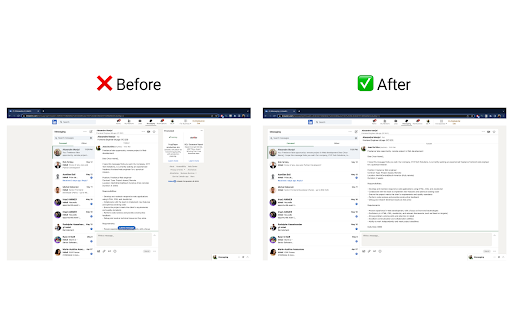
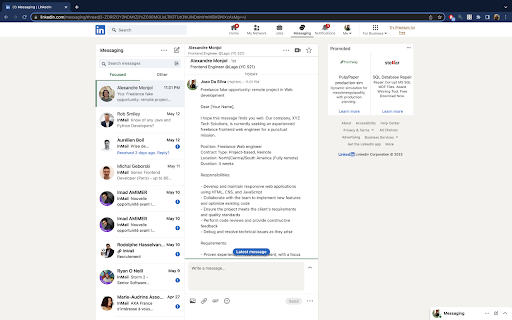
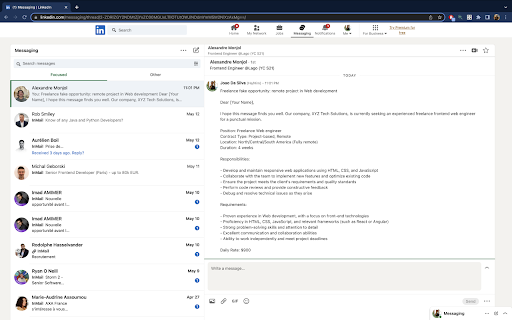
Fullwidth Messaging is a browser extension that modifies the CSS layout of LinkedIn's messaging interface. It aims to expand the chat area to improve readability for professional networking and communication.

Developer:joao.pro.dsvm
Version:1.0
Size:18.52KiB
Last updated:

Overview

Installs

595

Rating

★ 3.0

9 reviews

Languages

1 locales

Includes English

Market analysis

Review-backed positioning, friction, and market signals for this Chrome extension.

Backed by review samples

Macro category

Automation & Workflow Efficiency

Pricing friction

Low review signal

Complaint intensity

Moderate review signal

Listing & review signals
Observed signals from store listing text and review samples.

Listing positioning

The extension positions itself as a productivity tool designed to solve the cramped nature of the default LinkedIn messaging interface. It promises a wider, more spacious view to facilitate better organization and faster response times for users.

Inferred product pattern

Single-purpose CSS-injection UI utility for a specific web platform.

Review-backed pain points

Users are frustrated by the lack of permanent activation, the unintended expansion of the left-hand message sidebar, and the perception that it zooms content rather than restructuring it for better readability.

Observed feature gaps

The extension lacks a 'persistent-on-load' feature and specific control over which UI elements are expanded, leading to dissatisfaction among users who prefer a more surgical layout change.

Tags
LinkedInMessagingUI EnhancementProductivity
Target users

- LinkedIn power users

- Recruiters

- Sales professionals

- Frequent networkers

Primary use cases

- Expanding chat interface for better text visibility

- Reducing scrolling when reading long LinkedIn messages

Positive themes

- Effective at increasing space

- Simple utility for a common annoyance

- Improves readability of long messages

Negative themes

- Interface scaling issues

- Lack of persistence (manual activation required)

- Expansion affects the wrong UI elements (message list vs. body)

Observed friction

- Performance complaints detected

- No pricing friction observed; the extension is free to use.

Evidence boundary: Extraction is based on 7 public reviews in the Chrome Web Store, reflecting a polarized user base split between those who find the UI change useful and those who find the implementation inaccurate. Review sample size is small, and feedback is highly dependent on individual browser settings and LinkedIn's frequently changing interface layout.
Complaint summaries
Review-backed complaint signals grouped by operational area.

Support

No specific support or refund complaints found; grievances focus entirely on functionality and UI behavior.

Reliability

Users report that the tool sometimes requires manual interaction to trigger expansion and fails to provide the expected layout, leading to claims that it 'is not working'.

Privacy

None observed.

Access & pricing

- Free usage observed

- No account requirement observed

- Free plan or free usage claimed

Store listing facts

Listing assets

- Screenshots: 3

- Videos: 0

- Languages: 1

Trust signals

- Developer contact

- Official website

Store metadata

- Version: 1.0

- Size: 18.52KiB

- Last updated:

Listing SEO keywords

Search intent keywords
Keyword signals for evaluating how users may discover, compare, or search for this extension category.

Core discovery

LinkedIn messaging extensionwider LinkedIn chatLinkedIn UI fix

Comparison

My Style extensionCSS browser extension

Problem

cramped LinkedIn messagesLinkedIn message display issues

Alternative

LinkedIn layout tweaks

Similar extensions

Jump to related discovery paths:

Screenshots

Fullwidth messaging for Linkedin screenshot

Links

Website: joao.pro.dsvm

Recommended Chrome extensions

Related listings from the same category, trending peers, and the same publisher portfolio.

Browse communication
Grammar Checker and AI tool - Correcto icon

Grammar Checker and AI tool - Correcto

product-development-correcto

Improve your writing with the AI-powered online grammar and spelling checker in Spanish and our paraphrasing tool.

Installs

70K+

Rating

★ 4.6

Share link via email icon

Share link via email

Cobote

Adds a button and context menu item to send the page URL or a link URL via email

Installs

70K+

Rating

★ 3.9

Cursorful - Screen Recorder with Auto Zoom icon

Cursorful - Screen Recorder with Auto Zoom

Cursorful

Cursorful creates beautiful screen recordings with automatic zooms and pans that keep the viewer engaged.

Installs

60K+

Rating

★ 4.9

CrankWheel Screen Sharing icon

CrankWheel Screen Sharing

CrankWheel

Easier screen sharing. No app needed for viewers, even on their mobile. Record your screen or webcam.

Installs

60K+

Rating

★ 4.8

Mail Merge for Gmail - Mailmeteor icon

Mail Merge for Gmail - Mailmeteor

Mailmeteor

Free mail merge & mass email tool for Gmail, with email tracking and auto follow-ups

Installs

60K+

Rating

★ 4.8

ClassroomGo AI無邊際(學生) icon

ClassroomGo AI無邊際(學生)

雲動教育科技

1. 教師主控端支援Chrome OS、Mac、以及Windows系統,學生受控端支援已登入之Chromebook。 2. 可載入教師Google Classroom 開課資訊及上課學生清單,並可由教師主控端一覽上線學生受控端之螢幕畫面。 3.…

Installs

60K+

Rating

★ 1.4

Auto BCC for Gmail™ by cloudHQ icon

Auto BCC for Gmail™ by cloudHQ

cloudHQ

Setup automatic blind copies to your CRM or any other email address

Installs

60K+

Rating

★ 4.2

Private Grammar Checker - Harper icon

Private Grammar Checker - Harper

Elijah Potter

The private grammar checker for 21st Century English

Installs

50K+

Rating

★ 4.2

Amazon Q Business icon

Amazon Q Business

Amazon Q Business by Amazon Web Services

An enterprise AI assistant available to assist you when browsing the web.

Installs

50K+

Rating

★ 5.0

HTML Editor for Gmail by cloudHQ icon

HTML Editor for Gmail by cloudHQ

cloudHQ

HTML Editor for Gmail™ - code HTML email directly from Gmail

Installs

50K+

Rating

★ 4.0