Avaya Cloud Office for Google icon

Avaya Cloud Office for Google Chrome Extension Analysis

Automation & Workflow Efficiency

Chrome extension ID: efmcpiahjmffjhdkllmnfehdgabepjbb

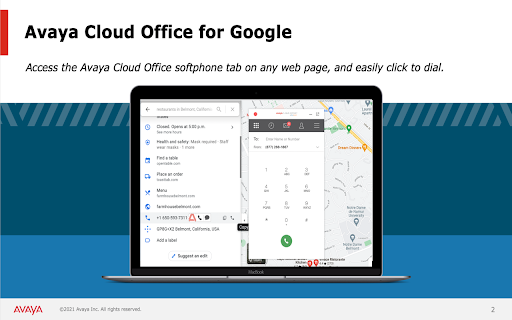
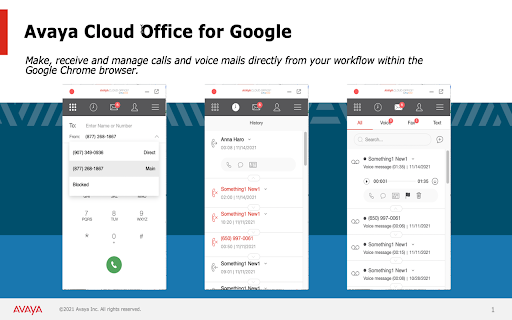
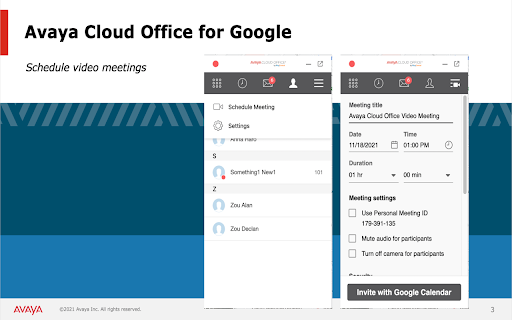
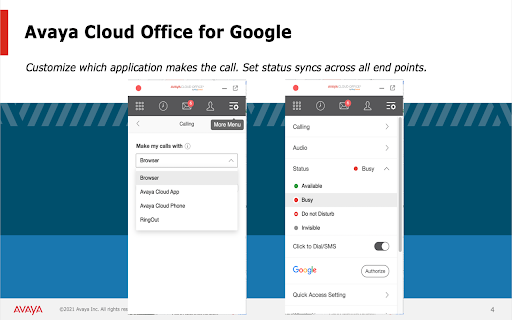
A Chrome extension that connects Avaya Cloud Office features to the browser and Google Calendar. It provides tools for click-to-call, SMS, meeting scheduling, and communication history management.

Developer:RingCentral
Version:24.3.31
Size:8.38MiB
Last updated:

Overview

Installs

5K+

Rating

2.3

3 reviews

Languages

1 locales

Includes English

Market analysis

Review-backed positioning, friction, and market signals for this Chrome extension.

Backed by review samples

Macro category

Automation & Workflow Efficiency

Pricing friction

Moderate review signal

Complaint intensity

Low review signal

Listing & review signals
Observed signals from store listing text and review samples.

Listing positioning

The product is positioned as a seamless integration between Avaya Cloud Office and Google Cloud. It aims to create a business communications hub that enables users to manage calls, messages, and scheduling without leaving their Google applications.

Inferred product pattern

Enterprise software bridge integrating a paid telephony suite into a productivity ecosystem.

Review-backed pain points

Some users find the extension unintuitive and not user-friendly.

Observed feature gaps

Contradictory feedback suggests a gap in consistent user experience and intuitive design.

Tags
Business CommunicationGoogle IntegrationCloud TelephonyUnified Communications
Target users

- Avaya Cloud Office users

- Enterprise communication teams

- Google Workspace users

Primary use cases

- Scheduling Avaya video meetings via Google Calendar

- Making calls or sending SMS from any Chrome web page

- Managing business communication history within the browser

Positive themes

- Simplicity of use

Negative themes

- Unintuitive user interface

- Poor user experience

Observed friction

- Payment required for meaningful usage

- No pricing-specific complaints observed in available reviews.

Evidence boundary: Analysis based on official store listing descriptions and a limited set of user reviews. Extremely low review sample size provides limited insight into broader user sentiment.
Complaint summaries
Review-backed complaint signals grouped by operational area.

Support

No support or account-related complaints observed in available reviews.

Reliability

No reliability or performance complaints observed in available reviews.

Privacy

No privacy or security complaints observed in available reviews.

Access & pricing

- Subscription model observed

- Account required for core usage

- Paid-only usage observed

Store listing facts

Listing assets

- Screenshots: 4

- Videos: 0

- Languages: 1

Trust signals

- Privacy policy

- Developer contact

Store metadata

- Version: 24.3.31

- Size: 8.38MiB

- Last updated:

Listing SEO keywords

Search intent keywords
Keyword signals for evaluating how users may discover, compare, or search for this extension category.

Core discovery

Avaya Cloud Office Google extensionAvaya Chrome integrationGoogle Calendar Avaya sync

Comparison

Avaya vs RingCentral integrationAvaya Cloud Office alternatives

Problem

how to integrate Avaya with GoogleAvaya Cloud Office user interface issues

Alternative

enterprise telephony Chrome extensionsAvaya Cloud Office alternatives

Similar extensions

Jump to related discovery paths:

Screenshots

Avaya Cloud Office for Google screenshot

Links

Recommended Chrome extensions

Related listings from the same category, trending peers, and the same publisher portfolio.

Browse workflow